Specify an x,y,z location relative to the previous vertex
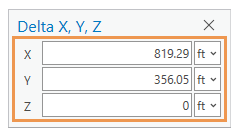
The Delta X,Y,Z command  places a vertex at a specified x,y,z coordinate location measured from the last vertex. A z-value can be specified if the feature is z-aware. This command is available if you are actively creating a feature and right-click the active map or scene.
When you specify a delta x,y,z location, consider the following:
The Z value parameter is available only with z-aware point, line, and polygon features.
To add more units to the units drop-down list, add them as location units to the project unit option settings.
To place a vertex at an x,y,z location relative to the previous vertex, complete the following steps:
Click a feature template in the Create Features pane that creates a line or polygon feature.
Click the active map and create at least one vertex.
Alternatively, right-click the map, click Absolute X,Y,Z
 , and provide a coordinate location.
Right-click the map and click Delta X,Y,Z
.The Delta X,Y,Z dialog box appears.
Choose a units format, type the x,y,z coordinates relative to the previous vertex, and press Enter.
Continue sketching the feature, or click Finish
 or press F2 if you're finished.