Configuration tips for ArcGIS Enterprise
Configuring ArcGIS Data Reviewer for ArcGIS Enterprise may require specific adjustments for certain settings. The information below can help you troubleshoot common problems and apply best practices for using Data Reviewer in a server environment.
Review configurations before publishing
To prepare a feature service publication, verify the following:
In the Geodatabase Connection Properties dialog box, ensure that the Versioning Type is set to Branch.
In the Properties dialog box, in the Manage tab, verify that Versioning is enabled and that Branch is selected for all feature datasets, feature classes, and tables. When branch versioning is selected, Archiving, Global IDs, and Editor tracking are automatically enabled.
Note:
For Location Referencing Enterprise geodatabases, the LRS_Locks should not be versioned.
Ensure that all GDB_Validation error tables are added to the map.
Add all feature classes and tables that participate in attribute rules to the map. For example, if you author a Feature on Feature check to find site address points that are located within a corresponding parcel, you must add both the site address points and the parcels to the map, as the parcels are referenced in the attribute rule.
Configure feature service settings
To publish a feature service with validation enabled, keep the following in mind:
Evaluation times out when ArcGIS Pro takes longer than the timeout value in the pooling settings. This can occur when evaluating large amounts of data without increasing service timeout values.
Learn more about service pool settings
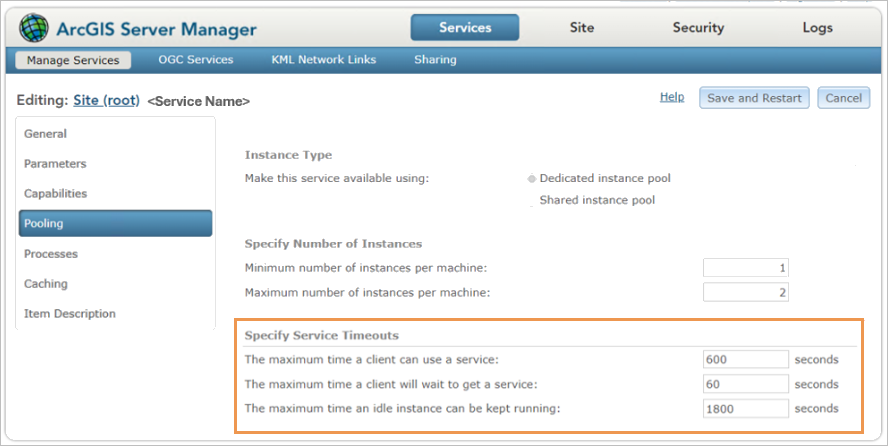
Schema locks prevent changes or the authoring of new attribute rules on a feature class that is part of a feature service. To modify attribute rules, you must stop the feature service that references that data in ArcGIS Server Manager. After you save changes, click Start
 to start the service again.
Server logs provide useful information for troubleshooting issues related to failures during evaluation.
Evaluate synchronously or asynchronously
For evaluations that are run synchronously or asynchronously in the Error Inspector pane, keep the following in mind:
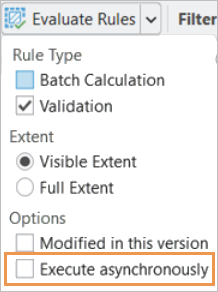
The Evaluate Rules command runs synchronously by default in the Error Inspector pane.
Synchronous evaluation has a shorter timeout and is best used for evaluating the map's visible extent with a smaller number of features that require calculation or validation.
Asynchronous evaluation is an optional setting that you can enable by checking the option at the bottom of the Evaluate Rules drop-down in the Error Inspector pane. This option dedicates server resources to run the evaluation, which allows a longer timeout. Asynchronous evaluation is recommended for large datasets that contain many features requiring calculation or validation.
Streamline evaluation using the REST API
To troubleshoot issues that may occur during evaluation, consider using different evaluation methods in addition to the Evaluate Rules command in the Error Inspector pane. For example, you can use the evaluate REST operation to help determine whether the problem is specific to ArcGIS Pro or affects all evaluation methods.
Licensing information
For licensing, ensure that the person in your organization who evaluates data is assigned the Advanced Editing user type extension in the ArcGIS Enterprise portal where you evaluate rules. This user type extension is included in the Professional and Professional Plus user types. It is also available as an add-on for user types with the capability to view and edit data, such as, Mobile Worker, Contributor, and Creator user types.
Learn more about the Advanced Editing user type extensions
Note:
User types may change from one software version to another. For example, they may be removed or replaced by new user types. Because the User types page provides the most up-to-date information on user types, consider that it may not represent this specific version's information.