Simplify By Tangent Segments (Editing Tools)
Summary
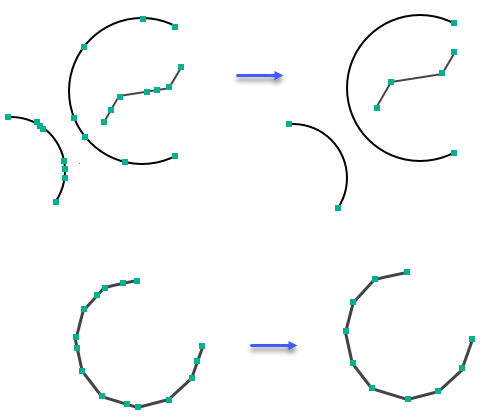
Simplifies polygon and line features by removing collinear and co-circular vertices from straight and curved lines. If the line or arc segments between vertices are tangent to each other, the vertices between the segments will be removed.
Illustration
Usage
Caution:
This tool modifies the input data. See Tools that modify or update the input data for more information and strategies to avoid undesired data changes.
- This tool can be used to remove extra vertices on straight and curved lines. For example, in some cases, vertices are added to features for topology validation. These cases include when features intersect with other features or touch other features. Over time, the extra vertices can accumulate and affect the outcomes of future edits to the features.
Parameters
| Label | Explanation | Data type |
|---|---|---|
|
Input Features |
The features that will be simplified. The features can be lines or polygons. |
Feature Layer |
|
Maximum Allowable Offset |
The maximum distance the resulting output feature geometries can deviate from the input feature geometries. If the geometries of the resultant features deviate by more than the specified offset from the input feature geometries, the vertices will not be removed and the features will remain unaltered. |
Linear Unit |
|
Anchor Points (Optional) |
The feature class that contains anchor points. Anchor points overlay vertices on the input features and indicate that they should not be deleted in the simplify process. |
Feature Layer |
Derived output
| Label | Explanation | Data type |
|---|---|---|
|
Output Features |
The updated features. |
Feature Layer |
Environments
This tool does not use any geoprocessing environments.
Licensing information
- Basic: No
- Standard: Yes
- Advanced: Yes