Embeddings in BLOB fields
Embeddings in ArcGIS workflows are persisted as fixed-precision numeric vectors stored in a geodatabase Binary Large Object (BLOB) field named Embedding. The representation is compact, efficient, platform-neutral, and optimized for high-performance read/write/query operations across runtimes and programming languages.
Embedding storage format
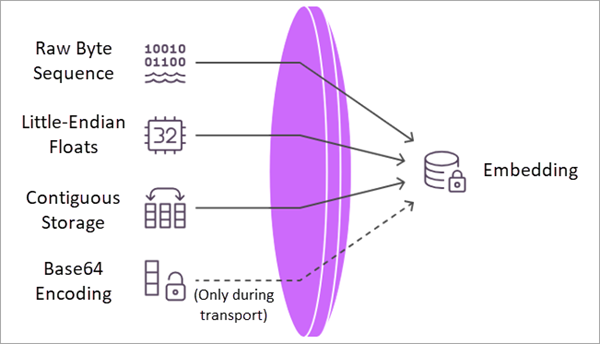
Embeddings are stored as contiguous little-endian IEEE-754 32-bit floating-point (Float32) values with no headers, delimiters, or metadata. Each element occupies exactly 4 bytes.
Conceptual representation
An embedding is logically a numeric vector.
E = [e0, e1, e2, …, e(D-1)]
On disk, the embedding is stored as a raw byte sequence.
[e0] [e1] [e2] ... [e(D-1)]
The embedding dimension D is fixed per model.
Expected payload size = D * 4 bytes
Transport through REST and JSON
When embeddings must traverse text-only channels (for example, JSON payloads or ArcGIS Feature Service REST APIs), the same binary payload is transported as a Base64-encoded string. The stored geodatabase value remains raw binary, and the binary layout is unchanged.
Write an Embedding to a feature class
embedding = np.array([0.12, -0.98, 1.42, 0.33], dtype='<f4')
embedding_bytes = np.asarray(embedding, dtype='<f4', order='C').tobytes()

with arcpy.da.InsertCursor(
    feature_class_path,
    ["SHAPE@", "Name", "Embedding"]
) as cursor:
    cursor.insertRow([geometry, "Sample Feature", embedding_bytes])
Read an Embedding
Read and verify the stored embedding as follows:
# Embedding Dimension
D = 4

with arcpy.da.SearchCursor(feature_class, ["Embedding"]) as cursor:
    for row in cursor:
        blob_bytes = row[0]

        if blob_bytes is None:
            continue

        if len(blob_bytes) % 4 != 0:
            raise ValueError("Invalid embedding payload size.")

        if len(blob_bytes) != D * 4:
            raise ValueError("Unexpected embedding dimension.")

        embedding = np.frombuffer(blob_bytes, dtype='<f4')
        print(embedding)
Validation requirements
Before reconstructing the embedding vector, do the following:
Confirm
len(blob_bytes) == D * 4Always check for little endianness
Best practices
The following describe best practices for working with Embeddings.
Enforce an explicit data type.
np.asarray(embedding, dtype='<f4', order='C')Keep model dimensions consistent.
Embedding dimension D must remain fixed per model version.
Avoid platform-specific serialization. Do not use pickle, JSON numeric arrays for storage, struct packing without explicit
<f4, etc. The only supported format is as follows:Contiguous little-endian IEEE-754 float32 bytes
Conclusion
In ArcGIS Pro, embeddings are stored as fixed-dimension Float32 vectors encoded as contiguous little-endian binary data within a geodatabase BLOB field.
Using ArcPy and the ArcGIS API for Python, embeddings can be written and reconstructed deterministically across file geodatabases and hosted feature services while maintaining full compatibility with ArcGIS platform standards.