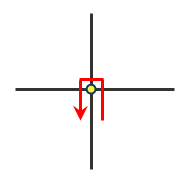
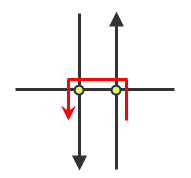
U-turn policies
U-turn policies can be set at the level of the network location, network analysis layer, or network dataset. The following sections explain the various ways U-turns can be allowed or prohibited.
Curb approach
CurbApproach is a property on network locations, such as stops in route analysis layers and orders in vehicle routing problems. It specifies the direction a vehicle can arrive at and depart from the network location.
The following four settings are available for CurbApproach (for simplicity, these descriptions refer to stops instead of network locations):
|
Setting |
Coded value |
Description |
|---|---|---|
|
Either side of vehicle |
0 |
The vehicle can approach and depart the stop in either direction, so a U-turn is allowed. This setting can be chosen if it's possible and desirable for your vehicle to turn around at the stop. This decision may depend on the width of the road and the amount of traffic or whether the stop has a parking lot where vehicles can pull in and turn around.
|
|
Right side of vehicle |
1 |
When the vehicle approaches and departs the stop, the stop must be on the right side of the vehicle. A U-turn is prohibited.
|
|
Left side of vehicle |
2 |
When the vehicle approaches and departs the stop, the stop must be on the left side of the vehicle. A U-turn is prohibited.
|
|
No U-turn |
3 |
When the vehicle approaches the stop, the stop can be on either side of the vehicle; however, when it departs, the vehicle must continue in the same direction as when it arrived. A U-turn is prohibited.
|
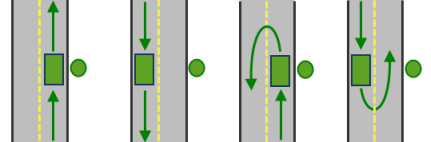
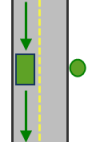
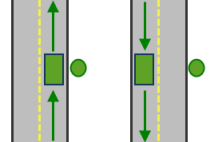
The CurbApproach property is designed to work with both types of national driving standards: right-hand traffic (United States) and left-hand traffic (United Kingdom). First, consider a stop on the left side of a vehicle. It is always on the left side regardless of whether the vehicle travels on the left or right half of the road. What may change with national driving standards is your decision to approach from the right or left side. For example, if you want to arrive at a stop and not have a lane of traffic between the vehicle and the stop, you would choose Right side of vehicle in the United States but Left side of vehicle in the United Kingdom.
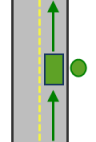
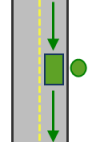
Since CurbApproach is a property on network locations, a network analysis layer can have mixed curb approaches among its objects.
Caution:
Currently, when a network location is on a junction, the ArcGIS Network Analyst extension allows U-turns there, even when its CurbApproach property is set to No U-turn and the U-Turns property of the network analysis layer is set to None.
U-turns
U-turns is a property on network analysis layers that allows you to restrict or permit U-turns at junctions that could occur during network traversal between stops.
The property has the following four settings:
|
Setting |
Description |
|---|---|
|
All |
U-turns are permitted at any junction.
|
|
Dead Ends and Intersections |
U-turns are prohibited at junctions where exactly two adjacent edges meet.
|
|
Dead Ends |
U-turns are prohibited at all junctions, except those that have only one adjacent edge (a dead end).
|
|
None |
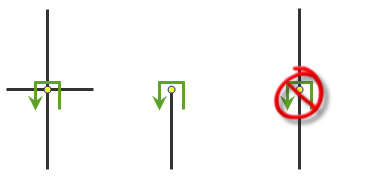
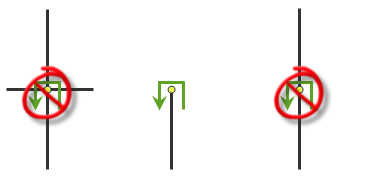
U-turns are prohibited at all junctions. Note, that U-turns are still permitted at network locations even when this setting is chosen; however, you can set the individual network locations' |
Turn features with restrictions
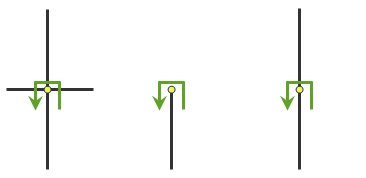
Turn features are part of the network dataset; therefore, any network analysis layer that is linked to that network dataset is affected by active turn features.
Turn features with restrictions are useful if you want Network Analyst to prohibit U-turns only at specific locations, such as at intersections where U-turns are posted as illegal. Also, turn features offer the only method of restricting U-turns that traverse multiple edges, which are most often found at intersections with a divided road.