Route dominance configuration
 Available with the Linear Referencing license.
Route concurrency occurs when two or more pipeline routes share a section. In this case, the routes share a centerline in the LRS Network.
Route concurrency occurs in a roadway when two or more routes share a section of pavement. This may be a familiar scenario to motorists whose typical course of travel includes concurrent road signs indicating a roadway section has more than one route.
In ArcGIS Linear Referencing, concurrent routes share the same centerline feature but are modeled with different measures that belong to the route. Concurrent routes provide some challenges to LRS contributors because events reference sections rather than route designations. Events along a concurrent route section are associated with only one route, so route loading and route editing can impact associated events.
If a segment of a concurrent route is retired or realigned, the existing event records on that segment may be assigned to another concurrent route, depending on the event behavior assigned to the event layer. Configure route dominance rules to determine which route becomes the new parent route of an event after an edit.
To locate events on a dominant route in a concurrent section, apply rules that determine the dominant route in each section. Dominance rules are based on fields in an LRS event table, a feature class, or the LRS Network, which can be compared to order concurrent routes.
Use the Configure Route Dominance Rules tool to configure a set of rules to determine the dominant route in a network where route concurrencies exist.
Route dominance scenario
The following scenario demonstrates the use of route dominance rules to determine the dominant route on concurrent sections.
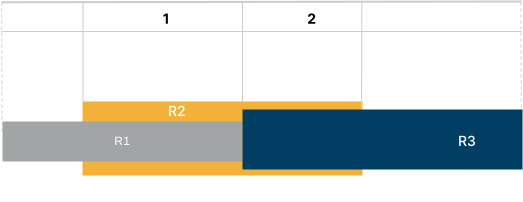
The following table identifies the concurrent sections in the diagram above:
| Section | Concurrent routes |
|---|---|
| 1 | R1, R2 |
| 2 | R2, R3 |
The following table shows the route ID and route name for the concurrent routes in the previous diagram:
| Route ID | Route name |
|---|---|
| {D9D2-} | R1 |
| {E6M1-} | R2 |
| {G3N4-} | R3 |
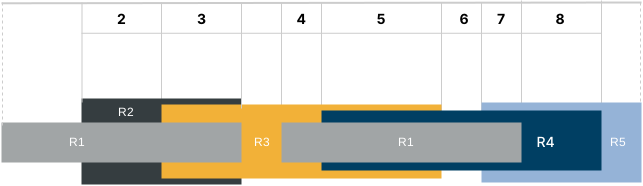
The diagram above shows a roadway on which multiple concurrent sections (2 through 8) exist. Each route has a functional class and name, and some of the routes have a number associated with them.
The following table identifies the concurrent sections in the diagram above:
| Section | Concurrent routes |
|---|---|
| 2 | R1, R2 |
| 3 | R1, R2, R3 |
| 4 | R1, R3 |
| 5 | R1, R3, R4 |
| 6 | R1, R4 |
| 7 | R1, R4, R5 |
| 8 | R4, R5 |
The following table shows the functional class values used in this scenario:
| Code | Functional class |
|---|---|
| 1 | Interstates |
| 3 | Principal arterials |
| 6 | Local roads |
The following table shows the route numbers, the functional class values, the numeric portion of the route ID, and the route name:
| Route ID | Functional class | Number | Name |
|---|---|---|---|
| R1 | 6 | N/A | Stuart Ave |
| R2 | 1 | 15 | I15 |
| R3 | 1 | 10 | I10 |
| R4 | 3 | 89 | US89 |
| R5 | 3 | 110 | US110 |
Note:
Concurrent routes in a section share a section ID in each concurrent group.
The network feature class or any nonspanning line event that is registered to the network can be used to calculate concurrencies.
Exceptions can be listed as a comma-separated list.
Multiple attribute fields can be used to create a rule.
Multiple rules can be used to decide the dominance.
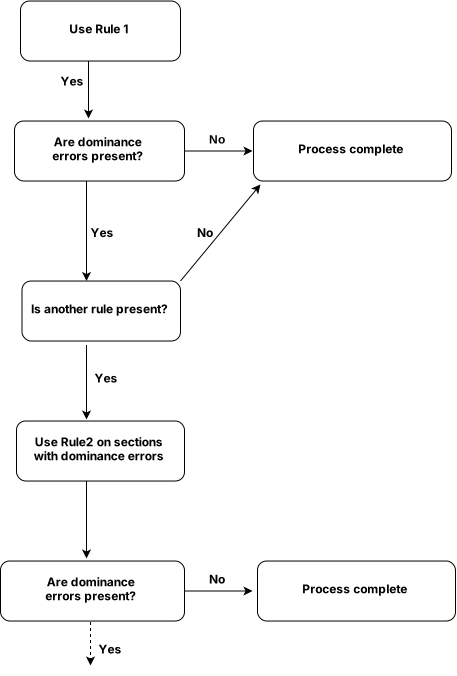
The following is the workflow for the application of rules:
In this example, the following rule is used to determine the dominant route:
| Rule | Fields | Order method | Order type | Exceptions |
|---|---|---|---|---|
| Rule 1 | Route Name | Lesser | Alphanumeric | R3 |
In this example, two rules are used to determine the dominant route:
| Rule | Fields | Order method | Order type | Exceptions |
|---|---|---|---|---|
| Rule 1 | Functional Class | Lesser | Numeric | N/A |
| Rule 2 | Number | Lesser | Numeric | 110 |
The dominant route in a concurrent section gets the dominance flag value of 1; nondominant routes get a value of 0. The dominance error column has the following five potential values.
| Dominance error | Description |
|---|---|
| 0 | No error when calculating the dominant route in the concurrent section. |
| 1 | Two or more routes have the same attribute value for the concurrent section. The dominant route was randomly selected. |
| 2 | Null or no values were present for the attribute, or attributes, used to calculate the dominant route in the concurrent section. |
| 3 | Too many values were present for the attribute, or attributes, used to calculate the dominant route in the concurrent section. |
| 4 | One of two conditions is present in the concurrent section: the route is not calibrated in the concurrent section, or the centerline that composes the concurrent section does not align with the route geometry. |
The following table details the results after calculating route dominance using the rule provided above:
| Section ID | Route name | Dominance flag | Dominance error | Details |
|---|---|---|---|---|
| 1 | R1 | 1 | 0 | The Route Name value of this route is less than that of route R2, so this route is the dominant route using Rule 1. |
| 1 | R2 | 0 | 0 | N/A |
| 2 | R2 | 0 | 0 | N/A |
| 3 | R3 | 1 | 0 | The Route Name value of this route is defined as an exception, so this route is the dominant route using Rule 1. |
The following table details the results after calculating the route dominance using the rules provided above:
| Section ID | Route ID | Dominance flag | Dominance error | Details |
|---|---|---|---|---|
| 2 | R1 | 0 | 0 | N/A |
| 2 | R2 | 1 | 0 | The functional class value of this route is lesser than that of route R1, so this route is the dominant route using Rule 1. |
| 3 | R1 | 0 | 0 | N/A |
| 3 | R2 | 0 | 0 | N/A |
| 3 | R3 | 1 | 0 | The functional class value of this route is lesser than that of route R1 and the same as that of route R2. Since there is a tie between R3 and R2 using Rule 1, use Rule 2 where the value of the Number field for R3 is lesser than that of R2. |
| 4 | R1 | 0 | 0 | N/A |
| 4 | R3 | 1 | 0 | The functional class value of this route is lesser than that of route R1, so this route is the dominant route using Rule 1. |
| 5 | R1 | 0 | 0 | N/A |
| 5 | R3 | 1 | 0 | The functional class value of this route is lesser than that of route R1 and R4, so this route is the dominant route using Rule 1. |
| 5 | R4 | 0 | 0 | N/A |
| 6 | R1 | 0 | 0 | N/A |
| 6 | R4 | 1 | 0 | The functional class value of this route is lesser than that of route R1, so this route is the dominant route using Rule 1. |
| 7 | R1 | 0 | 0 | N/A |
| 7 | R4 | 1 | 0 | The functional class value of this route is lesser than that of route R1 and the same as that of R5. Since there is a tie between R4 and R5 using Rule 1, use Rule 2 where the value of the Number field for R4 is lesser than that of R5. |
| 7 | R5 | 0 | 0 | N/A |
| 8 | R4 | 0 | 0 | N/A |
| 8 | R5 | 1 | 0 | The functional class value of this route is the same as that of R4. Since there is a tie between R4 and R5 using Rule 1, use Rule 2 where 110 is listed as an exception, thus making R5 the dominant route. |
Alternatively, more than one field can be used for creating a rule:
| Rule | Fields | Order method | Order type | Exceptions |
|---|---|---|---|---|
| Rule 1 | Functional Class, Number | Lesser | Numeric | US110 |
In which case, the concatenated value of the two fields in the order they appear in the list is used to calculate the dominance.