Edit unfinished vertices
Vertex Editing  is an editing mode that allows you to edit unfinished vertices and segments while you draw a feature. The workflow is comparable to editing vertices. This setting is available on the construction toolbar when a line or polygon feature construction tool is active.
When you use vertex editing, consider the following:
When vertex editing is off, vertices and segments cannot be modified while you draw a feature once you create them.
To draw a closed polyline feature with the last vertex at the same location as the first vertex, turn vertex editing off.
To set vertex editing on by default, enable this setting in project options.
To edit unfinished vertices and segments while you draw a feature, complete the following steps:
Create at least two unfinished segments using a polyline or polygon feature construction tool.
On the segment construction toolbar, click Vertex Editing
and confirm it is turned on.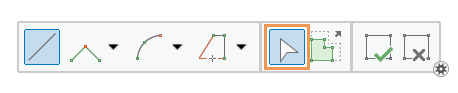
To edit a vertex, hover over the vertex until the vertex pointer appears. Drag the vertex with the pointer, or right-click it and click one of the following commands:
M value
Edit vertex m-values for polylineZM features.
Add Vertex

Add a vertex with the same x-, y-, z- and m-values as the right-clicked vertex.
Delete Vertex

Delete the right-clicked vertex.
Move

Move the right-clicked vertex by the specified x, y, z distances.
Move To

Move the right-clicked vertex to the specified x, y, z location.
Reverse Direction

Change the direction of a sketch. The first vertex in the sketch becomes the last vertex.
Trim Before

Delete all vertices in a sketch from the start vertex to the right-clicked vertex.
Trim After

Delete all vertices in a sketch from the right-clicked vertex to the end vertex.
To modify a segment, hover over the segment until the segment pointer appears. Drag the segment with the pointer, or right-click it and click one of the following commands:
Add Vertex
Add a vertex at the right-clicked location.
Change segment
Change the right-clicked segment to a line, an arc, or a Bezier curve.
Reverse Direction
Change the direction of a sketch. The first vertex in the sketch becomes the last vertex.
Note:
This command is available only with line feature sketches.
Change Length

Change the total length of a sketched line to the specified value.
A positive value preserves the location of the first vertex.
A negative value preservers the location of the last vertex.
Note:
This command is available only with line feature sketches.
To finish the feature, click Finish
 , or press the F2 key.