Set the layer display field
The display field layer property uses a designated field in the feature layer to identify a selected layer in editing tools and the selection chip. You can change the display field on the Layer Properties dialog box or write a custom display expression for easier identification.
Note:
The display field property is also used by MapTips, Pop-ups, published map services, and other areas of ArcGIS Pro that identify a feature layer.
To change the display field, complete the following steps:
On the ribbon, click the View tab. In the Windows group, click Contents
 .
.The Contents pane appears.
Right-click the layer and click Properties
 .
.The Layer Properties dialog box appears.
Click the Display tab.
Click the Display Field drop-down arrow and choose a field.
By default, it is set to the first available string field in the feature layer containing the word
namein the field name.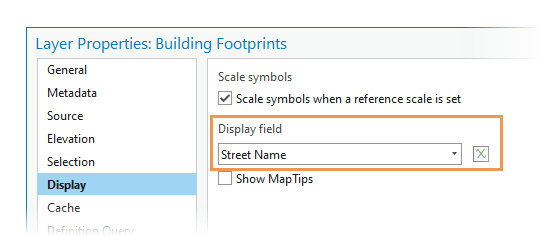
Tip:
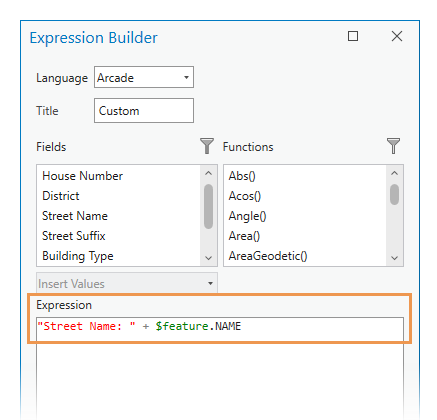
To create a custom display expression, click Set an expression
 .
.On the Expression Builder dialog box, use the Arcade language to concatenate your own text to the text supplied by the designated field, for example, "Street Name: " + $feature.NAME. Custom display expressions use the Feature Display Tile Arcade profile.
Click OK.