Manage cruising altitude diagrams
 Available with Aviation Charting license.
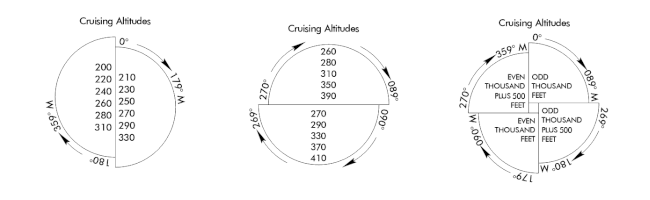
A cruising altitude diagram communicates critical information about cruising altitude levels during flight. The cruising altitude diagram layout element in ArcGIS Pro is highly customizable so you can apply it to multiple charts. There are three types of cruising altitude diagrams:
Vertical Cruising Altitude Diagram—The cruising altitude diagram has two sections and is vertically aligned.
Horizontal Cruising Altitude Diagram—The cruising altitude diagram has two sections and is horizontally aligned.
Quadrantal Cruising Altitude Diagram—The cruising altitude diagram has four sections aligned to the four cardinal directions.
Add a cruising altitude diagram
You can add a cruising altitude diagram to the layout in ArcGIS Pro.
Open or create a layout in ArcGIS Pro.
Click the Insert tab.
Click Additional Surrounds and choose a cruising altitude diagram option from the drop-down menu:
Vertical Cruising Altitude Diagram—Add a vertically aligned cruising altitude diagram to the layout.
Horizontal Cruising Altitude Diagram—Add a horizontally aligned cruising altitude diagram to the layout.
Quadrantal Cruising Altitude Diagram—Add a cruising altitude diagram to the layout with four cardinal directions.
Drag a box on the layout to insert the cruising altitude diagram you chose.
Open the Cruising Altitude Diagram pane
There are several formatting options available to you when configuring the cruising altitude diagram. You can configure the aviation north arrow in the Cruising Altitude Diagram pane.
To open the Cruising Altitude Diagram pane, complete the following steps:
Right-click the aviation north element in the Contents pane.
Click Properties.
The Cruising Altitude Diagram pane appears.
Format the diagram
The General section contains generic formatting options for the cruising altitude diagram. Complete the following steps to update the generic formatting of the cruising altitude diagram:
In the Name text box, type a name for the cruising altitude diagram.
Check the Visible check box to turn on and off the visibility of the cruising altitude diagram.
Check the Locked check box to lock the cruising altitude diagram on the layout.

Configure the cruising altitude diagram
The Cruising Altitude Diagram section contains options that define a cruising altitude diagram. To configure cruising altitude diagram options, complete the following steps:
In the Diagram Title text box, type a title for the cruising altitude diagram.
The title appears as a component on the cruising altitude diagram.
Click the Type drop-down arrow and choose an option:
Vertical Cruising Altitude Diagram—The element is a vertically aligned cruising altitude diagram to the layout.
Horizontal Cruising Altitude Diagram—The element is a horizontally aligned cruising altitude diagram to the layout.
Quadrantal Cruising Altitude Diagram—The element is a cruising altitude diagram to the layout with four cardinal directions.
In the Diagram Diameter text box, type a numerical value and a measurement unit.
The Diagram Diameter value determines the size of the cruising altitude diagram on the layout.
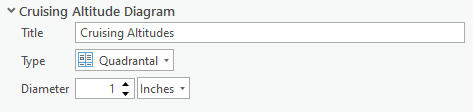
Diagram text
You can add custom text to sections of the cruising altitude diagram. The number of sections on the diagram depends on the type of cruising altitude diagram you choose. The number of text boxes on the Cruising Altitude Diagram pane depends on the number of sections on the diagram.
Update symbology for cruising altitude diagram components
Cruising altitude diagram elements have several symbol classes that you can modify in the Cruising Altitude Diagram pane to change how the cruising altitude diagram appears on the layout. You can modify symbology for the following symbol classes:
Title—The symbology for the title element on the cruising altitude diagram.
Line Symbol—The symbology for the cruising altitude diagram's outline.
Altitude Text Symbol—The symbology for the text inside of the cruising altitude diagram.
Bearing Text Symbol—The symbology for the text surrounding the cruising altitude diagram.
Bearing Line Symbol—The symbology for the arrows surrounding the cruising altitude diagram.
