Calculate Missing Z Values (3D Analyst Tools)
Summary
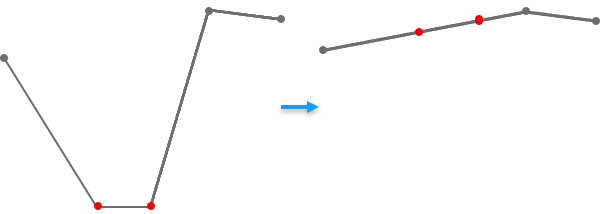
Creates features that update the z-values of 3D line or polygon vertices with placeholder values that represent missing z-value information.
Illustration
Usage
While z-enabled features will always have a z-value for each vertex, a specific value may represent a placeholder for an unknown z-value. This tool assigns a z-value for those vertices by deriving it from the z-value information of other vertices in the same feature. For line features, the computed z-value can be obtained by interpolation or extrapolation; for polygon features, this value is acquired through interpolation.
Each feature class has a default z-value assigned at the time of its creation. This default value can be controlled by setting the Default Output Z Value environment at the time of the feature class's creation. The default value will be 0 when nothing has been specified, but this may cause confusion if 0 is within the range of expected z-value information. To prevent confusion, consider assigning a uniquely identifiable default that is outside the expected range of z-coordinates in the data, such as -9999.
Parameters
| Label | Explanation | Data type |
|---|---|---|
|
Input 3D Features |
The 3D line or polygon features with missing z-values. |
Feature Layer |
|
Output Features |
The output features whose placeholder z-values will be updated. |
Feature Class |
|
Placeholder Value |
The z-value that represents missing or unknown information in the feature's geometry. |
Double |
Environments
Current Workspace, Output Coordinate System, Geographic Transformations, Output CONFIG Keyword, Output M Domain, Output XY Domain, Output Z Domain, XY Resolution, XY Tolerance, Z Resolution, Z Tolerance, Extent
Licensing information
- Basic: Requires 3D Analyst
- Standard: Requires 3D Analyst
- Advanced: Requires 3D Analyst