Intersect 3D (3D Analyst Tools)
Summary
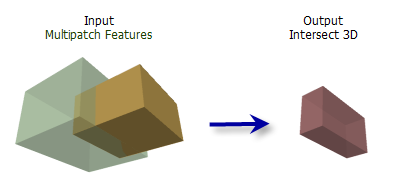
Computes the intersection of multipatch features to produce closed multipatches encompassing the overlapping volumes, open multipatch features from the common surface areas, or lines from the intersecting edges.
Illustration
Usage
Use caution when determining the data for this analysis. Highly detailed features may produce complex geometries that can affect performance due to the total number of vertices and orientation.
When one input is provided, the intersection of features in that multipatch dataset will be evaluated. When two inputs are provided, the intersection of features from both datasets will be determined and intersections found in only one input will be ignored.
Note:
When using two input features, attributes from both features will be concatenated in the output.
Textures and colors from the input multipatch features will not be preserved in the output.
When the Output Geometry Type parameter is specified as Solid, the input multipatches must be closed. The Surface and Line options do not require closed multipatches as input. Use the Is Closed 3D tool to determine if multipatches are closed.
Parameters
| Label | Explanation | Data type |
|---|---|---|
|
Input Multipatch Features |
The multipatch features that will be intersected. When only one input feature layer or feature class is provided, the output will indicate the intersection of its own features. |
Feature Layer |
|
Output Feature Class |
The feature class that will be produced. |
Feature Class |
|
Input Multipatch Features (Optional) |
The second multipatch feature layer or feature class that will intersect the first. |
Feature Layer |
|
Output Geometry Type (Optional) |
Specifies the type of intersection geometry that will be created.
|
String |
Environments
Current Workspace, Extent, Output Coordinate System, Geographic Transformations, Output CONFIG Keyword, Auto Commit, Output XY Domain, Output Z Domain
Licensing information
- Basic: Requires 3D Analyst
- Standard: Requires 3D Analyst
- Advanced: Requires 3D Analyst