Intersect 3D Line With Surface (3D Analyst Tools)
Summary
Computes the geometric intersection of 3D line features and one or more surfaces to return the intersection as segmented line features and points.
Illustration
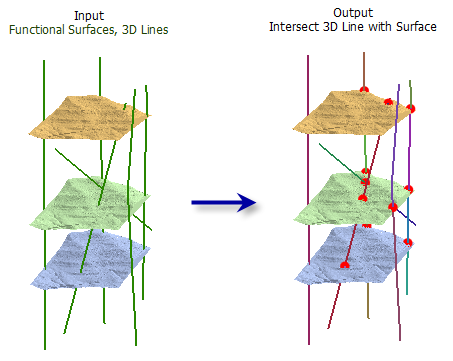
Usage
All of the input line features will be in the output line feature class even if they do not intersect a surface.
The following fields are included in the output line feature class:
OID_ORG—TheOBJECTIDvalue from the original 3D line featureSURF_FROM—The surface where the 3D line segment beganSURF_TO—The surface where the 3D line segment was drawn
The following fields are included in the optional output point feature class:
OID_LINE—TheOBJECTIDvalue from the original 3D line featureSURFACE—The surface name where the intersecting point was generatedDIST_ALONG—The distance from the beginning of the 3D line to the point of intersection
Parameters
| Label | Explanation | Data type |
|---|---|---|
|
Input Line Features |
The input 3D line features. |
Feature Layer |
|
Input Surfaces |
One or more surfaces that will be used to determine intersections. Supported inputs are raster and TIN datasets. |
Mosaic Layer; Raster Layer; TIN Layer |
|
Output Lines |
The output line features that represent the input line features split at the points of intersection with the surface. |
Feature Class |
|
Output Points (Optional) |
The optional point features that represent the input line's intersection with a surface . |
Feature Class |
Environments
Current Workspace, Extent, Output Coordinate System, Geographic Transformations, XY Resolution, XY Tolerance, Z Resolution, Z Tolerance, Output CONFIG Keyword, Auto Commit, Output XY Domain, Output Z Domain, Minimize memory use during analysis on terrains
Licensing information
- Basic: Requires 3D Analyst
- Standard: Requires 3D Analyst
- Advanced: Requires 3D Analyst