LAS To Multipoint (3D Analyst Tools)
Summary
Creates multipoint features using one or more lidar files.
Illustration
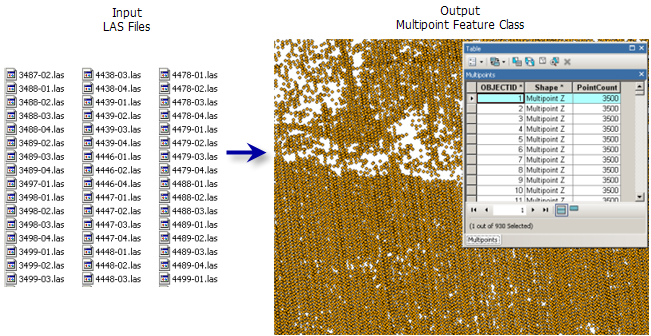
Usage
This tool supports ZLAS and LAS file versions 1.0 to 1.4.
The class code labels provided in the LAS dataset's layer and catalog properties reflect the class designations outlined in the ASPRS LAS 1.4 specifications. This classification scheme is oriented for aerial lidar surveys and is comprised of the following:
Classes associated with predefined objects, for example, 2 represents ground
Classes whose values are not defined but reserved for later use by the ASPRS
Classes that can be allocated to any other object
The LAS dataset layer's point filters, interactive editing options, and default symbology labels reflect the LAS format specification's class code labels.
The LAS format supports the storage of numerous predefined attributes for each lidar point. If you do not know which attributes are available with a given collection of LAS files, consider using a LAS dataset to review the LAS file properties.
When loading multiple LAS attributes into an Oracle database, you'll need to make sure all DBTUNE keywords for parameter
attribute_binaryare set to use binary large objects (BLOBs), not LONGRAW. This is because LAS attributes are loaded as BLOBs, and Oracle does not support multiple BLOBs in LONGRAW tables. See your Oracle database administrator for assistance.
Parameters
| Label | Explanation | Data type |
|---|---|---|
|
Input |
The LAS or ZLAS files that will be imported to a multipoint feature class. If a folder is specified, all the LAS files that reside therein will be imported. In the Geoprocessing pane, a folder can also be specified as an input by selecting the folder in File Explorer and dragging it onto the parameter's input box. |
Folder; File |
|
Output Feature Class |
The feature class that will be produced. |
Feature Class |
|
Average Point Spacing |
The average 2D distance between points in the input file or files. This can be an approximation. If areas have been sampled at different densities, specify the smaller spacing. The value needs to be provided in the projection units of the output coordinate system. |
Double |
|
Class Codes (Optional) |
The classification codes that will be used as a query filter for LAS data points. Valid values range from 0 to 255. No filter is applied by default. |
Long |
|
Return Values (Optional) |
The return values that will be used to filter the LAS points that get imported to multipoint features.
|
String |
|
Input Attribute Names (Optional) |
The LAS point properties whose values will be stored in binary large object (BLOB) fields in the attribute table of the output. If the resulting features will participate in a terrain dataset, the stored attributes can be used to symbolize the terrain. The Name column indicates the name of the field that will be used to store the specified attributes. The following LAS properties are supported: Value table columns:
|
Value Table |
|
Coordinate System (Optional) |
The coordinate system of the input LAS file. |
Coordinate System |
|
File Suffix (Optional) |
The suffix of the files that will be imported from an input folder. This parameter is required when a folder is specified as input. |
String |
|
Z Factor (Optional) |
The factor by which z-values will be multiplied. This is typically used to convert z linear units to match x,y linear units. The default is 1, which leaves elevation values unchanged. This parameter is not available if the spatial reference of the input surface has a z-datum with a specified linear unit. |
Double |
|
Include Subfolders (Optional) |
Scans through subfolders when an input folder is selected containing data in a subfolders directory. The output feature class will be generated with a row for each file encountered in the directory structure.
|
Boolean |
Environments
Current Workspace, Output Coordinate System, Geographic Transformations, Extent, XY Resolution, XY Tolerance, Z Resolution, Z Tolerance, Output CONFIG Keyword, Auto Commit, Output XY Domain, Output Z Domain
Licensing information
- Basic: Requires 3D Analyst
- Standard: Requires 3D Analyst
- Advanced: Requires 3D Analyst