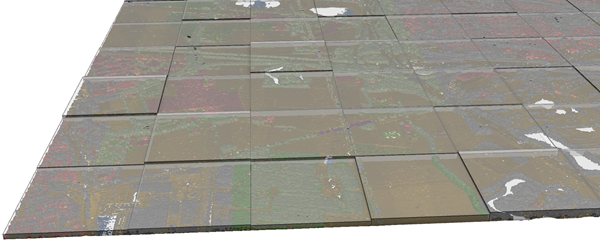
Creates polygon or multipatch output that captures the spatial extent and statistical information about one or more ASCII or LAS format point files.
Illustration
Usage
Each output feature will encompass the x,y extent of an input file. The features can be created as 2D polygons or multipatches depicting the z-range of each input file. The attribute table will have the following fields:
FileName—The name of the point file associated with the feature.
Pt_Count—The total number of points in the point file.
Pt_Spacing—The estimated average spacing of the points in the linear units of the specified coordinate system. The point spacing is an estimate that assumes the points in the input file are evenly spaced over the x,y extent of each input file.
Z_Min—The z-value of the lowest point in the file.
Z_Max—The z-value of the highest point in the file.
Use the Summarize by class code parameter to produce an output feature for each class code in an input .las or .zlas file. The output features will include a field named Class that contains the class code being summarized, and each attribute associated with the feature will reflect the properties for that class code. This parameter is not supported for .laz files.
When the Input Point Data parameter value is one or more .las or .zlas files, or a folder of .las or .zlas files, the default spatial reference of the output is taken from the first file read. When the input is a LAS dataset, the default spatial reference of the output is set to the LAS dataset's spatial reference. If the input is an .laz file, use the Coordinate System parameter to specify the spatial reference of the output. If no spatial reference is specified, the output will have no spatial reference.
The point data that will be processed. Supported inputs include LAS datasets; .las, .zlas, and .laz files; and ASCII files containing point records. One or more folders containing the files can also be specified as input. When a folder is included, the file suffix of the point files must be specified in the File Suffix parameter.
File; Folder
Output Feature Class
The feature class that will be produced.
Feature Class
File Format
Specifies the format of the input files.
LAS format lidar—The format of the input files is LAS format lidar, which includes .las, .zlas, and .laz files.
ASCII file with XYZ—The format of the input files is ASCII files with XYZ.
ASCII file with XYZI—The format of the input files is ASCII files with XYZI.
ASCII file in Generate format—The format of the input files is ASCII files in Generate format.
String
File Suffix
(Optional)
The suffix of the files that will be imported when a folder is specified in the input.
String
Coordinate System
(Optional)
The coordinate system of the input data.
Coordinate System
Include Subfolders
(Optional)
Specifies whether data in subfolders will be used to generate results. The tool scans subfolders when an input folder is selected containing data in a subfolders directory. The output feature class will be generated with a row for each file in the directory structure.
Checked—Any data in the input folder and its subdirectories will be used to generate results.
Unchecked—Only the data in the input folder will be used to generate results. This is the default.
Boolean
Extrude Geometry Shapes
(Optional)
Specifies whether the output will be created as a 2D polygon feature class or a multipatch feature class with extruded features that reflect the elevation range in each file.
Checked—The output will be created as a multipatch feature class.
Unchecked—The output will be created as a 2D polygon feature class. This is the default.
Boolean
Decimal Separator
(Optional)
The decimal character that will be used in the text file to differentiate the integer of a number from its fractional part.
Point—A point will be used as the decimal character. This is the default.
Comma—A comma will be used as the decimal character.
String
Summarize by class code
(Optional)
Specifies whether the results will summarize .las or .zlas files by class code or by file. This parameter is not available for .laz files.
Checked—Each output feature will represent a single class code in the input .las or .zlas file. This option will require a complete scan of the input files.
Unchecked—Each output feature will represent all the class codes in the .las or .zlas file. This is the default.
Boolean
Improve LAS files point spacing estimate
(Optional)
Specifies whether enhanced assessment of the point spacing in .las files, which can reduce over-estimation caused by irregular data distribution, will be used.
Checked—A regular point spacing estimate will be used for .las files in which the extent is equally divided by the number of points. This is the default.
Unchecked—Binning will be used to obtain a more precise point spacing estimate for .las files. This option may increase tool run time.
The point data that will be processed. Supported inputs include LAS datasets; .las, .zlas, and .laz files; and ASCII files containing point records. One or more folders containing the files can also be specified as input. When a folder is included, the file suffix must be specified in the file_suffix parameter.
File; Folder
out_feature_class
The feature class that will be produced.
Feature Class
in_file_type
Specifies the format of the input files.
LAS—The format of the input files is LAS format lidar, which includes .las, .zlas, and .laz files.
XYZ—The format of the input files is ASCII files with XYZ.
XYZI—The format of the input files is ASCII files with XYZI.
GENERATE—The format of the input files is ASCII files in Generate format.
String
file_suffix
(Optional)
The suffix of the files that will be imported when a folder is specified in the input.
String
input_coordinate_system
(Optional)
The coordinate system of the input data.
Coordinate System
folder_recursion
(Optional)
Specifies whether data in subfolders will be used to generate results. The tool scans subfolders when an input folder is selected containing data in a subfolders directory. The output feature class will be generated with a row for each file in the directory structure.
RECURSION—Any data in the input folder and its subdirectories will be used to generate results.
NO_RECURSION—Only the data in the input folder will be used to generate results. This is the default.
Boolean
extrude_geometry
(Optional)
Specifies whether the output will be created as a 2D polygon feature class or a multipatch feature class with extruded features that reflect the elevation range in each file.
EXTRUSION—The output will be created as a multipatch feature class.
NO_EXTRUSION—The output will be created as a 2D polygon feature class. This is the default.
Boolean
decimal_separator
(Optional)
The decimal character that will be used in the text file to differentiate the integer of a number from its fractional part.
DECIMAL_POINT—A point will be used as the decimal character. This is the default.
DECIMAL_COMMA—A comma will be used as the decimal character.
String
summarize_by_class_code
(Optional)
Specifies whether the results will summarize .las or .zlas files by class code or by file. This parameter is not available for .laz files.
SUMMARIZE—Each output feature will represent a single class code in the input .las or .zlas file. This option will require a complete scan of the input files.
NO_SUMMARIZE—Each output feature will represent all the class codes in the .las or .zlas file. This is the default.
Boolean
improve_las_point_spacing
(Optional)
Specifies whether enhanced assessment of the point spacing in .las files, which can reduce over-estimation caused by irregular data distribution, will be used.
LAS_SPACING—A regular point spacing estimate will be used for .las files in which the extent is equally divided by the number of points. This is the default.
NO_LAS_SPACING—Binning will be used to obtain a more precise point spacing estimate for .las files. This option may increase tool run time.
Boolean
Derived output
Name
Explanation
Data type
min_point_spacing
The average point spacing.
Double
Code sample
PointFileInformation example 1 (Python window)
The following sample demonstrates the use of this tool in the Python window:
PointFileInformation example 2 (stand-alone script)
The following sample demonstrates the use of this tool in a stand-alone Python script:
'''****************************************************************************
Name: PointFileInformation Example
Description: This script demonstrates how to use the
             PointFileInformation tool to create an output file that contains
             all LAS files under a parent folder.
****************************************************************************'''
# Import system modules
import arcpy

# Set environment settings
arcpy.env.workspace = "C:/data"
lidarList = arcpy.ListFiles("*.las")
if lidarList:
    # Set Local Variables
    outputFC = "Test.gdb/output_las_info"
    prj = "Coordinate Systems/Geographic Coordinate Systems/World/WGS 1984.prj"
    extrudeGeom = True # Indicates whether to create extruded geometry shapes
    sumClass = True # Indicates whether to summarize output by class code
    decSep = "DECIMAL_POINT" # Identifies the decimal separator

    # Run PointFileInformation
    arcpy.ddd.PointFileInformation(lidarList, outputFC, "LAS", "las", prj,
                                "", extrudeGeom, decSep, sumClass)
    print("Finished running Point File Information.")
else:
    print("There are no LAS files in {0}.".format(arcpy.env.workspace))