Surface Volume (3D Analyst Tools)
Summary
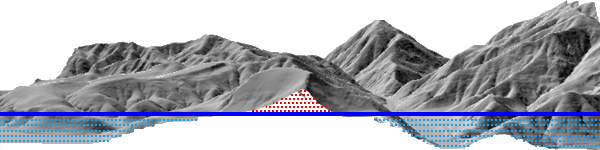
Calculates the area and volume of the region between a surface and a reference plane.
Illustration
Usage
Use the Z Factor parameter to ensure the accuracy of volume calculations when the surface z-values are in a different unit of measure than the x,y units. The Z Factor parameter will not modify the original data. The tool will automatically determine the appropriate z-factor when the x,y- and z-coordinate systems are defined.
The output text file will store the full path to the surface, the parameters used to generate results, and the calculated area and volume measurements. If the same output file is specified in multiple runs of the tool, the pre-existing records are maintained and the results are appended to the table as shown in the following example:
Dataset
Plane Height
Reference
Z Factor
Area 2D
Area 3D
Volume
C:\data\tin
100.00
Above
1
15984467.82
16354331.40
1886012931.05
C:\data\raster.tif
250.5
Below
3.28084
0
0
0
C:\data.gdb\fd\terrain
1250
Above
0.3048
1854238.36
1970550.88
1099221466.89
When the region for the calculations is a nonrectangular extent, use a polygon to define the region. Then use the Polygon Volume tool to determine the calculations.
A raster surface is evaluated using the extent of the center point of each cell, as opposed to the extent of the entire cell area. The resulting analysis will decrease the data area of the raster by half a cell relative to the data area displayed for the raster.
Parameters
| Label | Explanation | Data type |
|---|---|---|
|
Input Surface |
The raster, TIN, or terrain surface that will be processed. |
Mosaic Layer; Raster Layer; Terrain Layer; TIN Layer |
|
Output Text File (Optional) |
A comma-delimited ASCII text file containing the area and volume calculations. If the file already exists, the results will be appended to the file. |
File |
|
Reference Plane (Optional) |
Specifies the direction from the reference plane that will be used to calculate the results.
|
String |
|
Plane Height (Optional) |
The z-value of the plane that will be used to calculate area and volume. |
Double |
|
Z Factor (Optional) |
The factor by which z-values will be multiplied. This is typically used to convert z linear units to match x,y linear units. The default is 1, which leaves elevation values unchanged. This parameter is not available if the spatial reference of the input surface has a z-datum with a specified linear unit. |
Double |
|
Pyramid Level Resolution (Optional) |
The z-tolerance or window-size resolution of the terrain pyramid level that will be used. The default is 0, or full resolution. |
Double |
Environments
Licensing information
- Basic: Requires 3D Analyst
- Standard: Requires 3D Analyst
- Advanced: Requires 3D Analyst