Summary Statistics (Analysis Tools)
Summary
Calculates summary statistics for fields in a table.
Illustration
Usage
The output will consist of fields containing the result of the statistical operations.
The following statistical operations are available with this tool: sum, mean, minimum, maximum, range, standard deviation, count, first, last, median, variance, unique, concatenate, and mode.
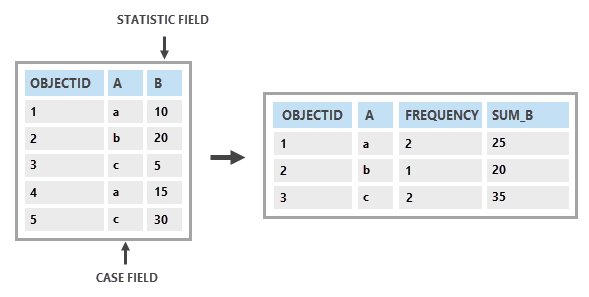
If the Case Fields parameter is specified, statistics will be calculated for each unique set of field values. The output table will include one record for each unique set of field values. If the Case Fields parameter is not specified, statistics will be calculated for all input records. The output table will contain a single record.
The output's
Frequencyfield is the count of all input records represented by the unique set of field values. If the Case Fields parameter is not specified, it will be a count of all input records.A field will be created for each statistic type using the following naming convention:
SUM_<field>,MEAN_<field>,MIN_<field>,MAX_<field>,RANGE_<field>,STD_<field>,COUNT_<field>,FIRST_<field>,LAST_<field>,MEDIAN_<field>,VARIANCE_<field>,UNIQUE_<field>,CONCATENATE_<field>,DBMS_SUM_<field>,DBMS_MEAN_<field>,DBMS_MIN_<field>,DBMS_MAX_<field>,DBMS_STD_<field>,DBMS_COUNT_<field>,DBMS_MEDIAN_<field>, andDBMS_VARIANCE_<field>in which <field> is the name of the input field for which the statistic is computed. The field name is truncated to 10 characters when the output table is a dBASE table.Use the DBMS statistic types to process the statistics directly in the database or on the service rather than on the client. The DBMS statistic types are only supported for input geodatabase data sources, including enterprise geodatabases, feature services, cloud data warehouses, GeoPackage, and SQLite geodatabases.
The DBMS statistic types do not support dBASE output.
Null values are excluded from all statistical calculations. For example, the average of 6, 4, and a null value is 5 ((6+4)/2).
When using layers, only the currently selected features will be used to calculate statistics.
Parameters
| Label | Explanation | Data type |
|---|---|---|
|
Input Table |
The input table containing the fields that will be used to calculate statistics. |
Table View; Raster Layer |
|
Output Table |
The output table that will store the calculated statistics. |
Table |
|
Statistics Fields |
Specifies the field or fields containing the attribute values that will be used to calculate the specified statistic. Multiple statistic and field combinations can be specified. Null values are excluded from all calculations. Numeric attribute fields can be summarized using any statistic. Text attribute fields can be summarized using minimum, maximum, count, first, last, unique, concatenate, and mode statistics. Date, Date only, and Timestamp offset attribute fields can be summarized only with the mean, minimum, maximum, count, first, last, unique, and concatenate statistics. The DBMS statistic types are only supported for input geodatabase data sources, including enterprise geodatabases, feature services, cloud data warehouses, and SQLite geodatabases Value table columns:
|
Value Table |
|
Case Fields (Optional) |
The field or fields in the input that will be used to calculate statistics separately for each unique attribute value (or combination of attribute values when multiple fields are specified). |
Field |
|
Concatenation Separator (Optional) |
A character or characters that will be used to concatenate values when the Concatenation option is used for the Statistics Fields parameter. By default, the tool will concatenate values without a separator. |
String |
Environments
Output CONFIG Keyword, Current Workspace, Scratch Workspace, Time Zone
Special cases
- Time Zone
-
The mean statistic type on a Timestamp offset field will use the timezone offset from this environment.
Licensing information
- Basic: Yes
- Standard: Yes
- Advanced: Yes