Analyze Airport Features (Aviation Tools)
Summary
Analyzes specified point features around an airfield to find and record information such as distance from a given runway centerline or the end of the nearest runway and its designation.
Usage
The Input Analysis Features parameter value does not need specific field schema. Only the geometry field and
OBJECTIDfield are required.In the absence of shape z-values in the input airport features, when Shape Z is specified as the Input Analysis Features Height parameter value, a height of 0 (zero) will be used.
If the Input Analysis Features parameter value contains a description field, the description field and values will be included in the output. The name of the description field can be one of the following:
DESCDESCRIPDESCRIPTION
A 5-nautical mile search radius will be used to filter searches when the tool locates the nearest features to the Input Runway Features parameter value.
If the Input Runway Features parameter value contains a runway designation field, runway designation values will be included in the output. The name of the runway designation field can be one of the following:
RWYDESGDESIGNATOR_TXTRUNWAYDESIGNATORIDENTIFIER
If the input runway end-point or airport reference point features are not provided, the resulting output fields will be empty.
If the Runway End Features parameter value contains a runway end designation field, runway end designation values will be included in the output. The name of the optional runway end designation field must be
RUNWAYENDD. The optionalRUNWAYENDDattribute will be used to populate theNearestRunwaycolumn in the output table.The tool populates several fields in the Output Table parameter value. The following diagram illustrates how these fields are calculated:
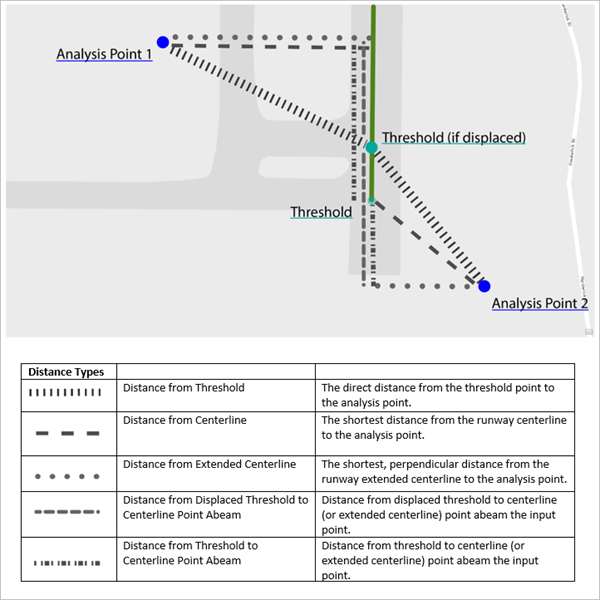
The following table describes the fields in the Output Table parameter value:
Output column name
Output column alias
Description
ElevationElevation
The elevation height of the Input Analysis Feature parameter value.
ELEVATIONVUOMElevation Vertical Unit of Measure
The vertical unit of measure.
This will be reported as one of the following:
The coordinate system's vertical unit of measure belonging to the input analysis feature class. This will be used if the Input Analysis Features Height Unit parameter value is derived from the SHAPE_Z value.
The unit specified for the Input Analysis Features Height Unit parameter when a specific value is used to represent the height.
DescriptionDescription
The
Descriptionattribute from the Input Analysis Features feature class.DirectionFromCenterlineDirection From Centerline
The intercardinal direction that the input analysis feature lies relative to the associated runway centerline.
DirectionFromThresholdDirection From Threshold
The intercardinal direction that the input analysis feature lies relative to the associated runway threshold.
Dist_DTHR_PtAbeamDistance Displaced Threshold to Centerline Point Abeam
The distance from the displaced threshold to the centerline (or extended centerline).
Dist_THR_PtAbeamDistance Threshold to Centerline Point Abeam
The distance from the threshold to the centerline (or extended centerline) point abeam the input point.
DistanceFromCenterlineDistance From Centerline
The shortest distance from the runway centerline to the analysis point.
DistanceFromExtendedCenterlineDistance from Extended Centerline
The shortest, perpendicular distance from the runway extended centerline to the analysis point.
DistanceFromThresholdDistance from Threshold
The direct distance from the threshold point to the analysis point. If the threshold point is not found, this value will be calculated from the runway end point.
HUOMHorizontal Unit of Measure
The coordinate system's horizontal unit of measure belonging to the input analysis feature class.
NearestRunwayNearest Runway
The runway end designator from the associated feature point in the Runway End Features feature class, from the
RUNWAYENDDattribute.ObjectIDObjectID
The
ObjectIDof the output table.OffsetDirectionOffset Direction
The side, left (L) or right (R), that the input feature lies relative to the landing direction of the extended runway centerline.
PointIDPoint ID
The
ObjectIDfrom the Input Analysis Feature parameter value associated with this output row.PointSourcePoint Source
The workspace path that the input analysis features are from.
RWYDESIGRunway Designator
The
Runway Designatorattribute from the associated polyline from the Input Runway Features feature class.XX
The x-coordinate of the input analysis feature in the horizontal units of measure.
YY
The y-coordinate of the input analysis feature in the horizontal units of measure.
If no Runway End Features parameter value is provided, the end of the input Input Runway Features polyline will be used as the end of the runway.
Note:
When no value is provided for the Runway End Features parameter, there is no way to identify the runway end designator for the provided runway.
If the Airport Reference Point Features parameter value is provided, the input feature class must contain the following fields:
Field name
Data type
POINTTYPEText
RUNWAYENDDText
These field values will be used to locate the nearest displaced threshold point. If the value specified for the Input Runway Features parameter does not contain these fields, the closest runway end point from the Runway End Features parameter value will be used.
If the Airport Control Point Features parameter value is provided, the tool will search for the location of the runway threshold points by finding features with a
POINTTYPEvalue ofDISPLACED_THRESHOLD. If no threshold point is found, or if this feature class is not provided, the calculations forDistanceFromThresholdandDist_DTHR_PtAbeamwill be impacted.
Parameters
| Label | Explanation | Data type |
|---|---|---|
|
Input Analysis Features |
The input point features that will be analyzed and recorded in terms of their physical relationships to features in the other inputs. |
Feature Layer |
|
Input Runway Features |
The input runway polyline features, specifically their centerlines, that will be used in the analysis. |
Feature Layer |
|
Output Table |
The output table, with a row for each input airport feature, containing the analyzed results. |
Table View |
|
Input Analysis Features Height (Optional) |
Specifies the name of a field in the input airport features dataset. The specified field must contain numeric values. The values in this field will be used to identify the height of each input airport feature. If the SHAPE_Z value is specified as the location of the height, the Input Analysis Features Height Unit parameter will be ignored.
|
String |
|
Input Analysis Features Height Unit (Optional) |
Specifies the linear unit of measure that will be used when the Input Analysis Features Height parameter value is specified.
|
String |
|
Runway End Features (Optional) |
The input runway end point features associated with the runways in the Input Runway Features parameter value that represent the thresholds of those runways. |
Feature Layer |
|
Airport Control Point Features (Optional) |
The input airport control point features that contain the runway threshold points. The runway threshold points will be identified by searching for the |
Feature Layer |
|
Airport Control Point Elevation (Optional) |
Specifies the name of a field in the input airport reference point features dataset. The specified field must contain numeric values. The values in this field will be used to identify the height of each input airport reference point feature. If SHAPE_Z is specified as the location of the height, the Airport Reference Point Elevation Unit parameter will be ignored.
|
String |
|
Airport Reference Point Elevation Unit (Optional) |
Specifies the linear unit of measure that will be used when an airport reference point height is specified.
|
String |
|
Output Horizontal Unit of Measure (Optional) |
Specifies the output unit of measurement for the five output distances produced.
|
String |
Environments
This tool does not use any geoprocessing environments.
Licensing information
- Basic: No
- Standard: Requires Airports
- Advanced: Requires Airports