Analyze LAS Runway Obstacles (Aviation Tools)
Summary
Analyzes lidar data and obstruction identification surfaces (OIS) to determine if lidar points are penetrating.
Usage
The Input OIS Features parameter value must be a multipatch feature class that contains the OIS.
The Input LAS Obstacles parameter value is a lidar (LAS) dataset.
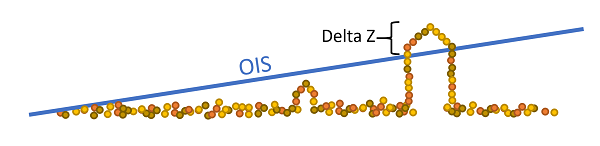
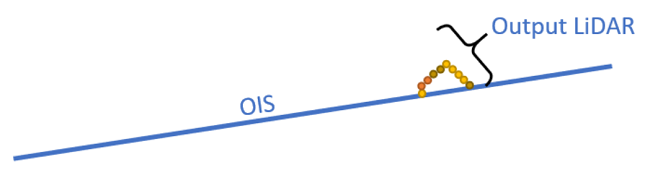
A point feature is generated, and output for each lidar point that falls within the area is covered by the OIS, where the height of that point exceeds the height of the OIS feature at that point. The x and y point coordinates are the same as the lidar point with which the output point is associated.
This tool requires an ArcGIS 3D Analyst extension license.
The input LAS dataset and
.lasfiles must be in a projected coordinate system. You can use the Project LAS tool to project the LAS dataset or.lasfiles.The optional output
.lasfiles will match the LAS version, point record format, and compression of the input.The optional
.lasfiles and LAS dataset file will overwrite any files that share the same names.When specified to generate the LAS output, the
.lasfile that is generated will contain the lidar points from the input penetrating the OIS surface.
This tool does not support in-memory output data for performance reasons.
Parameters
| Label | Explanation | Data type |
|---|---|---|
|
Input OIS Features |
The input multipatch features representing one or more OIS. The feature class must be z-enabled. |
Feature Layer |
|
Input LAS Obstacles |
The input LAS dataset that contains 3D data points covering the area around an airport. The points represent a 3D view of natural and human-made objects that may pose a hazard to flight. |
LAS Dataset Layer |
|
Output Obstacle Feature Class (Optional) |
The output point features that represent lidar points in OIS features in which the height of the lidar point is greater than the height of the enclosing OIS feature at that point. This feature class is required output only if no output LAS dataset is requested. |
Feature Layer |
|
Target Folder (Optional) |
The folder to which |
Folder |
|
Output LAS Obstacles (Optional) |
The output LAS dataset referencing the newly created |
LAS Dataset Layer |
|
Vertical Clearance (Optional) |
If a LAS point height is above the OIS surface, that point will be captured. The height of an OIS surface above a given LAS point is temporarily lowered by the specified vertical clearance value. This decreases the distance between the height of the LAS point and the corresponding OIS surface, resulting in the likeliness that more points will be captured. Consequently, a larger collection of ground features, represented by the LAS points penetrating through the OIS surface, will be captured. |
Double |
|
Vertical Clearance Unit (Optional) |
The linear unit that will be used for the vertical clearance.
|
String |
Environments
Licensing information
- Basic: No
- Standard: Requires Airports and 3D Analyst
- Advanced: Requires Airports and 3D Analyst