FAA 2C (Aviation Tools)
Summary
Generates an obstruction identification surface (OIS) for helipads based on specifications from FAA Advisory Circular 150/5390-2C.
This tool can be used to identify obstacles that may impact an aircraft's ability to take off from or land on a helipad. By creating multipatch or polygon features, you can visually identify obstructions in ArcGIS Pro.
Usage
This tool creates the OIS in an existing polygon or multipatch feature class. The OIS can also be generated in an existing polygon shapefile. If a feature class is provided for the Target OIS Features parameter, it must have a vertical spatial reference.
To create a
.jsonfile for the Custom JSON File parameter, use theCustomizeOIS.exeutility included in the Aviation Airports Product Data download available from My Esri.If you select the Curved Surface option for the Surface Shape parameter, you must provide polyline features for the Input Flight Path Features parameter for the surface to follow.
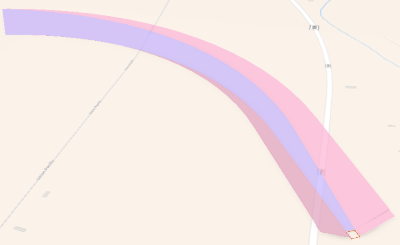
The Input Flight Path Features parameter value must be polyline geometry and include an
ObjectIDfield. The polyline endpoint pf the Input Flight Path Features parameter value should be created within a 100-meter search radius of the edge of the Input FATO Features parameter value.The Input Flight Path Features parameter value can be 2D data, because the x and y-values are used to create the direction of the curve.
If the
PATHIDfield is included in the Target OIS Features parameter value, it will be populated with theObjectIDvalue of its source Input Flight Path Feature. This allows Flight Path features to be related to their output curved approach surfaces. ThePATHIDfield (long integer) must first be added to the Target OIS Features parameter value.The Input FATO Features parameter value should be z-enabled polygon features with defined horizontal and vertical coordinate systems.
Note:
Z-values are required to determine the slope and final height of the approach surface.
The RunwayHelipadDesignSurface feature class in the Esri Airports Airfield dataset can be used for the Input FATO Features parameter value.
If the Input FATO Features parameter has values that are populated in the
RWYDESGandIDARPTfields, they will also be populated in corresponding fields in the Target OIS Features parameter value.The ObstuctionIdSurface_MP feature class in the Esri Airports Airspace dataset can be used for the Target OIS Features parameter value and contains the expected fields to be populated.
The following output attributes will be populated by the tool:
DESCRIP,NAME,OISSURTY,RWYDESG,SLOPE, andIDARPT.
Parameters
| Label | Explanation | Data type |
|---|---|---|
|
Input FATO Features |
The input Final Approach and Takeoff (FATO) features. |
Feature Layer |
|
Target OIS Features |
The target polygon or multipatch feature layer containing the OIS. |
Feature Layer |
|
Surface Classification |
Specifies the classification type of the FATO surface.
|
String |
|
Surface Shape (Optional) |
Specifies the shape of the take off or approach surface.
|
String |
|
Approach Bearing (Optional) |
The absolute bearing that an approaching aircraft will travel along the surface. A value of 0 will align the surface to true north. The default is 0. |
Double |
|
Input Flight Path Features (Optional) |
The polyline flight path features that the curved surface will follow. |
Feature Layer |
|
Helipad Elevation (Optional) |
The elevation of the highest point of the helipad. The value must be in the vertical coordinate system linear units of the target feature class. If no value is provided, the highest point of the Input FATO Features parameter value will be used. The default is 0. |
Double |
|
Custom JSON File (Optional) |
The import configuration file, in JSON format, that will be used to create the custom OIS. |
File |
Derived output
| Label | Explanation | Data type |
|---|---|---|
|
Output OIS Features |
The updated feature class containing the generated OIS. |
Feature Layer |
Environments
This tool does not use any geoprocessing environments.
Licensing information
- Basic: No
- Standard: Requires Airports or ArcGIS Aviation Charting
- Advanced: Requires Airports or ArcGIS Aviation Charting