Generate OIS Obstacle Data (Aviation Tools)
Summary
Generates a JSON string that is stored in the OBSTACLEJSON field on the input Obstruction Identification Surface (OIS) multipatch feature class. This class contains the data necessary to depict obstacles to flight safety within the approach surfaces (in the form of points, lines, or polygons) in the Terrain and Obstacle Profile layout element.
For each runway feature, the tool identifies each approach surface associated with that runway. For each approach surface, the tool uses the underlying elevation models and input obstacle features to determine the highest elevations and heights of those obstacle features that intersect the approach surfaces extent. The resulting 3D geometry, representing the highest-point cross section of each affected obstacle, are created and stored in JSON format and saved in the corresponding approach OIS feature.
The use of Obstacle Point feature input may be preferred since it populates additional OBSTACLEJSON fields and allows for labeling of obstacles within a Terrain and Profile Element.
Usage
The following table lists the values that are populated in the OBSTACLEJSON output message for Point input obstacle features. They are given per input obstacle feature if they planimetrically intersect an input approach surface multipatch feature.
Field
Example
Populated with
Type_Code"Type_Code": "Stack"
The
Type_Codefield of the Input Obstacle Features parameter value. It is the coded domain value description or Unknown if no domain value is found or if the input is null.HACCM"HACCM": 0.304801
The
HORIZACC_VALfield of the Input Obstacle Features parameter value, converted to meters. It is -1.0 if the input is null.VACCM"VACCM": 0.304801
The
VERTACC_VALfield of the Input Obstacle Features parameter value, converted to meters. It is -1.0 if the input is null.Height"Height": 16.664848
The Input Obstacle Height parameter value (feature geometry or input field), converted to meters.
GNDElev"GNDElev": 335.647491
The ground elevation at the input obstacle's location from the Elevation Source parameter value—a digital elevation model (DEM) or input field—converted to meters.
NormalDist"NormalDist": 946.035675
The distance, in meters, between the obstacle and the nearest point on the runway centerline.
Offset"Offset": 143.128218
The distance, in meters, between the obstacle and the nearest point on the extended runway centerline.
X"X": -95.953753
The x-coordinate of the obstacle in WGS84 decimal degrees.
Y"Y": 45.550517
The y-coordinate of the obstacle in WGS84 decimal degrees.
ZVMC"ZVMC": 352.31234
The elevation of the top of the obstacle (
Height+GNDElev) in meters.OIS"OIS": 384.942139
The z-value of the OIS at the obstacle's location.
Penetrates"Penetrates": false
A value of true if ZVMC is greater than or equal to OIS; otherwise, false.
Label"Label": "362"
The value of the Obstacle Labels input parameter.
Shadowing"Shadowed": false
A value of false for shadowing obstacles and a value of true for an obstacle that is shadowed by another.
The Input Runway Features parameter value must be z-enabled and have projected horizontal and vertical coordinate systems defined. It must include a populated
Runway Designatortext field, which must be named as one of the following from the ArcGIS Aviation data models:RWYDESGRUNWAYDESIGNATORIDENTIFIERDESIGNATOR_TXT
Tip:
Recommended input features are RunwayCenterline from the Esri Airports data model or ADHPSurfaceLine from the AIS data model. For more information, see the respective schemas for attribute properties.
The following table lists the values that are populated in the
OBSTACLEJSONoutput message for polyline and polygon input obstacle features. They are given per input obstacle feature if they planimetrically intersect an input approach surface multipatch feature.Field
X
Y
Z
M
Skyline—The height profile of the vertices of the tops of the input line or polygon obstacles.The x-coordinate of obstacle vertex in WGS84 decimal degrees.
The y-coordinate of obstacle vertex in WGS84 decimal degrees.
The elevation of the top of the obstacle vertex (Height +GNDElevfor Relative height type input, Height for Absolute height type input) in meters.
The distance in meters from the runway end of the approach surface to the obstacle vertex.
True—The true height of the ground profile that is used as a base for obstacles.The x-coordinate of obstacle vertex in WGS84 decimal degrees.
The y-coordinate of obstacle vertex in WGS84 decimal degrees.
The ground elevation at the input obstacle vertex from the Elevation Source parameter value—a digital elevation model (DEM) or input field—converted to meters.
The distance in meters from the runway end of the approach surface to the obstacle vertex.
Min—The minimum height of the ground profile that is used as a base for obstacles.The x-coordinate of obstacle vertex in WGS84 decimal degrees.
The y-coordinate of obstacle vertex in WGS84 decimal degrees.
The minimum value of all z-values under the
Truelisting, in meters. The same z-value is applied to all vertices underMin.The distance in meters from the runway end of the approach surface to the obstacle vertex.
Max—The maximum height of the ground profile that is used as the base for obstacles.The x-coordinate of obstacle vertex in WGS84 decimal degrees.
The y-coordinate of obstacle vertex in WGS84 decimal degrees.
The maximum value of all z-values under the
Truelisting, in meters. The same z-value is applied to all vertices underMax.The distance in meters from the runway end of the approach surface to the obstacle vertex.
Average—The average height of the ground profile that is used as the base for obstacles.The x-coordinate of obstacle vertex in WGS84 decimal degrees.
The y-coordinate of obstacle vertex in WGS84 decimal degrees.
The average value of all z-values under the
Truelisting, in meters. The same z-value is applied to all vertices underAverage.The distance in meters from the runway end of the approach surface to the obstacle vertex.
The Input Obstacle Features parameter value must be z-enabled and have projected horizontal and vertical coordinate systems defined.
Tip:
Recommended input features are VerticalStructurePoint, VerticalStructureLine, and VerticalStructurePolygon from the Esri Airports data model. For more information, review the respective schemas for the attribute properties.
Include a field for the Input Obstacle Features parameter value that represents the type of obstacle that is used by the tool to populate the
"Type_Code"values in theOBSTACLEJSONfield results. Null values in this field will be written as Unknown in the output. Permissible field names are the following:TYPE_CODEOBSTACLETYOBSTACLETYPECODEObsTypeOBJECTTYPECODEOBJECTTYPE
The Input Obstacle Features parameter can include the fields listed below. If present, the values of these fields will contribute to the
HACCMandVACCMfields in the outputOBSTACLEJSONvalues:HORIZACC_VALHORIZACC_UOMVERTACC_VALVERTACC_UOM
The Target OIS Features parameter value must be a multipatch feature class with defined projected horizontal and vertical coordinate systems. It must contain approach features and include the following fields for point feature class types:
RWYDESG,LANDINGSTRIPDESIGIDENTIFIER, orDESIGNATOR_TXT(populated with a runway designator, for example, '09/27')NAME(populated with the'Approach Surface'value)OBSTACLEJSON(populated by the tool)Tip:
Recommended input features are ObstructionIdSurface_MP from the Esri Airports data model. The approach features can be generated with one of the tools from the Obstruction Identification Surfaces toolset.
Note:
The field length must be at least 50,000 characters. A warning appears if the JSON output exceeds the length of the
OBSTACLEJSONfield.
The Input Obstacle Feature parameter value elevations are specified by the Obstacle Feature Height Type parameter. Use the Absolute Height option if the input data includes feature geometry or a numeric attribute field with the elevation value of the top of the obstacle above mean sea level. Use the Relative Height option if feature geometry or a numeric attribute field contains the value of the obstacle height above ground level.
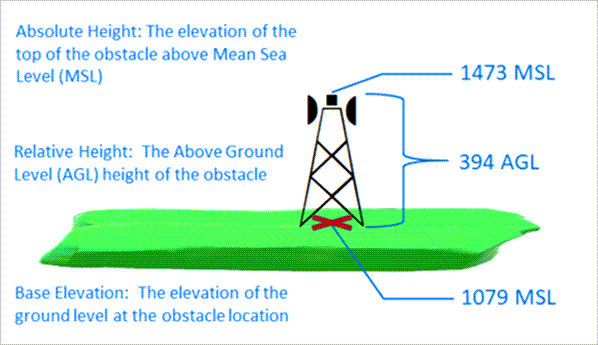
This tool requires base elevation data to function correctly. That data can come from one or more underlying DEMs or from a numeric attribute field in the input obstacle feature class. One or the other must be provided, with the appropriate option specified using the Elevation Source parameter.
The tool will use a flight path ID field (
PATHID,text,Nullable, or255) for the Target OIS Features parameter to associate curved approach polylines with specific approach surfaces. This is required if you have an Input Flight Path Features parameter value. Use this value for the Target OIS Features parameter with theOBJECTIDfield of the corresponding Input Flight Path Features parameter value. This will be populated by the Create Curved Approach tool when creating the curved approach surface or surfaces.If the tool is run repeatedly with different Input Obstacle Features parameter values, it will append the generated JSON data for each set of obstacles to each affected approach surface feature. Subsequently running the tool with updated Input Obstacle Features values will selectively update the JSON data for those features without affecting the JSON data generated using other Input Obstacle Features values.
You can exclude obstacles in the tool output that are shadowed by other obstacles. The following diagram shows how the Horizontal Distance and Slope parameters are used to generate these output features:
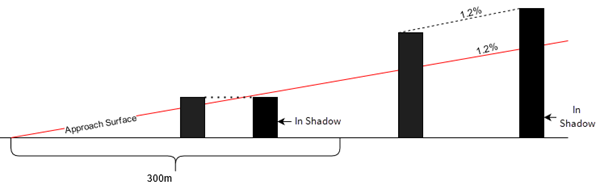
In this diagram, a value of 300 meters is used for the Horizontal Distance parameter value. For obstacles that are 300 meters or less from the end of the runway, the angle of the shadow will be considered horizontal. A slope of 1.2 is used for the Slope parameter value. For obstacles more than 300 meters from the end of the runway, the shadow will be cast at an object behind the obstacle at a slope of 1.2 percent.
Note:
Output of shadowing obstacles is only supported with point obstacles.
Parameters
| Label | Explanation | Data type |
|---|---|---|
|
Input Runway Features |
The input runway dataset. The feature class must be z-enabled and contain polylines. |
Feature Layer |
|
Input Elevation Model (Optional) |
The DEMs covering the obstacles that will be used to derive base elevation values. This parameter is used if Elevation Source is set to Elevation DEM. |
Raster Layer |
|
Input Obstacle Features |
The input obstacle features that will be analyzed. The feature class must be z-enabled. |
Feature Layer |
|
Target OIS Features |
The multipatch features with defined airport data model schema. The feature class must be z-enabled. |
Feature Layer |
|
Obstacle Height (Optional) |
Specifies the field that will contain the height of the obstacle features or the keyword
|
String |
|
Unit (Optional) |
Specifies the obstacle height unit of measure that will be used.
|
String |
|
Input Flight Path Features (Optional) |
The polyline features that will define curved approaches to the specified runways. If no features are provided, all input features will be processed as straight approaches. |
Feature Layer |
|
Obstacle Labels (Optional) |
A field from the input obstacle feature class that will be used to label the obstacle. When an obstacle JSON generated by this tool is later used to create a Terrain and Obstacle Profile element in a layout, the data from the field provided will be used to label the input point obstacles in that element. This parameter only applies when the Input Obstacle Features parameter values contain point features. Note:If no field is provided, the |
String |
|
Obstacle Feature Height Type (Optional) |
Specifies how obstacle height values will be measured.
|
String |
|
Elevation Source (Optional) |
Specifies how obstacle base elevation heights will be found.
|
String |
|
Elevation Field (Optional) |
The field that will contain base elevation heights of the obstacle features. This parameter is used if Elevation Source is set to Elevation field. The default is the first numeric field in the obstacle feature class. |
String |
|
Elevation Field Units (Optional) |
Specifies the linear unit that will be used for the base elevation values. This parameter is used if Elevation Source is set to Elevation field.
|
String |
|
Obstacle Output Method (Optional) |
Specifies the obstacles that will be included in the output feature class.
|
String |
|
Horizontal Distance (Optional) |
The length of the approach surface in meters (calculated from the runway end) where shadows are considered horizontally aligned. |
Double |
|
Slope (Optional) |
The slope of the shadow that will be considered past the Horizontal Distance parameter value. |
Double |
Derived output
| Label | Explanation | Data type |
|---|---|---|
|
Output OIS Features |
The updated multipatch feature class. |
Feature Layer |
Environments
Licensing information
- Basic: No
- Standard: Requires Airports or ArcGIS Aviation Charting
- Advanced: Requires Airports or ArcGIS Aviation Charting