Using this tool, you can automate the rotation of point and annotation features on a chart to make them easier to read.
Usage
Target point layers must have a CARTOANGLE_VAL field, which will be calculated by the tool to set the desired rotation. You can also manually edit the field to change the rotation of an aviation feature.
Note:
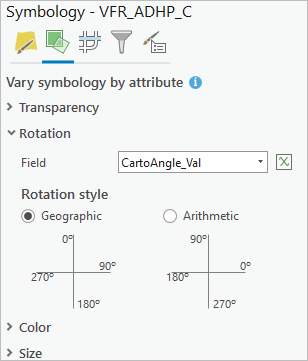
To view the tool results, you must set the Symbology value for the target point layer.
On the Vary symbology by attribute tab , expand Rotation, and set Field to CartoAngle_Val, and set Rotation style to Geographic.
Target annotation layers will be rotated by calculating their Angle field (the default) or the angle information in their Element BLOB field.
The Input Map parameter value must have a projected coordinate system.
The point or annotation feature layers that will be rotated.
String
rotate_option
(Optional)
Specifies how the features will be rotated.
ROTATE_TO_GRID—The features will be rotated to the map's grid. This is the default.
ROTATE_TO_PAGE_TOP—The features will be rotated to the top of the page.
ROTATE_TO_PAGE_LEFT—The features will be rotated to the left side of the page.
ROTATE_TO_PAGE_BOTTOM—The features will be rotated to the bottom of the page.
ROTATE_TO_PAGE_RIGHT—The features will be rotated to the right side of the page.
String
Derived output
Name
Explanation
Data type
updated_layers
The feature layer with updated rotation values.
Feature Layer
Code sample
RotateAviationFeatures example (stand-alone script)
The following stand-alone script demonstrates how to use the RotateAviationFeatures function to rotate features on a navigation chart.
# Name: RotateAviationFeatures_example.py

# Description: ArcGIS geoprocessing tool that automates
# the rotation of aviation features on a navigational chart

import arcpy

# Set the environment
arcpy.env.workspace = r"D:\Data\data.gdb"

# Tool parameters
input_map = "MyMap"
target_point_or_annotation_layers = ["ADHP_C", "NavaidComponent_C"]
rotate_option = "ROTATE_TO_GRID"

# Call the RotateAviationFeatures function
arcpy.aviation.RotateAviationFeatures(input_map, target_point_or_annotation_layers, rotate_option)
Environments
This tool does not use any geoprocessing environments.
 value for the target point layer.
 , expand Rotation, and set Field to CartoAngle_Val, and set Rotation style to Geographic.