Exports footprints from a BisCatalog to an output feature class.
Illustration
Usage
The Input BisCatalog parameter value must be a catalog dataset in a Bathymetric Information System (BIS) workspace.
The Output Feature Class parameter value must be created in an enterprise or file geodatabase.
The Output Feature Class parameter value must be exported to a workspace that is not a BIS.
When added to the map, the output polygon feature class will have ArcGIS Pro default rendering. To visualize a layer using the priority order established in a rule or model file, go to the Advanced symbology options tab and choose OBJECTID from the Drawing order field. Choose Lowest draws on top as the sorting method.
The BisCatalog that footprint features will be extracted from.
Feature Layer
Output Feature Class
The output feature class containing the footprint features extracted from the BisCatalog.
Feature Class
Query File (Filter, Rule, Model)
(Optional)
A filter, rule, or model file that will be used to establish either the subset of BIS datasets or the priority order of the exported footprints included in the output feature class. Choose from the following query file types:
Filter file (*.filter)—This file specifies the set of footprints that will be exported from the BisCatalog to the output polygon feature class. The output will follow the default OBJECTID ordering.
Rule file (*.rule)—This file establishes the sorting rules for the output data. All footprints in the BisCatalog will be exported to the polygon feature class according to the defined rules.
Model file (*.model)—This file defines the specific set of footprints that will be exported from the BisCatalog to the output polygon feature class, along with the specified order of the output.
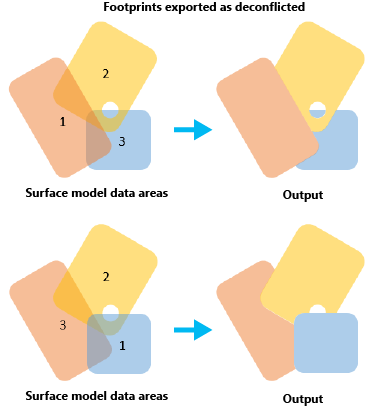
Specifies whether the output will contain overlapping features.
Checked—Footprint features will be exported as nonoverlapping polygon features. Footprints with the highest draw order will be preserved, and footprints with lower draw orders will be modified to exclude overlapping areas.
Unchecked—All footprints will be preserved in the output feature class. This is the default.
The BisCatalog that footprint features will be extracted from.
Feature Layer
out_feature_class
The output feature class containing the footprint features extracted from the BisCatalog.
Feature Class
in_query_file
(Optional)
A filter, rule, or model file that will be used to establish either the subset of BIS datasets or the priority order of the exported footprints included in the output feature class. Choose from the following query file types:
Filter file (*.filter)—This file specifies the set of footprints that will be exported from the BisCatalog to the output polygon feature class. The output will follow the default OBJECTID ordering.
Rule file (*.rule)—This file establishes the sorting rules for the output data. All footprints in the BisCatalog will be exported to the polygon feature class according to the defined rules.
Model file (*.model)—This file defines the specific set of footprints that will be exported from the BisCatalog to the output polygon feature class, along with the specified order of the output.
Specifies whether the output will contain overlapping features.
DECONFLICT_FOOTPRINTS—Footprint features will be exported as nonoverlapping polygon features. Footprints with the highest draw order will be preserved, and footprints with lower draw orders will be modified to exclude overlapping areas.
NO_DECONFLICT_FOOTPRINTS—All footprints will be preserved in the output feature class. This is the default.
Boolean
Code sample
ExportFootprints example (stand-alone script)
The following script demonstrates how to use the ExportFootprints function.
 and choose OBJECTID from the Drawing order field. Choose Lowest draws on top as the sorting method.