Generate Drive Time Trade Areas (Business Analyst Tools)
Summary
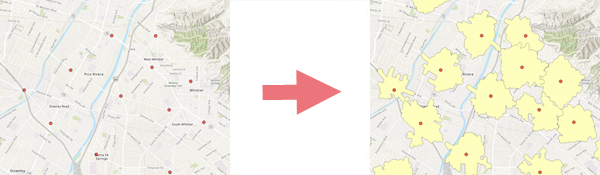
Creates a feature class of trade areas around point features based on travel time and distance.
Illustration
Usage
This tool requires a locally stored dataset or a portal connection, such as ArcGIS Online.
You can create drive time rings that don't overlap using various travel modes.
When using the Remove Overlap parameter, limit your features to around 200-300 points. For larger site sets, you may have success by generating overlapping areas first then using the Remove Overlap (multiple) tool.
The Time of Day parameter is used to model output polygons based on historical traffic data at the specified day and time.
The ID Field parameter is used to create an attribute in the output that uniquely identifies each polygon and respective input point.
Parameters
| Label | Explanation | Data type |
|---|---|---|
|
Input Features |
The input point feature layer. |
Feature Layer |
|
Output Feature Class |
The output feature class containing the drive time polygons. |
Feature Class |
|
Distance Type |
The method of travel that will be used for drive time calculation. |
String |
|
Distances |
The distances that will be used for drive time calculations. |
Double |
|
Distance Units (Optional) |
The units that will be used for the distance values. The default value is miles. |
String |
|
ID Field (Optional) |
A unique ID field for existing facilities. |
Field |
|
Dissolve Option (Optional) |
Specifies whether overlapping or nonoverlapping service areas for a single location will be used when multiple distances are specified.
|
String |
|
Remove Overlap (Optional) |
Specifies whether overlapping concentric rings will be created or overlap will be removed from multiple locations in relation to one another.
|
Boolean |
|
Travel Direction (Optional) |
Specifies the direction of travel toward or away from stores.
|
String |
|
Time of Day (Optional) |
The time and date that will be used when calculating distance. |
Date |
|
Time Zone (Optional) |
Specifies the time zone that will be used for the Time of Day parameter.
|
String |
|
Search Tolerance (Optional) |
The maximum distance that input points can be from the network. Points located beyond the search tolerance will be excluded from processing. This parameter requires a distance value and units for the tolerance. The default value is 5000 meters. |
Linear Unit |
|
Polygon Detail (Optional) |
Specifies the level of detail that will be used for the output drive time polygons.
|
String |
|
Input Method (Optional) |
Specifies the type of value that will be used for each drive time.
|
String |
|
Distance Expression (Optional) |
A fields-based expression used to calculate drive time. |
SQL Expression |
Environments
Current Workspace, Data Source, Network Source, Geographic Transformations
Licensing information
- Basic: Requires Business Analyst and Network Analyst
- Standard: Requires Business Analyst and Network Analyst
- Advanced: Requires Business Analyst and Network Analyst