Import Segmentation Profile (Business Analyst Tools)
Summary
Generates a segmentation profile from a table.
Usage
Optimally, the input table should contain the
Segment ID,Segment Name,Count, andPercentfields. If the table was built with volumetric data, theTotal VolumeandAverage Volumetricfields should also be included.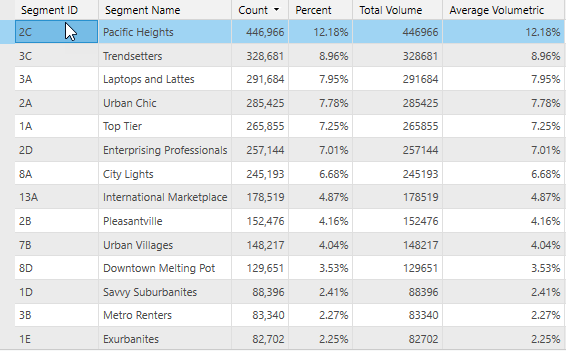
Tip:
Remove any additional fields that exist in the input table before importing it.
The
Segment IDandCountfields are required in the input table.The
Segment IDfield values in the input table must exist in the active Business Analyst dataset.The input table must be in a tabular format supported by ArcGIS Pro. Supported formats include the following:
Geodatabase
Database
Feature layer attribute table
dBASE
Microsoft Excel
Text, ASCII, and comma-separated values files (
.csv)
If the
Segment Namefield does not exist in the input table, it will be added during the import process. The new field will be populated with values based on correlation to theSegment IDfield.If only a subset of
Segment IDvalues are included in the input table, the balance of the full distribution of segments will be added during processing. TheCountandPercentfields for these additions will be zero filled.
Parameters
| Label | Explanation | Data type |
|---|---|---|
|
Input Table |
The input table with segmentation information. |
Table View |
|
Segmentation Base |
The segmentation base for the profile being created. Available options are provided by the segmentation dataset in use. |
String |
|
Output Profile |
The name of the segmentation file that will be created. |
File |
|
Segment ID Field |
A string field that contains the segmentation code. |
Field |
|
Count Field |
A numeric field that contains segment count information. |
Field |
|
Total Volume Field (Optional) |
A numeric field that contains volume information. |
Field |
Environments
Current Workspace, Data Source, Display Segment Names
Licensing information
- Basic: Requires Business Analyst
- Standard: Requires Business Analyst
- Advanced: Requires Business Analyst