Remove Overlap (Business Analyst Tools)
Summary
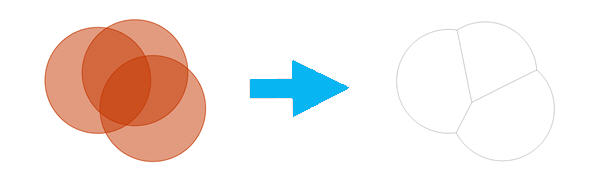
Removes overlap between two or more areas to form adjacent boundaries.
Illustration
Usage
The Output Feature Class parameter contains the input polygons with overlap removed.
If no overlap exists between the input polygons, the output feature class will be a copy of the input.
You can assign a numeric attribute from the Input Features parameter with the Weight Field parameter to influence the location of the boundary being created. The polygon with the higher value will contain more of the overlapping area when the border is defined.
Overlapping trade areas containing multiple rings of equal values can present challenges to preserve boundaries. The Define Trade Areas parameter allows you to assign a ring ID field that identifies which parts of overlapping trade areas will be dissolved together. For example, if your input features are trade areas consisting of 1-,3-, and 5-mile rings around stores, boundaries will be created for three separate areas: a boundary for 1-mile rings, a boundary for 3-mile rings, and a boundary for 5-mile rings.
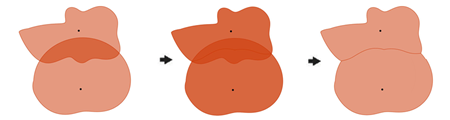
The Center Line option in the Method parameter creates a border that evenly distributes the area of overlap between polygons. For example, if two polygons overlapped, this method would draw a straight line from each intersection and split the two areas in half. Center Line is the simplest method compared to the more complex Grid and Thiessen options.
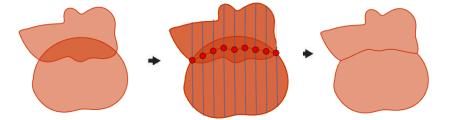
The Grid option in the Method parameter removes overlap by creating a grid of parallel lines used to find a natural division between two polygons.
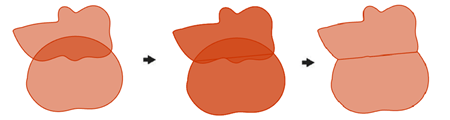
The Thiessen option in the Method parameter removes overlap between two or more trade areas using straight lines to divide the area of overlap. This method uses a series of geometric functions to create nonoverlapping trade areas.
Parameters
| Label | Explanation | Data type |
|---|---|---|
|
Input Features |
The input features containing the overlapping polygons. |
Feature Layer |
|
Output Feature Class |
The feature class containing the new trade area features. |
Feature Class |
|
Method (Optional) |
Specifies how the overlap between trade areas will be removed.
|
String |
|
Define Trade Areas (Optional) |
Specifies whether ring overlap in a trade area will be removed.
|
Boolean |
|
Ring ID Field (Optional) |
A field from the input that defines common trade areas. Overlap between polygons will only be removed if their values in this field are equal. |
Field |
|
Weight Field (Optional) |
A field from the input used to influence removal of overlap based on its values. |
Field |
|
Input Feature Store ID Field (Optional) |
A unique ID field in the stores feature layer. |
Field |
|
Stores (Optional) |
The input features containing the center points for the overlapping trade areas. |
Feature Layer |
|
Associated Store ID Field (Optional) |
A unique ID field representing a store or facility location. |
Field |
Environments
Licensing information
- Basic: Requires Business Analyst
- Standard: Requires Business Analyst
- Advanced: Requires Business Analyst