Modifies the cap type for stroke symbol layers in the line symbols of the input layer.
Illustration
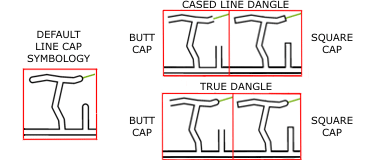
Square or butt caps are applied to dead-end streets, showing options where the cased-line streets connect to a green single-line street.
Usage
Stroke symbol layers symbolizing the Input Features parameter value must have the Cap Type property connected to an attribute field with no expression applied. The values in this field are updated by this tool.
Line symbols that are relatively wide and drawn with multiple stroke symbol layers to display a cased road effect are often joined at their endpoints with round line caps to prevent symbol gaps appearing at sharp angles between features. However, a round end cap is generally not a desirable cartographic appearance for a dead-end street (dangling line features that are not connected at their endpoint to another feature.) The line cap style is typically overridden to a butt or square style in these situations. This tool detects dangles and overrides the cap type of the stroke symbol layer.
You cannot modify only a single end cap of a line feature. For any line feature with a dead end, the tool modifies both end caps, regardless of how the line connects to other lines. To ensure the update of the correct end caps, split the line features at all true intersections.
The input feature layer containing line symbols. Stroke symbol layers must have the Cap Type property connected to a single attribute field with no expression applied. The values in this field are updated by this tool.
Layer
Cap Type
(Optional)
Specifies how the ends of stroke symbol layers will be drawn. The default cap type of strokes is round; the symbol is terminated with a semicircle of radius equal to stroke width centered at the line endpoint.
Butt cap type—The stroke symbol will end exactly where the line geometry ends. This is the default.
Square cap type—The stroke symbol will end with closed, square caps that extend past the endpoint of the line by half the symbol width.
String
Dangle Option
(Optional)
Specifies how line caps will be calculated for adjoining line features that share an endpoint but are drawn with different symbology.
Cased line dangle—The cap style will be modified for dangling lines (those not connected at their endpoints to another line), as well as for lines where a cased-line symbol is joined at the endpoint of a single-stroke layer line symbol. This is the default.
True dangle—The cap style will be modified only for endpoints that are not connected to another feature.
The input feature layer containing line symbols. Stroke symbol layers must have the Cap Type property connected to a single attribute field with no expression applied. The values in this field are updated by this tool.
Layer
cap_type
(Optional)
Specifies how the ends of stroke symbol layers will be drawn. The default cap type of strokes is round; the symbol is terminated with a semicircle of radius equal to stroke width centered at the line endpoint.
BUTT—The stroke symbol will end exactly where the line geometry ends. This is the default.
SQUARE—The stroke symbol will end with closed, square caps that extend past the endpoint of the line by half the symbol width.
String
dangle_option
(Optional)
Specifies how line caps will be calculated for adjoining line features that share an endpoint but are drawn with different symbology.
CASED_LINE_DANGLE—The cap style will be modified for dangling lines (those not connected at their endpoints to another line), as well as for lines where a cased-line symbol is joined at the endpoint of a single-stroke layer line symbol. This is the default.
TRUE_DANGLE—The cap style will be modified only for endpoints that are not connected to another feature.
String
Derived output
Name
Explanation
Data type
out_representations
The updated input line feature layer.
Layer
Code sample
CalculateLineCaps example 1 (Python window)
The following Python window script demonstrates how to use the CalculateLineCaps function in immediate mode.
This stand-alone script shows an example of using the CalculateLineCaps function.
# Name: CalculateLineCaps_standalone_script.py
# Description: Calculates the cap type for stroke symbol layers in the line
#              symbols of the input layer

# Import system modules
import arcpy

# Set environment settings
arcpy.env.workspace = "C:/data"

# Set local variables
in_features = "roads.lyrx"
cap_type = "BUTT"
dangle_option = "CASED_LINE_DANGLE"

# Run Calculate Line Caps
arcpy.cartography.CalculateLineCaps(in_features, cap_type, dangle_option)
Environments
This tool does not use any geoprocessing environments.