Calculates the dominant angles of input polygon features and assigns the values to a field to use to orient symbology such as markers or hatch lines within the polygons.
Illustration
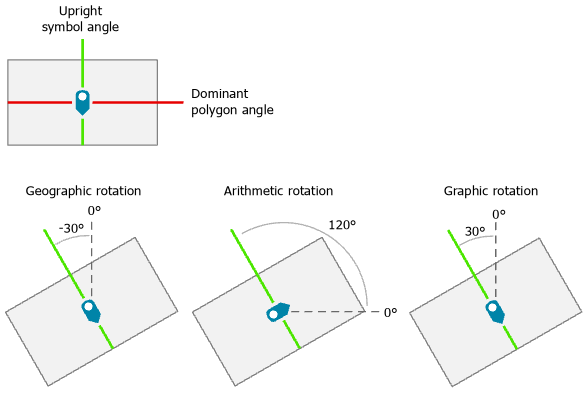
The dominant polygon angle as applied to interior symbology is demonstrated for the three rotation methods.
Usage
The dominant angle of a polygon is the angle of the longest collection of segments that have similar orientation. For the purpose of symbol rotation, polygons are considered to be oriented upright when the dominant angle is horizontal. The angle perpendicular to the dominant polygon angle is recorded because this results in the expected orientation when using the value for symbol rotation.
The angle perpendicular to the dominant angle of the polygon will be stored in the specified field in decimal degrees from the origin point of the rotation method.
This tool is primarily for orthogonal polygons rather than polygons that are organically shaped.
CalculatePolygonMainAngle example 2 (stand-alone script)
This stand-alone script shows an example of using the CalculatePolygonMainAngle function.
# Name: CalculatePolygonMainAngle_standalone_script.py
# Description: Calculates the dominant angles of input polygon features and
#              assigns the values to a specified field in the feature class

# Import system modules
import arcpy

# Set environment settings
arcpy.env.workspace = "C:/data"

# Set local variables
in_features = "cartography.gdb/buildings_area"
angle_field = "poly_angle"
rotation_method = "ARITHMETIC"

# Run Calculate Polygon Main Angle
arcpy.cartography.CalculatePolygonMainAngle(in_features, angle_field,
                                            rotation_method)