Convert Control Points To Vertices (Cartography Tools)
Summary
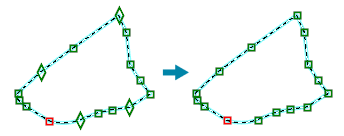
Converts control points in a line or polygon feature layer to vertices.
Illustration
Usage
Caution:
This tool modifies the input data. See Tools that modify or update the input data for more information and strategies to avoid undesired data changes.
Control points are vertices that are used to control the appearance of certain symbol effects such as dashed lines. Use this tool to remove control points from all input features.
Vertices will not be removed.
Control points are not supported on shapefiles.
Parameters
| Label | Explanation | Data type |
|---|---|---|
|
Input Features |
The line or polygon input features containing control point geometry that will be converted to vertices. |
Feature Layer |
Derived output
| Label | Explanation | Data type |
|---|---|---|
|
Updated Features |
The updated input features. |
Feature Layer |
Environments
This tool does not use any geoprocessing environments.
Licensing information
- Basic: No
- Standard: No
- Advanced: Yes