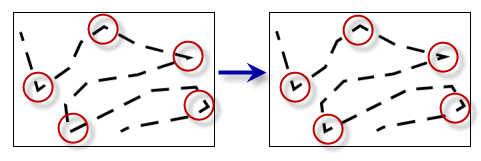
Places a control point at vertices along a line or polygon outline where the angle created by a change in line direction is less than or equal to a specified maximum angle.
Illustration
Dash placement can be improved along a line or polygon outline when control points are placed at prominent angles.
The feature layer containing line or polygon features.
Feature Layer
Maximum Angle (decimal degrees)
The angle used to determine whether a vertex along a line or polygon outline will be set as a control point. The angle value must be greater than zero and less than 180 decimal degrees.
The feature layer containing line or polygon features.
Feature Layer
maximum_angle
The angle used to determine whether a vertex along a line or polygon outline will be set as a control point. The angle value must be greater than zero and less than 180 decimal degrees.
Double
Derived output
Name
Explanation
Data type
out_representations
The updated input features.
Feature Layer
Code sample
SetControlPointByAngle example 1 (Python window)
The following Python window script demonstrates how to use the SetControlPointByAngle function in immediate mode.
SetControlPointByAngle example 2 (stand-alone script)
This stand-alone script shows an example of using the SetControlPointByAngle function.
# Name: SetControlPointByAngle_standalone_script.py
# Description: Places a control point at vertices along a line or polygon
#              outline where the angle created by a change in line direction is
#              less than or equal to a specified maximum angle

# Import system modules
import arcpy

# Set environment settings
arcpy.env.workspace = "C:/data"

# Set local variables
in_layer = "trails.lyrx"
minimum_angle_deviation = "135"

# Run Set Representation Control Point At Intersect
arcpy.cartography.SetControlPointByAngle(in_layer, minimum_angle_deviation)