Extract Scanned Lines (Conversion Tools)
Summary
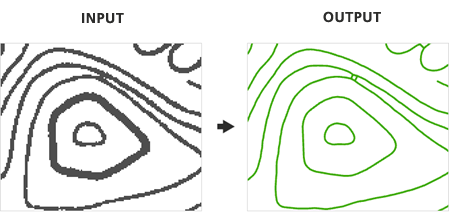
Generates polyline features from scanned images.
Illustration
Usage
The raster must be classified into two classes (binary image) in order to extract features.
Results may be determined by the state of the scanned map at the time of the extraction. To eliminate noise and unwanted pixels it is sometimes necessary to modify the image prior to the extraction of features.
The parameters control which cells are extracted as well as the amount of generalization and smoothing that is applied to the output polyline features.
Generating output polygon features is optional.
Parameters
| Label | Explanation | Data type |
|---|---|---|
|
Input Scanned Map Image |
The input raster dataset. The raster must be classified into two classes (binary image). |
Raster Layer |
|
Foreground Value |
The foreground value that represents the raster cells that will be extracted to line features. |
Long |
|
Output Centerline Features |
The output converted polylines. |
Feature Class |
|
Intersection Solution |
Specifies how polyline features will be created at raster intersections. Raster intersections are locations where three or more raster lines meet.
|
String |
|
Maximum Line Width (Optional) |
A filter that enables you to omit larger, thicker lines and focus on extracting only the thinner lines in the raster. This parameter also influences the construction of the output features, making it important to use the most accurate value for your data. Raster lines with a width at or below the maximum line width will be eligible for centerline extraction, while wider elements will be extracted as polygon features (if the Output Polygon Features parameter is specified). |
Double |
|
Noise Level (Optional) |
The level of noise that will be omitted from the extraction to help improve results. |
Double |
|
Compression Tolerance (Optional) |
Simplifies lines by removing vertices based on the specified tolerance. Higher compression tolerance values will result in fewer vertices and greater deviation from the original line shape. The compression tolerance indicates the degree of generalization, not map or pixel units. |
Double |
|
Apply Smoothing (Optional) |
Specifies whether smoothing will be applied to polyline features during extraction.
|
Boolean |
|
Smoothing Weight (Optional) |
The intensity of smoothing. Higher smoothing weight values produce smoother lines but may cause the output to deviate from the original shape. The smoothing weight value is not a specific map or pixel unit. |
Double |
|
Resolve Corners (Optional) |
Specifies whether corners will be sharpened or smoothed at locations where raster lines intersect. When extracting natural features (such as contours, soil boundaries, or streams), the resolution of corners may not be as important as other types of map images that represent the built environment.
|
Boolean |
|
Maximum Corner Angle (Optional) |
The maximum angle of intersecting raster lines that will be considered a corner. |
Double |
|
Hole Size (Optional) |
If a hole's diagonal length is less than or equal to the specified distance, it will be treated as part of the raster line when extracted. This parameter allows you to ignore holes (small gaps fully enclosed by foreground pixels) in raster lines during extraction. Holes often result from poor source quality or scanning errors. |
Long |
|
Close Gaps (Optional) |
Specifies whether the tool handles breaks in a raster line and closes gaps that are less than or equal to the specified tolerance resulting in a continuous polyline. Gaps will not be closed at locations where raster lines intersect.
|
Boolean |
|
Gap Tolerance (Optional) |
The distance, measured in pixels, that will be used to determine whether gaps between raster lines should be closed during extraction. |
Double |
|
Gap Search Angle (Optional) |
The angle that will be used to search for gaps in raster lines to enhance extraction results. This parameter is helpful when extracting curved raster lines that contain interruptions, ensuring a more accurate and continuous output polyline. |
Double |
|
Output Polygon Features (Optional) |
The output feature class that will contain the converted polygons that represent the outline of the raster cells. |
Feature Class |
Environments
Current Workspace, Extent, Output Coordinate System, Geographic Transformations, Output CONFIG Keyword, Output XY Domain, Output Z Domain
Licensing information
- Basic: No
- Standard: No
- Advanced: Yes