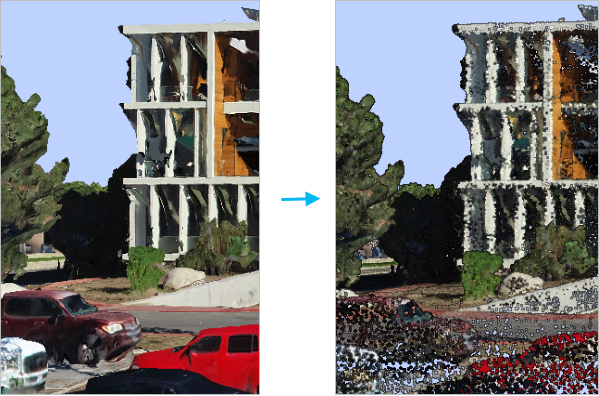
Converts an integrated mesh into a LAS format point cloud.
Illustration
Usage
An integrated mesh is a data model that captures an entire scene using 3D mesh geometry. It can represent an entire city, a neighborhood within a city, or enclosed spaces such as building interiors, tunnels, and caves. The integrated mesh is typically created from overlapping imagery that was captured by cameras mounted on airplanes, drones, terrestrial vehicles, or hand-held devices. These images are processed using photogrammetric techniques to create a robust 3D scene. All objects captured in the photos, such as the ground, buildings, trees, and street furniture, are combined into one undifferentiated dataset. Converting this mesh into a point cloud provides an opportunity for using point cloud capabilities to classify and extract the objects from the mesh.
To process integrated mesh data stored in the open scene graph binary file format (OSGB), convert the data to an integrated mesh scene layer using the Create Integrated Mesh Scene Layer Content tool.
The integrated mesh consists of a collection of triangles with textures. The point cloud is created by either using the triangle vertices as points or sampling points from the face of the triangles. Each point will have an RGB color derived from the texture using bilinear interpolation.
When creating the points by sampling them from the mesh surface, each triangle in the mesh is potentially subdivided into smaller triangles of equal area. The Maximum Triangle Area parameter value controls how large these subdivided triangles can be. A mesh triangle that is smaller than the maximum size limit of the subdivided triangles will not be partitioned. The output point density will be larger as the maximum triangle area size limit gets smaller and vice versa. If no Maximum Triangle Area value is specified, one point will be sampled from the face of each triangle.
The integrated mesh scene layer package or I3S service that will be exported to the LAS format point cloud.
Scene Layer; File
Target Folder
The folder where the output LAS format files that will be created from the integrated mesh will be stored.
Folder
Method
(Optional)
Specifies the method that will be used to create the point cloud from the integrated mesh.
Sample Points From Faces—Points will be sampled from the integrated mesh triangle faces. Triangles may potentially be subdivided based on the Maximum Triangle Area parameter value. The centroid of each triangle or subdivided triangle will be converted to points. This is the default.
Use Triangle Vertices—Points will be created from the vertices of the integrated mesh.
String
Maximum Triangle Area
(Optional)
Controls the density of points created from the integrated mesh by defining the maximum area of each triangle that contributes points. Any mesh triangle that is larger than this value will be subdivided. If no value is provided, one point will be sampled from the face of each triangle.
This parameter is only used when the Method parameter is set to Sample Points From Faces
Areal Unit
Processing Extent
(Optional)
The extent of the integrated mesh that will be exported to the point cloud. If the processing extent is specified with an extraction boundary polygon, both the intersection of the extent and the boundary will be exported.
Current Display Extent—The extent will be based on the active map or scene.
Draw Extent—The extent will be based on a rectangle drawn on the map or scene.
Extent of a Layer—The extent will be based on an active map layer. Choose an available layer or use the Extent of data in all layers option. Each map layer has the following options:
All Features—The extent of all features.
Selected Features—The extent of the selected features.
Visible Features—The extent of visible features.
Browse—The extent will be based on a dataset.
Clipboard—The extent can be copied to and from the clipboard.
Copy Extent—Copies the extent and coordinate system to the clipboard.
Paste Extent—Pastes the extent and coordinate system from the clipboard. If the clipboard does not include a coordinate system, the extent will use the map's coordinate system.
Reset Extent—The extent will be reset to the default value.
When coordinates are manually provided, the coordinates must be numeric values and in the active map's coordinate system. The map may use different display units than the provided coordinates. Use a negative value sign for south and west coordinates.
Extent
Extraction Boundary
(Optional)
The polygon features defining the area that will be clipped.
Feature Layer
Rearrange LAS Points
(Optional)
Specifies whether points in the .las or .zlas files will be rearranged to optimize the performance of reading and updating the classification of the point cloud.
Checked—The order of points will be rearranged into spatial clusters that optimize reading the data. Rearranged points can improve the performance of subsequent operations that are performed on the point cloud. This is the default.
Unchecked—The order of points will not be rearranged .
Boolean
Compute statistics
(Optional)
Specifies whether statistics will be computed for the .las files referenced by the LAS dataset. Computing statistics provides a spatial index for each .las file, which improves analysis and display performance. Statistics also enhance the filtering and symbology experience by limiting the display of LAS attributes, such as classification codes and return information, to values that are present in the .las file.
Checked—Statistics will be computed. This is the default.
Unchecked—Statistics will not be computed.
Boolean
Output LAS Dataset
(Optional)
The output LAS dataset that will reference the LAS format files created by the conversion process.
LAS Dataset
Compression
(Optional)
Specifies whether the output .las file will be in a compressed format or the standard LAS format.
No Compression—The output will be in the standard LAS format (*.las file). This is the default.
zLAS Compression—Output .las files will be compressed in the zLAS format.
String
Derived output
Label
Explanation
Data type
Output Folder
The output folder where the LAS format files created from the integrated mesh will be stored.
The integrated mesh scene layer package or I3S service that will be exported to the LAS format point cloud.
Scene Layer; File
target_folder
The folder where the output LAS format files that will be created from the integrated mesh will be stored.
Folder
method
(Optional)
Specifies the method that will be used to create the point cloud from the integrated mesh.
SAMPLE_POINTS_FROM_FACES—Points will be sampled from the integrated mesh triangle faces. Triangles may potentially be subdivided based on the maximum_triangle_area parameter value. The centroid of each triangle or subdivided triangle will be converted to points. This is the default.
USE_TRIANGLE_VERTICES—Points will be created from the vertices of the integrated mesh.
String
maximum_triangle_area
(Optional)
Controls the density of points created from the integrated mesh by defining the maximum area of each triangle that contributes points. Any mesh triangle that is larger than this value will be subdivided. If no value is provided, one point will be sampled from the face of each triangle.
This parameter is only used when the method parameter is set to SAMPLE_POINTS_FROM_FACES.
Areal Unit
extent
(Optional)
The extent of the integrated mesh that will be exported to the point cloud. If the processing extent is specified with an extraction boundary polygon, both the intersection of the extent and the boundary will be exported.
MAXOF—The maximum extent of all inputs will be used.
MINOF—The minimum area common to all inputs will be used.
DISPLAY—The extent is equal to the visible display.
Layer name—The extent of the specified layer will be used.
Extent object—The extent of the specified object will be used.
Space delimited string of coordinates—The extent of the specified string will be used. Coordinates are expressed in the order of x-min, y-min, x-max, y-max.
Extent
boundary
(Optional)
The polygon features defining the area that will be clipped.
Feature Layer
rearrange_points
(Optional)
Specifies whether points in the .las or .zlas files will be rearranged to optimize the performance of reading and updating the classification of the point cloud.
REARRANGE_POINTS—The order of points will be rearranged into spatial clusters that optimize reading the data. Rearranged points can improve the performance of subsequent operations that are performed on the point cloud. This is the default.
MAINTAIN_POINTS—The order of points will not be rearranged .
Boolean
compute_stats
(Optional)
Specifies whether statistics will be computed for the .las files referenced by the LAS dataset. Computing statistics provides a spatial index for each .las file, which improves analysis and display performance. Statistics also enhance the filtering and symbology experience by limiting the display of LAS attributes, such as classification codes and return information, to values that are present in the .las file.
COMPUTE_STATS—Statistics will be computed. This is the default.
NO_COMPUTE_STATS—Statistics will not be computed.
Boolean
out_las_dataset
(Optional)
The output LAS dataset that will reference the LAS format files created by the conversion process.
LAS Dataset
compression
(Optional)
Specifies whether the output .las file will be in a compressed format or the standard LAS format.
NO_COMPRESSION—The output will be in the standard LAS format (*.las file). This is the default.
ZLAS—Output .las files will be compressed in the zLAS format.
String
Derived output
Name
Explanation
Data type
out_folder
The output folder where the LAS format files created from the integrated mesh will be stored.
Folder
Code sample
MeshToLas example (Python window)
The following sample demonstrates the use of this tool in the Python window:
 —The extent will be based on the active map or scene.
 —The extent will be based on a rectangle drawn on the map or scene.
 —The extent will be based on an active map layer. Choose an available layer or use the Extent of data in all layers option. Each map layer has the following options:
 —The extent of all features.
 —The extent of the selected features.
 —The extent of visible features.
 —The extent will be based on a dataset.
 —The extent can be copied to and from the clipboard.
 —Copies the extent and coordinate system to the clipboard.
 —The extent will be reset to the default value.