Generate Rectangles Along Lines (Data Management Tools)
Summary
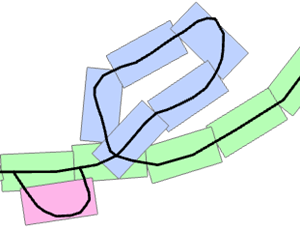
Creates a series of rectangular polygons that follow a single linear feature or a group of linear features.
Illustration
Usage
The output has the following fields:
ID—An incremental number assigned to each feature.GroupId—An integer assigned to all the features in a connecting chain or group of line features. The tool results can include multiple groups. Typically, a single group will originate from a connected set of line features or from a single line with multiple, unconnected parts. Features created from individual, unconnected line features will be assigned to separate groups.GroupIdvalues are unique and are derived from the object ID of the first line feature in the given chain.SeqId—An incremental number assigned to each feature based on the creation order for the feature in each group.Previous—A reference to the previousSeqIdvalue in each group except for the first record in each group. The first record could reference a neighboring element outside the group.Next—A reference to the nextSeqIdvalue in each group except for the last record in each group. The last record could reference a neighboring element outside the group.Angle—Values are calculated using the default orientation of a map in which 0 degrees is due north, 90 degrees is due east, 180 degrees is due south, and -90 degrees is due west.
The default units for the Length Along the Line and Length Perpendicular to the Line parameters will automatically change to the units of the spatial reference of the input line features.
Parameters
| Label | Explanation | Data type |
|---|---|---|
|
Input Line Features |
The input polyline features defining the path of the features. |
Feature Layer |
|
Output Feature Class |
The output polygon feature class. |
Feature Class |
|
Length Along the Line (Optional) |
The length of the output polygon features along the input line features. The default value is determined by the spatial reference of the input line features. This value will be 1/100 of the input feature class extent along the x-axis. |
Linear Unit |
|
Length Perpendicular to the Line (Optional) |
The length of the output polygon features perpendicular to the input line features. The default value is determined by the spatial reference of the input line features. This value will be one-half the number used for the length along the line. |
Linear Unit |
|
Spatial Sort Method (Optional) |
Specifies the starting point of the sequential order that will be used in the creation of the output features. Setting the direction type to upper right will start the output features in the upper right of each input feature.
|
String |
Environments
Licensing information
- Basic: Yes
- Standard: Yes
- Advanced: Yes