Get Count (Data Management Tools)
Summary
Returns the total number of rows for a table.
Usage
If the input is a layer or table view containing a selected set of records, only the selected records will be counted.
This tool honors the Extent environment. Only those features that are within or intersect the Extent environment setting will be counted.
You can view the returned row count in Geoprocessing history.
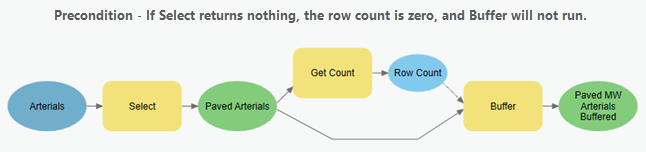
In ModelBuilder, this tool can be used to set up a precondition, as illustrated below. In this model, the Get Count tool counts the number of records returned by the Select tool. If the count is zero, the Buffer tool will not run due to the precondition.
Parameters
| Label | Explanation | Data type |
|---|---|---|
|
Input Rows |
The input table view or raster layer. If a selection is defined on the input, the count of the selected rows will be returned. |
Table View; Raster Layer |
Derived output
| Label | Explanation | Data type |
|---|---|---|
|
Row Count |
The total number of rows for the input. |
Long |
Environments
Licensing information
- Basic: Yes
- Standard: Yes
- Advanced: Yes