Package Locator (Data Management Tools)
Summary
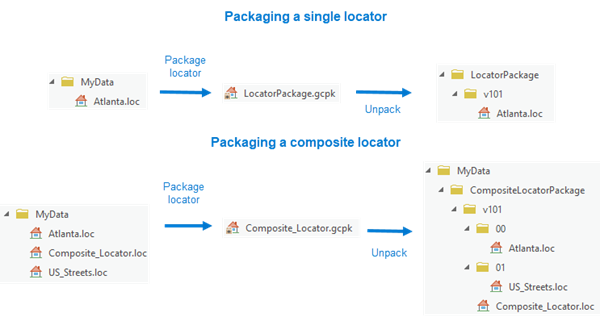
Packages a locator or composite locator and creates a single compressed .gcpk file.
Learn more about sharing an address locator as a locator package
Illustration
Usage
To create a package for a composite locator, ensure that the participating locators are stored in the file folder.
A warning is issued when this tool encounters an invalid locator. The invalid locator will not be packaged.
The locator package file (
.gcpk) can be shared with other users.Learn more about sharing an address locator as a locator package.
You can use the Extract Package tool and specify an output folder to unpack a locator package. You can also specify a folder in which to unpack packages in the Share and download options.
Each locator will be copied to a unique folder created in the consolidated folder.
Parameters
| Label | Explanation | Data type |
|---|---|---|
|
Input Locator |
The locator or composite locator that will be packaged. |
Address Locator |
|
Output File |
The name and location of the output locator package ( |
File |
|
Composite locator only: copy participating locators in enterprise database instead of referencing them (Optional) |
This parameter has no effect in ArcGIS Pro. It remains only to support backward compatibility. |
Boolean |
|
Additional Files (Optional) |
The additional files that will be included in the package. |
File |
|
Summary (Optional) |
The text that will be used as the output package's summary property. |
String |
|
Tags (Optional) |
The tag information that will be added to the properties of the package. Multiple tags can be added, separated by a comma or semicolon. |
String |
Environments
Licensing information
- Basic: Yes
- Standard: Yes
- Advanced: Yes