Resamples the bands of a spectral library to match the bands of a target spectral library or image, producing a new spectral library file. The target spectral library or image can be predefined from a list of common sensors, or it can be based on a custom image or spectra.
Usage
The Output Library Spectra parameter value will be a spectra with the same number of bands and wavelength range as the Target sensor parameter value.
The operation is performed on bands with overlapping wavelengths. If the input has a greater range than the target, the excess bands will be discarded. If the target has a greater range than the input, the bands outside of the input range will not be included and will be designated with a negative value that can be defined as NoData.
For the Resampling Method parameter's Band averaging option, an input band will be included in the calculation based on whether its center wavelength falls within the target band's minimum and maximum wavelength range.
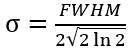
For the Resampling Method parameter's Gaussian convolution option, whether an input band will be included in the calculation is based on whether its center wavelength falls within the target's center wavelength ± 3σ as follows:
Specifies the resampling method that will be used for the Output Library Spectra parameter value.
Band averaging—A simple average of the input spectra based on all band values that fall within each target band's wavelength range will be used. This is the default.
Gaussian convolution—A Gaussian model will be used to represent the spectral response function of the sensor, and the input band values will be weighted for each wavelength range.
Specifies the resampling method that will be used for the out_library_spectra parameter value.
BAND_AVERAGING—A simple average of the input spectra based on all band values that fall within each target band's wavelength range will be used. This is the default.
GAUSSIAN_CONVOLUTION—A Gaussian model will be used to represent the spectral response function of the sensor, and the input band values will be weighted for each wavelength range.
String
Code sample
ResampleLibrarySpectra example 1 (Python window)
This example uses the LANDSAT-8 option for the target_spectra parameter.
# Import system modules
import arcpy
from arcpy.management import *

# Run ResampleLibrarySpectra
arcpy.management.ResampleLibrarySpectra(r"c:\library\aspen.esl", r"C:\library\aspen_resampled.esl", "LANDSAT-8", "BAND_AVERAGING")
ResampleLibrarySpectra example 2 (stand-alone script)
This example uses the CUSTOM_TARGET_IMAGE_OR_SPECTRA option for the target_spectra parameter.