Transpose Fields (Data Management Tools)
Summary
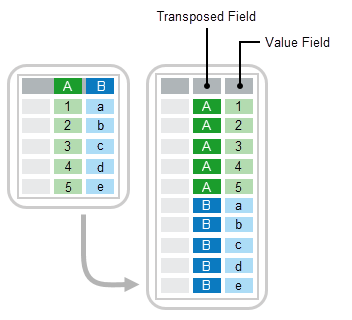
Switches data stored in fields or columns to rows in a new table or feature class.
This tool is useful when a table or feature class stores values in field names (such as Field1, Field2, Field3) that you want to rotate so they're arranged in rows. It lets you switch the field names and the corresponding data values in the fields to rows.
Illustration
Usage
By default, the output is a table. When the input is a feature class and the output should be a feature class, add the
Shapefield to the Attribute Fields parameter.The output Transposed Field and Value Field field types will be text.
Parameters
| Label | Explanation | Data type |
|---|---|---|
|
Input Table |
The input feature class or table containing data value fields that will be transposed. |
Table View |
|
Fields To Transpose |
The fields containing data values in the input table that will be transposed. Depending on your requirements, you can select multiple fields to be transposed. The value specified here defines what the field name will be in the output. When no value is specified, the field name will be used. For example, if the field names to be transposed are Value table columns:
|
Value Table |
|
Output Table |
The output feature class or table. The output will contain a transposed field, a value field, and any number of specified attribute fields that need to be inherited from the input table. By default, the value is a table. The output will be a feature class when the Input Table parameter value is a feature class and the |
Table |
|
Transposed Field |
The name of the field that will be created to store field names of the transposed fields. Any valid field name can be used. |
String |
|
Value Field |
The name of the field that will be created to store the corresponding values of the transposed fields. Any valid field name can be used, as long as it does not conflict with existing field names from the input table or feature class. |
String |
|
Attribute Fields (Optional) |
The additional attribute fields from the input table that will be included in the output table. To output a feature class, include the |
Field |
Environments
Licensing information
- Basic: Yes
- Standard: Yes
- Advanced: Yes