Erase Point (Editing Tools)
Summary
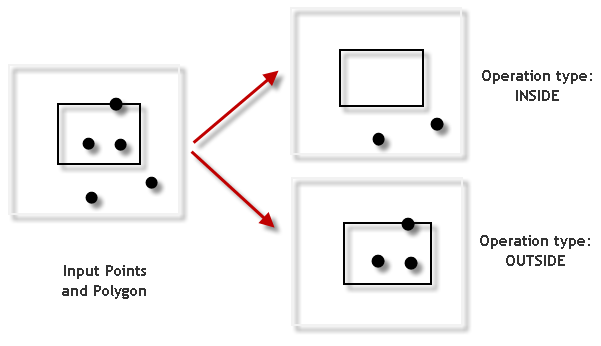
Deletes points from the input that are either inside or outside the remove features, depending on the operation type.
Illustration
Usage
Caution:
This tool modifies the input data. See Tools that modify or update the input data for more information and strategies to avoid undesired data changes.
To delete points inside or on the boundary of the Remove Features parameter value, use the Operation Type parameter's Inside option. To delete points outside the Remove Features parameter value, use the Operation Type parameter's Outside option.
When the Input Features parameter consists of multipoint features, only points inside or outside the Remove Features parameter value will be deleted, depending on the Operation Type option.
Parameters
| Label | Explanation | Data type |
|---|---|---|
|
Input Features |
The input point features. |
Feature Layer |
|
Remove Features |
The polygon features that will be used to determine which features from the Input Features value will be deleted. |
Feature Layer |
|
Operation Type (Optional) |
Specifies whether points inside or outside the remove features will be deleted.
|
String |
Derived output
| Label | Explanation | Data type |
|---|---|---|
|
Updated Input Features |
The updated input features. |
Feature Class |
Environments
Licensing information
- Basic: No
- Standard: Yes
- Advanced: Yes