Calculate Density (Standard Feature Analysis Tools)
Summary
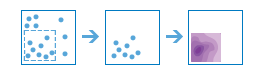
Creates a density map from point or line features by spreading known quantities of a phenomenon (represented as attributes of the points or lines) across the map. The result is a layer of areas classified from least dense to most dense.
Illustration
Usage
For point input, each point should represent the location of an event or incident, and the result layer will represent a count of the incident per unit area. A higher density value in a new location means that there are more points near that location. In many cases, the result layer can be interpreted as a risk surface for future events. For example, if the input points represent locations of lightning strikes, the result layer can be interpreted as a risk surface for future lightning strikes.
For line input, the line density surface represents the total amount of line that is near each location. The units of the calculated density values are the length of line per unit area. For example, if the lines represent rivers, the result layer will represent the total length of rivers that are within the search radius. This result can be used to identify areas that are hospitable to grazing animals.
Other use cases of this tool include the following:
Create crime density maps to help police departments properly allocate resources to high crime areas.
Calculate densities of hospitals within a county. The result layer will show areas with high and low accessibility to hospitals, and this information can be used to decide where new hospitals should be built.
Identify areas that are at high risk of forest fires based on historical locations of forest fires.
Locate communities that are far from major highways to plan where new roads should be constructed.
Parameters
| Label | Explanation | Data type |
|---|---|---|
|
Input Features |
The point or line features that will be used to calculate density. |
Feature Set |
|
Output Name |
The name of the output layer that will be created on your portal. |
String |
|
Count Field (Optional) |
A field specifying the number of incidents at each location. For example, if you have points that represent cities, you can use a field representing the population of the city as the count field, and the resulting population density layer will calculate larger population densities near cities with larger populations. If no value is provided, each location will be assumed to represent a single count. |
Field |
|
Cell Size (Optional) |
The cell size that will be used to create a mesh of points where density values are calculated. The smaller the value, the smoother the polygon boundaries will be. Conversely, with larger values, the polygon boundaries will be more coarse and jagged. |
Double |
|
Cell Size Units (Optional) |
Specifies the units that will be used for the cell size value. A value is required if the cell size has been set.
|
String |
|
Radius (Optional) |
The distance that will be searched to find point or line features when calculating density values. For example, if you provide a radius of 1,800 meters, the density of any location in the output layer is calculated based on features that are within 1,800 meters of the location. Any location that does not have any incidents within 1,800 meters will receive a density value of zero. If no value is provided, a default will be calculated based on the locations of the input features and the values in the count field (if a count field is provided). |
Double |
|
Radius Units (Optional) |
Specifies the units that will be used for the radius value. A value is required if the radius has been set.
|
String |
|
Bounding Polygons (Optional) |
The layer containing the polygons where densities will be calculated. For example, if you are interpolating densities of fish in a lake, you can use the boundary of the lake in this parameter, and the output will only draw within the boundary of the lake. |
Feature Set |
|
Area Units (Optional) |
Specifies the units that will be used for the calculated density values.
|
String |
|
Classification Type (Optional) |
Specifies how density values will be classified into polygons.
|
String |
|
Number of Classes (Optional) |
The range of predicted values that will be divided into distinct classes. The range of values in each class is determined by the classification type. Each class defines the boundaries of the result polygons. The default is 10 and the maximum is 32. |
Long |
Derived output
| Label | Explanation | Data type |
|---|---|---|
|
Output Layer |
The output polygon layer with classified density values. |
Feature Set |
Environments
Licensing information
- Basic: Requires your account in ArcGIS Enterprise to have the Perform Analysis privilege
- Standard: Requires your account in ArcGIS Enterprise to have the Perform Analysis privilege
- Advanced: Requires your account in ArcGIS Enterprise to have the Perform Analysis privilege