Set Parcel Line Label Position (Parcel Tools)
Summary
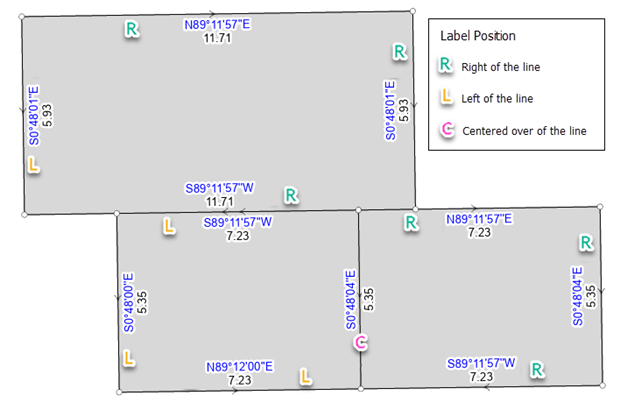
Sets the label position of the line's COGO dimension to the left of the parcel line, to the right of the parcel line, or centered over the parcel line.
The label position is set to the right of a parcel line when the parcel edge it represents is to the right, to the left of the parcel line when the parcel edge it represents is to the left, and centered over the parcel line when boundary it represents is shared between adjacent parcels.
The direction of the parcel line determines the left and right side of the parcel line.
Illustration
Usage
Caution:
This tool modifies the input data. See Tools that modify or update the input data for more information and strategies to avoid undesired data changes.
The tool updates the
Label Positionfield on the parcel line feature class to Left, Right or Centered. The parcel line label classes use theLabel Positionfield to place COGO dimension labels.The
Label Positionfield of a parcel line is updated regardless of whether there are COGO dimensions in the line's COGO attribute fields.Labels are not updated for historic parcel lines.
The tool does not set label positions for parcel fabric connection lines.
Parameters
| Label | Explanation | Data type |
|---|---|---|
|
Input Parcel Features |
The input parcel line layers with label positions that will be updated. |
Feature Layer |
Derived output
| Label | Explanation | Data type |
|---|---|---|
|
Updated Parcel Features |
The updated parcel line layers. |
Feature Layer |
Environments
This tool does not use any geoprocessing environments.
Licensing information
- Basic: No
- Standard: Yes
- Advanced: Yes