Solve Vehicle Routing Problem (Ready To Use Tools)
Summary
Solves a vehicle routing problem (VRP) to find the best routes for a fleet of vehicles.
A dispatcher managing a fleet of vehicles is often required to make decisions about vehicle routing. One such decision involves how to best assign a group of customers to a fleet of vehicles and to sequence and schedule their visits. The objectives in solving such VRPs are to provide a high level of customer service by honoring any time windows while keeping the overall operating and investment costs for each route as low as possible. The constraints are to complete the routes with available resources and within the time limits imposed by driver work shifts, driving speeds, and customer commitments.
This service can be used to determine solutions for such complex fleet management tasks.
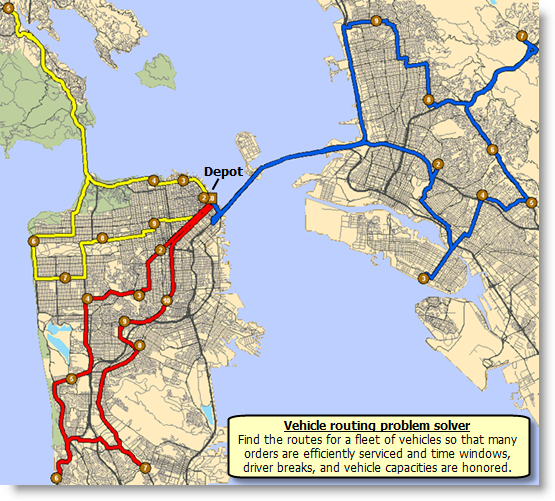
An example is delivering goods to grocery stores from a central warehouse location. A fleet of three trucks is available at the warehouse. The warehouse operates within a certain time window—from 8:00 a.m. to 5:00 p.m.—during which all trucks must return to the warehouse. Each truck has a capacity of 15,000 pounds, which limits the amount of goods it can carry. Each store has a demand for a specific amount of goods (in pounds) that needs to be delivered, and each store has time windows that confine when deliveries can be made. A driver can work only eight hours per day, requires a break for lunch, and is paid for the time spent driving and servicing the stores. The goal is to come up with an itinerary for each driver (or route) so the deliveries can be made while honoring all the service requirements and minimizing the total time spent on a particular route by a driver. The image below shows three routes obtained by solving this vehicle routing problem example.
Legacy:
This is a deprecated tool. See the support article to learn more about how to carry out Network Analysis workflows from the Network Analysis gallery.
Illustration
Usage
The Solve Vehicle Routing Problem service generate routes for fleets of vehicles that need to visit many orders for deliveries, pickups, or service calls. The service runs in asynchronous mode and is suited for larger problems that take longer to solve.
Tools in the Ready To Use toolbox areArcGIS Online geoprocessing services that use hosted data and analysis capabilities in ArcGIS Online.
You can include up to 2,000 orders and 100 routes. Also, a maximum of 200 orders can be assigned to one route.
You can add up to 250 point barriers. You can add any number of line or polygon barriers, but line barriers cannot intersect more than 500 street features, and polygon barriers cannot intersect more than 2,000 features.
Regardless of whether the Use Herarchy parameter is checked (True), hierarchy is always used when the straight-line distance between orders, depots, or orders and depots is greater than 50 miles (80.46 kilometers).
The straight-line distance between any orders or depots cannot be greater than 27 miles (43.45 kilometers) when Travel Mode is set to Walking or when it is set to Custom and the Walking restriction is used.
If the distance between an input point and its nearest traversable street is more than 12.42 miles (20 kilometers), the point is excluded from the analysis.
Parameters
| Label | Explanation | Data type |
|---|---|---|
|
Orders |
One or more locations that the routes of the VRP analysis will visit. An order can represent a delivery (for example, furniture delivery), a pickup (such as an airport shuttle bus picking up a passenger), or some type of service or inspection (a tree trimming job or building inspection, for example). When specifying the orders, you can set properties for each—such as its name or service time—using the following attributes:
The system-managed ID field.
The name of the order. The name must be unique. If the name is left null, a name is automatically generated at solve time.
The descriptive information about the order. This can contain any textual information for the order and has no restrictions for uniqueness. You can store a client's ID number in the
The amount of time that will be spent at the network location when the route visits it; that is, the impedance value for the network location. A zero or null value indicates that the network location requires no service time. The unit for this field value is specified by the
The beginning time of the first time window for the network location. This field can contain a null value; a null value indicates no beginning time. A time window only states when a vehicle can arrive at an order; it doesn't state when the service time must be completed. To account for service time and departure before the time window ends, subtract the The time window fields ( When solving a problem that spans multiple time zones, each order's time-window values refer to the time zone in which the order is located.
The end time of the first window for the network location. This field can contain a null value; a null value indicates no end time.
The beginning time of the second time window for the network location. This field can contain a null value; a null value indicates that there is no second time window. If the first time window is null as specified by the If both time windows are not null, they can't overlap. Also, the second time window must occur after the first.
The end time of the second time window for the network location. This field can contain a null value. When When
A time window is considered violated if the arrival time occurs after the time window has ended. This field specifies the maximum allowable violation time for the first time window of the order. It can contain a zero value but can't contain negative values. A zero value indicates that a time window violation at the first time window of the order is unacceptable; that is, the first time window is hard. Conversely, a null value indicates that there is no limit on the allowable violation time. A nonzero value specifies the maximum amount of lateness; for example, a route can arrive at an order up to 30 minutes beyond the end of its first time window. The unit for this field value is specified by the Time Field Units parameter Time window violations can be tracked and weighted by the solver. Consequently, you can direct the VRP solver to do one of the following:
By assigning an importance level for the Time Window Violation Importance parameter, you are essentially choosing one of these options. In any case, however, the solver will return an error if the value set for
The maximum allowable violation time for the second time window of the order. This field is analogous to the
Defines when the item to be delivered to the order will be ready at the starting depot. The order can be assigned to a route only if the inbound arrive time precedes the route's latest start time value; this way, the route cannot leave the depot before the item is ready to be loaded onto it. This field can help model scenarios involving inbound-wave transshipments. For example, a job at an order requires special materials that are not currently available at the depot. The materials are being shipped from another location and will arrive at the depot at 11:00 a.m. To ensure a route that leaves before the shipment arrives isn't assigned to the order, the order's inbound arrive time is set to 11:00 a.m. The special materials arrive at 11:00 a.m., they are loaded onto the vehicle, and the vehicle departs from the depot to visit its assigned orders. Notes:
Defines when the item to be picked up at the order must arrive at the ending depot. The order can be assigned to a route only if the route can visit the order and reach its end depot before the specified outbound depart time. This field can help model scenarios involving outbound-wave transshipments. For instance, a shipping company sends out delivery trucks to pick up packages from orders and bring them into a depot where they are forwarded on to other facilities, en route to their final destination. At 3:00 p.m. every day, a semitrailer stops at the depot to pick up the high-priority packages and take them directly to a central processing station. To avoid delaying the high-priority packages until the next day's 3:00 p.m. trip, the shipping company tries to have delivery trucks pick up the high-priority packages from orders and bring them to the depot before the 3:00 p.m. deadline. This is done by setting the outbound depart time to 3:00 p.m. Notes:
The size of the delivery. You can specify size in any dimension, such as weight, volume, or quantity. You can also specify multiple dimensions, for example, weight and volume. Enter delivery quantities without indicating units. For example, if a 300-pound object needs to be delivered to an order, enter 300. You will need to remember that the value is in pounds. If you are tracking multiple dimensions, separate the numeric values with a space. For example, if you are recording the weight and volume of a delivery that weighs 2,000 pounds and has a volume of 100 cubic feet, enter 2000 100. Again, you need to remember the units—in this case, pounds and cubic feet. You also need to remember the sequence in which the values and their corresponding units are entered. Ensure that the values for An empty string or null value is equivalent to all dimensions being infinity. If the string has an insufficient number of values in relation to the capacity count or dimensions being tracked, the remaining values are treated as infinity. Delivery quantities can't be negative.
The size of the pickup. You can specify size in any dimension, such as weight, volume, or quantity. You can also specify multiple dimensions, for example, weight and volume. You cannot, however, use negative values. This field is analogous to the In the case of an exchange visit, an order can have both delivery and pickup quantities.
The income generated if the order is included in a solution. This field can contain a null value—a null value indicates zero revenue—but it can't have a negative value. Revenue is included in optimizing the objective function value but is not part of the solution's operating cost; that is, the Revenue is included in optimizing the objective function value but is not part of the solution's operating cost; that is, the
A space-separated string containing the names of the specialties required by the order. A null value indicates that the order doesn't require specialties. The spelling of any specialties listed in the Orders and Routes classes must match exactly so that the VRP solver can link them together. To illustrate what specialties are and how they work, a lawn care and tree trimming company has a portion of its orders that requires a bucket truck to trim tall trees. The company enters BucketTruck in the
Specifies the rule for assigning the order to a route. The field value is specified as one of the following integers (use the numeric code, not the name in parentheses):
This field can't contain a null value.
Specifies the direction a vehicle may arrive at and depart from the order. The field value is specified as one of the following integers (use the numeric code, not the name in parentheses):
The
The name of the route to which the order is assigned. This field is used to preassign an order to a specific route. It can contain a null value, indicating that the order is not preassigned to any route, and the solver identifies the best possible route assignment for the order. If this is set to null, the After a solve operation, if the order is routed, the
This indicates the sequence of the order on its assigned route. This field is used to specify the relative sequence of an order on the route. This field can contain a null value specifying that the order can be placed anywhere along the route. The input sequence values are positive and unique for each route (shared across renewal depot visits, orders, and breaks) but do not need to start from 1 or be contiguous. After a solve operation, the
The direction in which a point is moving. The units are degrees and are measured clockwise from true north. This field is used in conjunction with the Bearing data is usually sent automatically from a mobile device equipped with a GPS receiver. Try to include bearing data if you are loading an input location that is moving, such as a pedestrian or a vehicle. Using this field tends to prevent adding locations to the wrong edges, which can occur when a vehicle is near an intersection or an overpass, for example. Bearing also helps the tool determine on which side of the street the point is.
The bearing tolerance value creates a range of acceptable bearing values when locating moving points on an edge using the The units are in degrees, and the default value is 30. Values must be greater than 0 and less than 180. A value of 30 means that when Network Analyst attempts to add a network location on an edge, a range of acceptable bearing values is generated 15 degrees to either side of the edge (left and right) and in both digitized directions of the edge.
This field is only used in the solve process if the The units of |
Feature Set |
|
Depots |
Specifies one or more depots for the given vehicle routing problem. A depot is a location that a vehicle departs from at the beginning of its workday and returns to at the end of the workday. Vehicles are loaded (for deliveries) or unloaded (for pickups) at depots. In some cases, a depot can also act as a renewal location where the vehicle can unload or reload and continue performing deliveries and pickups. A depot has open and close times, as specified by a hard time window. Vehicles can't arrive at a depot outside of this time window. When specifying the depots, you can set properties for each—such as its name or service time—using the following attributes:
The system-managed ID field.
The name of the depot. The Depot names are not case sensitive but must be unique and not empty.
The descriptive information about the depot location. This can contain any textual information and has no restrictions for uniqueness. For example, to note the region a depot is in or the depot's address and telephone number, you can enter the information here rather than in the
The beginning time of the first time window for the network location. This field can contain a null value; a null value indicates no beginning time. The time window fields ( When solving a problem that spans multiple time zones, each depot's time-window values refer to the time zone in which the depot is located.
The end time of the first window for the network location. This field can contain a null value; a null value indicates no end time.
The beginning time of the second time window for the network location. This field can contain a null value; a null value indicates that there is no second time window. If the first time window is null, as specified by the If both time windows are not null, they can't overlap. Also, the second time window must occur after the first.
The end time of the second time window for the network location. This field can contain a null value. When When
The
The direction in which a point is moving. The units are degrees and are measured clockwise from true north. This field is used in conjunction with the Bearing data is usually sent automatically from a mobile device equipped with a GPS receiver. Try to include bearing data if you are loading an input location that is moving, such as a pedestrian or a vehicle. Using this field tends to prevent adding locations to the wrong edges, which can occur when a vehicle is near an intersection or an overpass, for example. Bearing also helps the tool determine on which side of the street the point is.
The bearing tolerance value creates a range of acceptable bearing values when locating moving points on an edge using the The units are in degrees, and the default value is 30. Values must be greater than 0 and less than 180. A value of 30 means that when Network Analyst attempts to add a network location on an edge, a range of acceptable bearing values is generated 15 degrees to either side of the edge (left and right) and in both digitized directions of the edge.
This field is only used in the solve process if the The units of |
Feature Set |
|
Routes |
Specifies one or more routes that describe vehicle and driver characteristics. A route can have start and end depot service times, a fixed or flexible start time, time-based operating costs, distance-based operating costs, multiple capacities, various constraints on a driver's workday, and so on. The routes can be specified with the following attributes:
The name of the route. The name must be unique. The tool generates a unique name at solve time if the field value is null; entering a value is optional in most cases. However, you must enter a name if the analysis includes breaks, route renewals, route zones, or orders that are preassigned to a route because the route name is used as a foreign key in these cases. Route names are not case sensitive.
The name of the starting depot for the route. This field is a foreign key to the If the Virtual start depots are not allowed if orders or depots are in multiple time zones. If the route is making deliveries and
The name of the ending depot for the route. This field is a foreign key to the
The service time at the starting depot. This can be used to model the time spent loading the vehicle. This field can contain a null value; a null value indicates zero service time. The unit for this field value is specified by the Time Field Units parameter. The service times at the start and end depots are fixed values (the
The service time at the ending depot. This can be used to model the time spent unloading the vehicle. This field can contain a null value; a null value indicates zero service time. The unit for this field value is specified by the Time Field Units parameter. The service times at the start and end depots are fixed values (the
The earliest allowable start time for the route. This is used by the solver in conjunction with the time window of the starting depot for determining feasible route start times. This field can't contain null values and has a default time-only value of 8:00 AM. The default value is interpreted as 8:00 a.m. on the default date set for the analysis. When solving a problem that spans multiple time zones, the time zone for
The latest allowable start time for the route. This field can't contain null values and has a default time-only value of 10:00 AM. The default value is interpreted as 10:00 a.m. on the default date set for the analysis. When solving a problem that spans multiple time zones, the time zone for
This field stores the amount of travel time needed to accelerate the vehicle to normal travel speeds, decelerate it to a stop, and move it off and on the network (for example, in and out of parking). By including an The cost for this property is incurred between visits to noncoincident orders, depots, and route renewals. For example, when a route starts from a depot and visits the first order, the total arrive/depart delay is added to the travel time. The same is true when traveling from the first order to the second order. If the second and third orders are coincident, the Although a vehicle must slow down and stop for a break and accelerate afterward, the VRP solver cannot add the For example, there are five coincident orders in a high-rise building, and they are serviced by three different routes. This means three arrive/depart delays are incurred; that is, three drivers need to separately find parking places and enter the same building. However, if the orders can be serviced by one route instead, only one driver needs to park and enter the building, and only one arrive/depart delay is incurred. Since the VRP solver tries to minimize cost, it attempts to limit the arrive/depart delays and identify the single-route option. (Multiple routes may need to be sent when other constraints—such as specialties, time windows, or capacities—require it.) The unit for this field value is specified by the
The maximum capacity of the vehicle. You can specify capacity in any dimension, such as weight, volume, or quantity. You can also specify multiple dimensions, for example, weight and volume. Enter capacities without indicating units. For example, if the vehicle can carry a maximum of 40,000 pounds, enter 40000. You need to remember that the value is in pounds. If you are tracking multiple dimensions, separate the numeric values with a space. For example, if you are recording the weight and volume of a delivery that weighs 2,000 pounds and has a volume of 100 cubic feet, enter 2000 100. Again, you need to remember the units—in this case, pounds and cubic feet. You also need to remember the sequence in which the values and their corresponding units are entered. Remembering the units and the unit sequence is important for a couple of reasons: first, so you can reinterpret the information later; second, so you can properly enter values for the An empty string or null value is equivalent to infinity. Capacity values can't be negative. If the The VRP solver only performs a simple Boolean test to determine whether capacities are exceeded. If a route's capacity value is greater than or equal to the total quantity being carried, it is assumed that the cargo fits in the vehicle. This may be incorrect, depending on the actual shape of the cargo and the vehicle. For example, the VRP solver allows you to fit a 1,000-cubic-foot sphere into a 1,000-cubic-foot truck that is 8 feet wide. In reality, however, since the sphere is 12.6 feet in diameter, it won't fit in the 8-foot wide truck.
A fixed monetary cost that is incurred only if the route is used in a solution (that is, it has orders assigned to it). This field can contain null values; a null value indicates zero fixed cost. This cost is part of the total route operating cost.
The monetary cost incurred—per unit of work time—for the total route duration, including travel times as well as service times and wait times at orders, depots, and breaks. This field can't contain a null value and has a default value of 1.0. The unit for this field value is specified by the
The monetary cost incurred—per unit of distance traveled—for the route length (total travel distance). This field can contain null values; a null value indicates zero cost. The unit for this field value is specified by the
The duration of regular work time before overtime computation begins. This field can contain null values; a null value indicates that overtime does not apply. The unit for this field value is specified by the For example, if the driver is to be paid overtime when the total route duration extends beyond eight hours,
The monetary cost incurred per time unit of overtime work. This field can contain null values; a null value indicates that the
The maximum allowable number of orders on the route. This field can't contain null values and has a default value of 30.
The maximum allowable route duration. The route duration includes travel times as well as service and wait times at orders, depots, and breaks. This field can contain null values; a null value indicates that there is no constraint on the route duration. The unit for this field value is specified by the
The maximum allowable travel time for the route. The travel time includes only the time spent driving on the network and does not include service or wait times. This field can contain null values; a null value indicates that there is no constraint on the maximum allowable travel time. This field value can't be larger than the The unit for this field value is specified by the
The maximum allowable travel distance for the route. The unit for this field value is specified by the This field can contain null values; a null value indicates that there is no constraint on the maximum allowable travel distance.
A space-separated string containing the names of the specialties required by the order. A null value indicates that the order doesn't require specialties. The spelling of any specialties listed in the Orders and Routes classes must match exactly so that the VRP solver can link them together. To illustrate what specialties are and how they work, a lawn care and tree trimming company has a portion of its orders that requires a bucket truck to trim tall trees. The company enters BucketTruck in the
Specifies the rule for assigning the order to a route. The field value is specified as one of the following integers (use the numeric code, not the name in parentheses): This field can't contain a null value.
|
Record Set |
|
Breaks |
The rest periods, or breaks, for the routes in a given vehicle routing problem. A break is associated with exactly one route and can be taken after completing an order, while en route to an order, or prior to servicing an order. It has a start time and a duration for which the driver may or may not be paid. There are three options for establishing when a break begins: a time window, a maximum travel time, or a maximum work time. Time-window breaks are not allowed if orders or depots are in multiple time zones unless times are in UTC. When specifying the breaks, you can set properties for each—such as its name or service time—using the following attributes:
The system-managed ID field.
The name of the route to which the break applies. Although a break is assigned to exactly one route, many breaks can be assigned to the same route. This field is a foreign key to the
Precedence values sequence the breaks of a given route. Breaks with a precedence value of 1 occur before those with a value of 2, and so on. All breaks must have a precedence value, regardless of whether they are time-window, maximum-travel-time, or maximum-work-time breaks.
The duration of the break. This field can't contain null values. The default value is 60. The unit for this field value is specified by the
The start time of the break's time window. Both a start time and an end time must be specified. If this field has a value, the An error will occur at solve time if a route has multiple breaks with overlapping time windows. The time window fields in breaks can contain a time-only value or a date and time value in a date field and not as integers representing milliseconds since epoch. The time zone for time window fields is specified using the Time Zone Usage for Time Fields parameter. If a time field, such as
The end time of the break's time window. Both a start time and an end time must be specified. If this field has a value,
This field specifies the maximum allowable violation time for a time-window break. A time window is considered violated if the arrival time falls outside the time range. A zero value indicates that the time window cannot be violated; that is, the time window is hard. A nonzero value specifies the maximum amount of lateness. For example, the break can begin up to 30 minutes beyond the end of its time window, but the lateness is penalized pursuant to the Time Window Violation Importance parameter. This property can be null. A null value with The unit for this field value is specified by the
The maximum amount of travel time that can be accumulated before the break is taken. The travel time is accumulated either from the end of the previous break or, if a break has not yet been taken, from the start of the route. If this is the route's final break, This field limits how long a person can drive until a break is required. For example, if the time unit for the analysis is set to minutes, and If this field has a value, The unit for this field value is specified by the
The maximum amount of work time that can be accumulated before the break is taken. Work time is always accumulated from the beginning of the route. Work time is the sum of travel time and service times at orders, depots, and breaks. However, this excludes wait time, which is the time a route (or driver) spends waiting at an order or depot for a time window to begin. This field limits how long a person can work until a break is required. For example, if the time unit for the analysis is set to minutes, Continuing with the last example, a second break is needed after three more hours of work. To specify this break, enter 315 (five hours and 15 minutes) as the second break's If this field has a value, The unit for this field value is specified by the
A Boolean value indicating whether the break is paid or unpaid. Setting this field value to 1 indicates that the time spent at the break is included in the route cost computation and overtime determination. A value of 0 indicates otherwise. The default value is 1.
Indicates the sequence of the break on its route. This field can contain null values; a null value causes the solver to assign the break sequence. If sequence values are specified, they should be positive and unique for each route (shared across renewal depot visits, orders, and breaks) but do not need to start from 1 or be contiguous. |
Record Set |
|
Time Units |
The time units for all time-based field values in the analysis. Many features and records in a VRP analysis have fields for storing time values, such as Output time-based fields use the same units specified by this parameter.
|
String |
|
Distance Units |
The distance units for all distance-based field values in the analysis. Many features and records in a VRP analysis have fields for storing distance values, such as Output distance-based fields use the same units specified by this parameter.
|
String |
|
Analysis Region (Optional) |
The region in which the analysis will be performed. If a value is not specified for this parameter, the tool will automatically calculate the region name based on the location of the input points. Setting the name of the region is required only if the automatic detection of the region name is not accurate for the inputs. To specify a region, use one of the following values: Legacy:The following region names are no longer supported and will be removed in future releases. If you specify one of the deprecated region names, the tool automatically assigns a supported region name for the region.
|
String |
|
Default Date (Optional) |
The default date for time field values that specify a time of day without including a date. You can find these time fields in various input parameters, such as the |
Date |
|
UTurn at Junctions (Optional) |
Specifies the U-turn policy at junctions. To understand the parameter values, consider the following terminology: a junction is a point where a street segment ends and potentially connects to one or more other segments; a pseudojunction is a point where exactly two streets connect to one another; an intersection is a point where three or more streets connect; and a dead end is where one street segment ends without connecting to another. The value you specify for this parameter is ignored unless Travel Mode is set to Custom, which is the default value.
|
String |
|
Time Window Factor (Optional) |
Specifies the importance of honoring time windows.
|
String |
|
Spatially Cluster Routes (Optional) |
Specifies whether routes will be spatially clustered.
|
Boolean |
|
Route Zones (Optional) |
Delineates work territories for given routes. A route zone is a polygon feature used to constrain routes to servicing only those orders that fall within or near the specified area. The following are examples of when route zones may be useful:
When specifying the route zones, you must set properties for each—such as its associated route—using the following attributes:
The system-managed ID field.
The name of the route to which this zone applies. A route zone can have a maximum of one associated route. This field can't contain null values, and it is a foreign key to the
A Boolean value indicating a hard or soft route zone. A True value indicates that the route zone is hard; that is, an order that falls outside the route zone polygon can't be assigned to the route. The default value is 1 (True). A False value (0) indicates that such orders can still be assigned, but the cost of servicing the order is weighted by a function based on the Euclidean distance from the route zone. Basically, this means that as the straight-line distance from the soft zone to the order increases, the likelihood of the order being assigned to the route decreases. |
Feature Set |
|
Route Renewals (Optional) |
The intermediate depots that routes can visit to reload or unload the cargo they are delivering or picking up. Specifically, a route renewal links a route to a depot. The relationship indicates the route can renew (reload or unload while en route) at the associated depot. Route renewals can be used to model scenarios in which a vehicle picks up a full load of deliveries at the starting depot, services the orders, returns to the depot to renew its load of deliveries, and continues servicing more orders. For example, in propane gas delivery, the vehicle may make several deliveries until its tank is nearly or completely depleted, visit a refueling point, and make more deliveries. Keep the following in mid when using route renewals:
When specifying the route renewals, you must set properties for each—such as the name of the depot where the route renewal can occur—using the following attributes:
The system-managed ID field.
The name of the depot where this renewal takes place. This field can't contain a null value and is a foreign key to the
The name of the route to which this renewal applies. This field can't contain a null value and is a foreign key to the
The service time for the renewal. This field can contain a null value; a null value indicates zero service time. The unit for this field value is specified by the The time taken to load a vehicle at a renewal depot may depend on the size of the vehicle and how full or empty the vehicle is. However, the service time for a route renewal is a fixed value and does not take into account the actual load. The renewal service time should be given a value corresponding to a full truckload, an average truckload, or another time estimate of your choice. |
Record Set |
|
Order Pairs (Optional) |
Pairs pick up and deliver orders so they are serviced by the same route. Specifying order pairs prevents the analysis from assigning only one of the orders to a route: either both orders are assigned to the same route, or neither order is assigned. Sometimes it is necessary for the pick up and delivery of orders to be paired. For example, a courier company may need to have a route pick up a high-priority package from one order and deliver it to another without returning to a depot, or sorting station, to minimize delivery time. These related orders can be assigned to the same route with the appropriate sequence using order pairs. Restrictions on how long the package can stay in the vehicle can also be assigned; for example, the package might be a blood sample that must be transported from the doctor's office to the lab within two hours. Some situations may require two pairs of orders. For example, you want to transport a senior citizen from her home to the doctor and then back home. The ride from her home to the doctor is one pair of orders with a desired arrival time at the doctor, and the ride from the doctor to her home is another pair with a desired pickup time. When specifying the order pairs, you must set properties for each—such as the names of the two orders—using the following attributes:
The system-managed ID field.
The name of the first order of the pair. This field is a foreign key to the
The name of the second order of the pair. This field is a foreign key to the The first order in the pair must be a pickup order; that is, the value for its The order quantities are not loaded or unloaded at depots.
The maximum transit time for the pair. The transit time is the duration from the departure time of the first order to the arrival time at the second order. This constraint limits the time-on-vehicle, or ride time, between the two orders. When a vehicle is carrying people or perishable goods, the ride time is typically shorter than that of a vehicle carrying packages or nonperishable goods. This field can contain null values; a null value indicates that there is no constraint on the ride time. The unit for this field value is specified by the Excess transit time (measured with respect to the direct travel time between order pairs) can be tracked and weighted by the solver. Because of this, you can direct the VRP solver to take one of the following approaches:
By assigning an importance level for the |
Record Set |
|
Excess Transit Factor (Optional) |
Specifies the importance of reducing excess transit time of order pairs. Excess transit time is the amount of time exceeding the time required to travel directly between the paired orders. Excess time can be caused by driver breaks or travel to intermediate orders and depots.
|
String |
|
Point Barriers (Optional) |
Use this parameter to specify one or more points that will act as temporary restrictions or represent additional time or distance that may be required to travel on the underlying streets. For example, a point barrier can be used to represent a fallen tree along a street or a time delay spent at a railroad crossing. The tool imposes a limit of 250 points that can be added as barriers. When specifying point barriers, you can set properties for each, such as its name or barrier type, using the following attributes:
The name of the barrier.
Specifies whether the point barrier restricts travel completely or adds time or distance when it is crossed. The value for this attribute is specified as one of the following integers (use the numeric code, not the name in parentheses):
The added travel time when the barrier is traversed. This field is applicable only for added-cost barriers and when the Measurement Units parameter value is time based. This field value must be greater than or equal to zero, and its units must be the same as those specified in the Measurement Units parameter.
The added distance when the barrier is traversed. This field is applicable only for added-cost barriers and when the Measurement Units parameter value is distance based. The field value must be greater than or equal to zero, and its units must be the same as those specified in the Measurement Units parameter.
The added cost when the barrier is traversed. This field is applicable only for added-cost barriers when the Measurement Units parameter value is neither time based nor distance based.
Specifies how the restriction point barriers are applied to the edge elements during the analysis. The field value is specified as one of the following integers (use the numeric code, not the name in parentheses):
Specifies the direction of traffic that is affected by the barrier. The field value is specified as one of the following integers (use the numeric code, not the name in parentheses):
Because junctions are points and don't have a side, barriers on junctions affect all vehicles regardless of the curb approach. The
The direction in which a point is moving. The units are degrees and are measured clockwise from true north. This field is used in conjunction with the Bearing data is usually sent automatically from a mobile device equipped with a GPS receiver. Try to include bearing data if you are loading an input location that is moving, such as a pedestrian or a vehicle. Using this field tends to prevent adding locations to the wrong edges, which can occur when a vehicle is near an intersection or an overpass, for example. Bearing also helps the tool determine on which side of the street the point is.
The bearing tolerance value creates a range of acceptable bearing values when locating moving points on an edge using the The units are in degrees, and the default value is 30. Values must be greater than 0 and less than 180. A value of 30 means that when Network Analyst attempts to add a network location on an edge, a range of acceptable bearing values is generated 15 degrees to either side of the edge (left and right) and in both digitized directions of the edge.
This field is only used in the solve process if the The units of |
Feature Set |
|
Line Barriers (Optional) |
Use this parameter to specify one or more lines that prohibit travel anywhere the lines intersect the streets. For example, a parade or protest that blocks traffic across several street segments can be modeled with a line barrier. A line barrier can also quickly fence off several roads from being traversed, thereby channeling possible routes away from undesirable parts of the street network. The tool imposes a limit on the number of streets you can restrict using the Line Barriers parameter. While there is no limit to the number of lines you can specify as line barriers, the combined number of streets intersected by all the lines cannot exceed 500. When specifying the line barriers, you can set name and barrier type properties for each using the following attributes:
The name of the barrier. |
Feature Set |
|
Polygon Barriers (Optional) |
Use this parameter to specify polygons that either completely restrict travel or proportionately scale the time or distance required to travel on the streets intersected by the polygons. The service imposes a limit on the number of streets you can restrict using the Polygon Barriers parameter. While there is no limit to the number of polygons you can specify as polygon barriers, the combined number of streets intersected by all the polygons cannot exceed 2,000. When specifying the polygon barriers, you can set properties for each, such as its name or barrier type, using the following attributes:
The name of the barrier.
Specifies whether the barrier restricts travel completely or scales the cost (such as time or distance) for traveling through it. The field value is specified as one of the following integers (use the numeric code, not the name in parentheses):
This is the factor by which the travel time of the streets intersected by the barrier is multiplied. The field value must be greater than zero. This field is applicable only for scaled-cost barriers and when the Measurement Units parameter is time-based.
This is the factor by which the distance of the streets intersected by the barrier is multiplied. The field value must be greater than zero. This field is applicable only for scaled-cost barriers and when the Measurement Units parameter is distance-based.
This is the factor by which the cost of the streets intersected by the barrier is multiplied. The field value must be greater than zero. This field is applicable only for scaled-cost barriers when the Measurement Units parameter is neither time-based nor distance-based. |
Feature Set |
|
Use Hierarchy (Optional) |
Specifies whether hierarchy will be used when finding the best routes. If the straight-line distance between orders, depots, or orders and depots is greater than 50 miles, hierarchy is automatically used even if this parameter is unchecked ( This parameter is ignored unless Travel Mode is set to Custom, which is the default value.
|
Boolean |
|
Restrictions |
The restrictions that will be honored by the tool when finding the best routes. A restriction represents a driving preference or requirement. In most cases, restrictions cause roads to be prohibited. For instance, using the Avoid Toll Roads restriction will result in a route that will include toll roads only when it is required to travel on toll roads to visit an incident or a facility. Height Restriction makes it possible to route around any clearances that are lower than the height of the vehicle. If you are carrying corrosive materials on the vehicle, using the Any Hazmat Prohibited restriction prevents hauling the materials along roads where it is marked illegal to do so. Note:Some restrictions require an additional value to be specified for their use. This value must be associated with the restriction name and a specific parameter intended to work with the restriction. You can identify such restrictions if their names appear in the AttributeName column of the Attribute Parameter Values parameter. Specify the Note:Some restrictions are supported only in certain countries; their availability is stated by region in the list below. Of the restrictions that have limited availability within a region, you can determine whether the restriction is available in a particular country by reviewing the table in the Country list section of Network analysis coverage. If a country has a value of Yes in the Logistics Attribute column, the restriction with select availability in the region is supported in that country. If you specify restriction names that are not available in the country where the incidents are located, the service ignores the invalid restrictions. The service also ignores restrictions when the Restriction Usage attribute parameter value is between 0 and 1 (see the Attribute Parameter Value parameter). It prohibits all restrictions when the Restriction Usage parameter value is greater than 0. The service supports the following restrictions: Note:The values you provide for this parameter are ignored unless Travel Mode is set to Custom.
|
String |
|
Attribute Parameter Values (Optional) |
Use this parameter to specify additional values required by an attribute or restriction, such as to specify whether the restriction prohibits, avoids, or prefers travel on restricted roads. If the restriction is meant to avoid or prefer roads, you can further specify the degree to which they are avoided or preferred using this parameter. For example, you can choose to never use toll roads, avoid them as much as possible, or prefer them. Note:The values you provide for this parameter are ignored unless Travel Mode is set to Custom. If you specify the Attribute Parameter Values parameter from a feature class, the field names on the feature class must match the fields as follows:
The Attribute Parameter Values parameter is dependent on the Restrictions parameter. The In Attribute Parameter Values, each restriction (listed as
In most cases, you can use the default value, PROHIBITED, as the Restriction Usage value if the restriction is dependent on a vehicle characteristic such as vehicle height. However, in some cases, the Restriction Usage value depends on your routing preferences. For example, the Avoid Toll Roads restriction has the default value of AVOID_MEDIUM for the Restriction Usage attribute. This means that when the restriction is used, the tool will route around toll roads when it can. AVOID_MEDIUM also indicates how important it is to avoid toll roads when finding the best route; it has a medium priority. Choosing AVOID_LOW puts lower importance on avoiding tolls; choosing AVOID_HIGH instead gives it a higher importance and makes it more acceptable for the service to generate longer routes to avoid tolls. Choosing PROHIBITED entirely disallows travel on toll roads, making it impossible for a route to travel on any portion of a toll road. Keep in mind that avoiding or prohibiting toll roads, and avoiding toll payments, is the objective for some. In contrast, others prefer to drive on toll roads, because avoiding traffic is more valuable to them than the money spent on tolls. In the latter case, choose PREFER_LOW, PREFER_MEDIUM, or PREFER_HIGH as the value for Restriction Usage. The higher the preference, the farther the tool will go to travel on the roads associated with the restriction. |
Record Set |
|
Populate Route Lines (Optional) |
Specifies whether the output route line will be generated. When the Route Shape parameter is set to True Shape, the generalization of the route shape can be further controlled using the appropriate values for the Route Line Simplification Tolerance parameter. Regardless of the value you specify for the Route Shape parameter, the best routes are determined by minimizing the travel along the streets, not by using the straight-line distance. This means that only the route shapes are different, not the underlying streets that are searched when finding the route.
|
Boolean |
|
Route Line Simplification Tolerance (Optional) |
The amount by which the geometry of the output lines will be simplified for routes and directions. The value provided for this parameter is ignored unless Travel Mode is set to Custom, which is the default value. This parameter is ignored if the Simplification maintains critical points on a route, such as turns at intersections, to define the essential shape of the route and removes other points. The simplification distance you specify is the maximum allowable offset that the simplified line can deviate from the original line. Simplifying a line reduces the number of vertices that are part of the route geometry. This improves the tool processing time. |
Linear Unit |
|
Populate Directions (Optional) |
Specifies whether the tool will generate driving directions for each route.
|
Boolean |
|
Directions Language (Optional) |
The language that will be used when generating travel directions. This parameter is used only when the Populate Directions parameter is checked ( The parameter value can be specified using one of the following two- or five-character language codes:
The tool first searches for an exact match for the specified language including any language localization. If an exact match is not found, it tries to match the language family. If a match is still not found, the tool returns the directions using the default language, English. For example, if the directions language is specified as es-MX (Mexican Spanish), the tool will return the directions in Spanish, as it supports the es language code but not es-MX. Caution:If a language supports localization, such as Brazilian Portuguese (pt-BR) and European Portuguese (pt-PT), specify the language family and the localization. If you only specify the language family, the tool will not match the language family and instead return directions in the default language, English. For example, if the directions language specified is pt, the tool will return the directions in English since it cannot determine whether the directions should be returned in pt-BR or pt-PT. |
String |
|
Directions Style Name (Optional) |
Specifies the name of the formatting style for the directions. This parameter is used only when the Populate Directions parameter is checked (
|
String |
|
Travel Mode (Optional) |
The mode of transportation that will be modeled in the analysis. Travel modes are managed in ArcGIS Online and can be configured by the administrator of your organization to reflect the organization's workflows. Specify the name of a travel mode that is supported by your organization. To get a list of supported travel mode names, run the Get Travel Modes tool from the Utilities toolbox under the same GIS server connection you used to access the tool. The Get Travel Modes tool adds the Supported Travel Modes table to the application. Any value in the The default value, Custom, allows you to configure a custom travel mode using the custom travel mode parameters (UTurn at Junctions, Use Hierarchy, Restrictions, Attribute Parameter Values, and Impedance). The default values of the custom travel mode parameters model traveling by car. You can also choose Custom and set the custom travel mode parameters listed above to model a pedestrian with a fast walking speed or a truck with a given height, weight, and cargo of certain hazardous materials. You can try different settings to get the analysis results you want. Once you have identified the analysis settings, work with your organization's administrator and save these settings as part of a new or existing travel mode so that everyone in your organization can run the analysis with the same settings. Caution:When you choose Custom, the values you set for the custom travel mode parameters are included in the analysis. Specifying another travel mode, as defined by your organization, causes any values you set for the custom travel mode parameters to be ignored; the tool overrides them with values from the specified travel mode. |
String |
|
Impedance (Optional) |
Specifies the impedance, which is a value that represents the effort or cost of traveling along road segments or on other parts of the transportation network. Travel time is an impedance: a car may take 1 minute to travel a mile along an empty road. Travel times can vary by travel mode—a pedestrian may take more than 20 minutes to walk the same mile, so it is important to choose the right impedance for the travel mode you are modeling. Travel distance can also be an impedance; the length of a road in kilometers can be thought of as impedance. Travel distance in this sense is the same for all modes—a kilometer for a pedestrian is also a kilometer for a car. (What may change is the pathways on which the different modes are allowed to travel, which affects distance between points, and this is modeled by travel mode settings.) If you choose a time-based impedance, such as TravelTime, TruckTravelTime, Minutes, TruckMinutes, or WalkTime, the Break Units parameter must be set to a time-based value; if you choose a distance-based impedance such as Miles or Kilometers, the Break Units value must be distance based. Caution:The value you provide for this parameter is ignored unless Travel Mode is set to Custom, which is the default value. Legacy:Drive Time, Truck Time, Walk Time, and Travel Distance impedance values are no longer supported and will be removed in a future release. If you use one of these values, the tool uses the value of the Time Impedance parameter for time-based values and the Distance Impedance parameter for distance-based values.
|
String |
|
Time Zone Usage for Time Fields (Optional) |
Specifies the time zone for the input date-time fields supported by the tool. This parameter specifies the time zone for the following fields: Specifying the date-time values in UTC is useful if you do not know the time zone where the orders or depots are located or if you have orders and depots in multiple time zones, and you want all the date-time values to start simultaneously. The UTC option is applicable only when your network dataset defines a time zone attribute. Otherwise, all the date-time values are treated as GEO_LOCAL.
|
String |
|
Save Output Network Analysis Layer (Optional) |
Specifies whether the analysis settings will be saved as a network analysis layer file. You cannot directly work with this file even when you open the file in an ArcGIS Desktop application such as ArcMap. It is meant to be sent to Esri Technical Support to diagnose the quality of results returned from the tool.
|
Boolean |
|
Overrides (Optional) |
Note:This parameter is for internal use only. |
String |
|
Save Route Data (Optional) |
Specifies whether the output includes a
|
Boolean |
|
Time Impedance (Optional) |
The time-based impedance value represents the travel time along road segments or on other parts of the transportation network. Note:If the impedance for the travel mode, as specified using the Impedance parameter, is time based, the values for the Time Impedance and Impedance parameters must be identical. Otherwise, the service will return an error.
|
String |
|
Distance Impedance (Optional) |
The distance-based impedance value represents the travel distance along road segments or on other parts of the transportation network. Note:If the impedance for the travel mode, as specified using the Impedance parameter, is distance based, the values for the Distance Impedance and Impedance parameters must be identical. Otherwise, the service will return an error.
|
String |
|
Populate Stop Shapes (Optional) |
Specifies whether the tool will create the shapes for the output assigned and unassigned stops.
|
Boolean |
|
Output Format (Optional) |
Specifies the format in which the output features will be returned. When a file-based output format, such as JSON File or GeoJSON File, is specified, no outputs will be added to the display because the application, such as ArcMap or ArcGIS Pro, cannot draw the contents of the result file. Instead, the result file is downloaded to a temporary directory on your machine. In ArcGIS Pro, the location of the downloaded file can be determined by viewing the value for the Output Result File parameter in the entry corresponding to the tool operation in the geoprocessing history of the project. In ArcMap, the location of the file can be determined by accessing the Copy Location option in the shortcut menu of the Output Result File parameter in the entry corresponding to the tool operation in the Geoprocessing Results window.
|
String |
|
Ignore Invalid Order Locations (Optional) |
Specifies whether invalid orders will be ignored when solving the vehicle routing problem.
|
Boolean |
|
Locate Settings (Optional) |
Use this parameter to specify settings that affect how inputs are located, such as the maximum search distance to use when locating the inputs on the network or the network sources being used for locating. Learn more about locating inputs The locator JSON object has the following properties:
Note:Currently, you can't specify different source names for the The parameter value is specified as a JSON object. The JSON object allows you to specify a locator JSON for all input feature in the analysis, or you can specify an override for a particular input. The override allows you to have different settings for each analysis input. For example, you can disallow stops to locate on highway ramps and allow point barriers to locate on highway ramps. When specifying the |
String |
Derived output
| Label | Explanation | Data type |
|---|---|---|
|
Output Unassigned Stops |
Note:The default value for this parameter can be obtained from the service resource JSON. Append ?token=<yourToken>&f=pjson to the service URL to access the service resource JSON. This provides access to the orders that couldn't be visited by any routes. You can also determine why the orders couldn't be visited and make the necessary changes to correct the problem. |
Feature Set |
|
Output Stops |
This provides information about stops made at depots, orders, and breaks. The information includes which routes make the stops, the arrival and departure times, and the stop sequence. |
Feature Set |
|
Output Routes |
This provides access to the drivers, vehicles, and route paths of a vehicle routing problem analysis. |
Feature Set |
|
Output Directions |
This provides access to the turn-by-turn directions for each resulting route. |
Feature Set |
|
Solve Succeeded |
Determines whether solving the vehicle routing problem analysis succeeded. |
Boolean |
|
Output Network Analysis Layer |
The network analysis layer, with properties configured in the tool parameters, that can be used for further analysis or debugging in the map. |
File |
|
Output Route Data |
A |
File |
|
Output Result File |
A |
File |
|
Output Network Analysis Layer Package |
This is a layer package that includes a network analysis layer with the data and settings used in the analysis. |
File |
|
Usage Cost |
This parameter returns the credits used by the analysis. Note:Each analysis can generate a different number of billable objects and thus will use different number of credits. If the service fails to determine credits, the |
String |
Environments
This tool does not use any geoprocessing environments.