How Generate Weighted Voronoi works
 Available with Spatial Analyst license.
The Generate Weighted Voronoi tool partitions space into regions of influence around input point sites, assigning each location to the site with the lowest influence cost under a selected Voronoi type. The tool extends classic unweighted Voronoi (also known as Thiessen) diagram by incorporating site-specific weights, higher-order allocation, and a generalized influence expression. It is designed to support raster allocation workflows while also providing a polygon representation for vector workflows.
Uses for weighted Voronoi
A weighted Voronoi capability fills a functional gap between traditional Thiessen polygons and raster allocation tools. Thiessen polygons are effectively first-order, unweighted Voronoi regions and are commonly treated as a vector construct. Euclidean allocation supports raster allocation but is not structured to represent multiple weighted Voronoi formulations, custom influence models, and higher-order outputs in a way that remains transparent and maintainable. The Generate Weighted Voronoi tool provides a dedicated, extensible implementation that supports both raster and vector workflows.
Influence function and allocation
The tool calculates the influence of each site on the surrounding plane by computing unweighted or weighted influence scores.
Let \(S\) be the set of input sites, where \(i = 1 \ldots N\), and each site has geometry \(s_i\) and optional attributes \(w_i\) (weight) and \(k_i\) (coefficient).
For any location \(x\) in the study space, the tool does the following:
Computes a distance \(d(x, s_i)\) using the selected Distance Method and Distance Unit parameter values.
Converts that distance to an influence score \(F_i(x)\) using the selected Voronoi Type parameter value or a Custom Expression that you define.
Allocates the location \(x\) to the site (or sites) that minimizes the influence score.
Example influence equations include the following:
Unweighted (classic Voronoi): \(F_i(x) = d(x, s_i)\)
Weighted (example form): \(F_i(x) = d(x, s_i) \times w_i\)
Custom (example form): \(F_i(x) = \dfrac{d(x, s_i)}{(\sqrt{w_i})^{k_i}} + e\)
For each location, the tool compares influence scores across all candidate sites and assigns the location to the site (or site set) with the lowest score. In other words, a lower influence score means stronger influence and determines the Voronoi assignment.
In first-order Voronoi calculations, each location is assigned to the single best site. In higher-order calculations, each location is assigned to its \(k\)th nearest site (or to the set of the first \(k\) nearest sites, depending on combination).
Distance calculation
The results from the distance calculation is dependent on the setting of two prarameters.
The Distance Method parameter value determines how \(d(x, s_i)\) is measured.
The Planar option will compute distances in a projected coordinate system using planar (Cartesian) mathematics. This method is appropriate for analyses where the curvature of the earth can be ignored at the map scale and where the data is in a suitable projected coordinate system.
The Geodesic option will compute distances on the ellipsoid, accounting for the curvature of the earth. This method is appropriate to use if the datasets are in geographic coordinates or cover large extents.
The Distance Unit parameter value defines how the reporting and internal scaling unit for will be adjusted for distance values. It also influences the numeric magnitude of \(d\) in the influence function. Supported units are Cells, Meters, Centimeters, Kilometers, Inches, Feet, Yards, and Miles.
When the Cells option is used, distance will be expressed in number of raster cells. This requires an output cell size so that one cell corresponds to a known ground distance. If a value I not provided, a default cell size will be calculated using the extent of the analysis area.
Voronoi types
The relationship between distance and weight is defined by the Voronoi Type parameter value. This parameter defines the influence function \(F_i(x)\). Conceptually, all types reduce to the same decision rule, that being to allocate a location to the site with the lowest influence score. They differ in how distance and attributes are combined.
Unweighted
The formula is: \(Influence = d\)
The behavior of this type is standard Thiessen. Influence is determined solely by geometric proximity. Weights are ignored. Boundaries are straight lines equidistant between points.
Multiplicative weighted
The formula is: \(Influence = d \times w\)
The behavior of this type is that of a gravity model. It is appropriate to use for retail and market analysis. Higher weights reduce the friction of distance, making the facility seem closer. A store with a weight value of 2 has half the reach of a store with a weight of 1. The boundaries are typically circular arcs.
Additive weighted
The formula is: \(Influence = d - w\)
The behavior of this type is that of a growth model. It is used for physical expansion or service capacity. The weight acts as a head start or initial radius. The boundary is determined by the difference in weights. The boundaries are hyperbolic or straight lines.
Power weighted
The formula is: \(Influence = d^2 - w^2\)
The behavior of this type follows Laguerre geometry. It is a variation of additive weighting that uses squared values as exponents. Unlike multiplicative or additive types, which create curved boundaries, power diagrams produce straight-line boundaries.
Custom expression
This allows for a custom formula to be used. You will define the behavior based on an expression you provide.
Some examples of custom expressions are:
Use \(d + (w \times k)\), which combines distance, weight, and coefficient in a single expression.
Use \(-\dfrac{w}{d^4}\) or \(-\dfrac{w}{d^2}\) for selecting the most powerful radar or antenna signal. The negative sign is used to flip a decaying strength function so that stronger signals produce smaller influence scores, matching the tool's lowest-score allocation rule.
Use \(\dfrac{d}{\sqrt{w} \times \sqrt{\sqrt{\sqrt{w}}} \times k}\) for healthcare facility access modeling.
You can also include operators and functions in custom expressions to control and modify how weights and coefficients behave. For example, expressions can use functions and constants such as \(\exp(\cdot)\), \(\log(\cdot)\), \(\operatorname{abs}(\cdot)\), \(\pi\), and Euler's number \(e\).
Example calculations
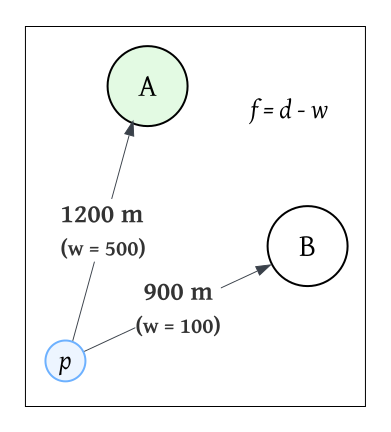
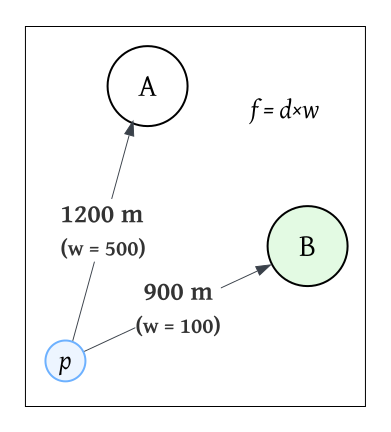
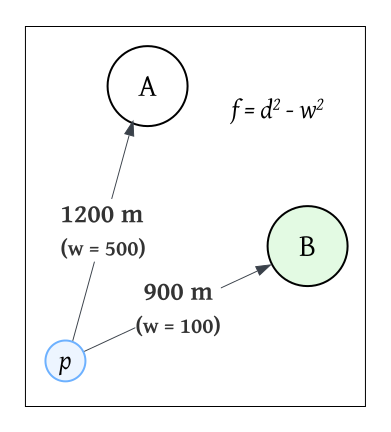
Assume there are two sites, A and B, and a location \(p\). The distances from \(p\) to the sites are \(d_A = 1200\) meters and \(d_B = 900\) meters.
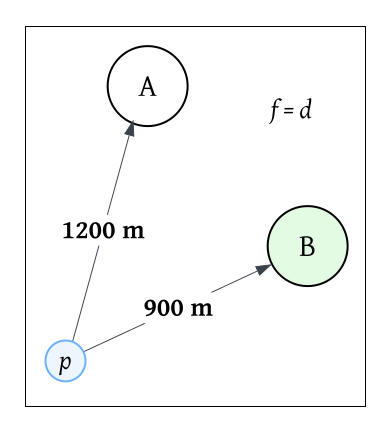
Unweighted Voronoi
\(F_A = 1200\), \(F_B = 900\).
Therefore, location \(p\) will be assigned to site B.
Additive weighted Voronoi
Assume the capacity of site A is \(w_A = 500\), and for site B is \(w_B = 100\).
Consequently,
\(F_A = 1200 - 500 = 700\)
\(F_B = 900 - 100 = 800\)
In this instance, even though B is closer, A has a higher weight and lower influence score. Therefore, location \(p\) will be assigned to site A.
Multiplicative weighted Voronoi
Consider the same weights as before, where \(w_A = 500\) and \(w_B = 100\):
\(F_A = 1200 \times 500 = 600{,}000\)
\(F_B = 900 \times 100 = 90{,}000\)
Here, site A has higher influence on the site and therefore, location \(p\) will be assigned to site B.
Power weighted Voronoi
With the same weights, the formulas become:
\(F_A = (1200 \times 1200) - (500 \times 500) = 1{,}190{,}000\)
\(F_B = (900 \times 900) - (100 \times 100) = 800{,}000\)
In this case, site B wins.
Custom expression
Consider a custom expression where:
\(F(d,w,k) = \dfrac{d^2}{\max(w,k)}\)
If \(w_A = 2\) and \(w_B = 1\), and \(k = 1\), then:
\(F_A = \dfrac{1200^2}{2} = 720{,}000\)
\(F_B = \dfrac{900^2}{1} = 810{,}000\)
Site A will be selected in this case.
How Voronoi order works
The Voronoi Order parameter defines the neighbor rank that will be used for allocation. A value of 1 corresponds to classic allocation. This means each location will be assigned to the single most influential site, that being the nearest according to the selected influence function. A value of 2 will assign each location to its second-most influential site, and a value of 3 to its third-most influential site. Using values greater than 1 can be applied to scenarios such as backup facility modelling and and redundancy planning.
Conceptually, for each location, the tool computes influence scores \((F_i(x))\) for all sites, ranks them ascending, and selects the \(k\)th ranked site as the allocation target when order = \(k\).
Distance settings, Voronoi type, and order
Changing the Distance Method parameter changes how distance will be calculated. Selecting the Planar option make the tool to be sensitive to projection choice and scale, while the Geodesic option allows the tool perform calculations that are stable across large extents. Changing the Distance Unit parameter scales the numeric distance values and, therefore, affects weighted and custom expressions that combine distance with attribute terms. Using consistent units is essential for interpretable weighting. Changing the Voronoi Type parameter changes how site attributes compete with distance. Increasing the Voronoi Order parameter value shifts the allocation to less-preferred sites. Use the Voronoi Combination parameter to change whether the output represents only that rank or a cumulative set of ranks up to it.
Potential applications
Some potential applications for this tool include:
Urban and regional planning—Partition service areas based on facility capacity, such as assigning neighborhoods to schools, libraries, or public service centers while accounting for site size or staffing. Higher-order outputs support redundancy planning for overflow scenarios.
Health care access and catchment modeling—Allocate population to clinics or hospitals, weighting by bed count, provider capacity, or specialty availability.
Emergency management and disaster response—Assign staging areas and resources where facility influence depends on equipment, staffing, or readiness. Second- or third-order allocations represent backup response sites when primary sites are unavailable.
Retail and market analytics—Delineate store trade areas using sales volume or revenue as weights, supporting competition analysis, market influence modeling, and territory planning. Larger stores exert greater pull beyond what distance alone predicts.
Environmental management and conservation—Allocate observation influence for sensor networks or sampling stations, where weights reflect sensor sensitivity or sampling intensity. This improves spatial partitioning for monitoring design.
Accessibility and equity analysis—Create allocation surfaces that incorporate both distance and capacity, enabling comparisons between closest facility and effective facility (closest under a capacity-adjusted influence model). This is particularly relevant for public services and mobility planning.
Additional references
Aurenhammer, F. (1987). Power diagrams: Properties, algorithms and applications. SIAM Journal on Computing, 16 (1), 78-96.
Aurenhammer, F., & Klein, R. (1996). Voronoi diagrams. FernUniversität, Fachbereich Informatik.
Boots, B. N. (1980). Weighting Thiessen polygons. Economic Geography, 56 (3), 248-259.
Lee, D. T., & Drysdale, R. L., III. (1981). Generalization of Voronoi diagrams in the plane. SIAM Journal on Computing, 10 (1), 73-87.
Okabe, A., Boots, B., Sugihara, K., & Chiu, S. N. (2009). Spatial tessellations: Concepts and applications of Voronoi diagrams (2nd ed.). Wiley.