Add Territory Barriers (Territory Design Tools)
Summary
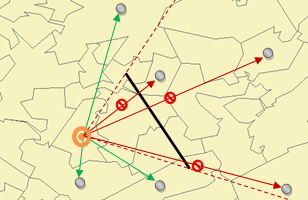
Allows the addition of polygon or line features to prevent or restrict the growth of territories.
Illustration
Usage
Line or polygon layers can be used as barriers.
New features can be added to an existing barrier.
Each level can contain both an impedance and a restricted area.
Parameters
| Label | Explanation | Data type |
|---|---|---|
|
Input Territory Solution |
The Territory Design solution layer that will be used in the analysis. |
Group Layer; Feature Dataset; String |
|
Level |
The level to which the barriers will be applied. |
String |
|
Input Barrier Features |
Line or polygon features used as a barrier. |
Feature Layer |
|
Barrier Type (Optional) |
Specifies the type of barrier.
|
String |
|
Append to existing barriers (Optional) |
Specifies whether to append or replace the records to the barriers layer.
|
Boolean |
Derived output
| Label | Explanation | Data type |
|---|---|---|
|
Updated Territory Solution |
The updated territory solution. |
Group Layer |
Environments
Licensing information
- Basic: Requires Business Analyst
- Standard: Requires Business Analyst
- Advanced: Requires Business Analyst