Set Territory Distance Parameters (Territory Design Tools)
Summary
Defines the type of distance calculation or distance constraints to use when creating territories.
Usage
The Maximum Territory Radius parameter value specifies the maximum size of the territory. Adjacent territories can be smaller than the radius specified if the boundaries between territories overlap. Territories will expand until the radius value is reached.
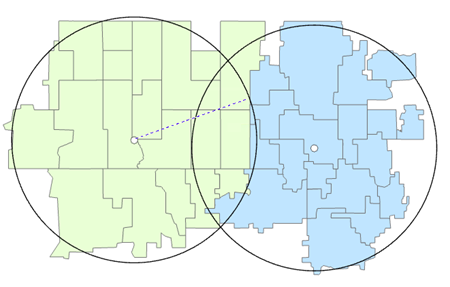
The Territory Buffer Distance parameter value specifies the buffer size around each territory that cannot be encroached. Territories will be constrained by the adjacent territory buffer.
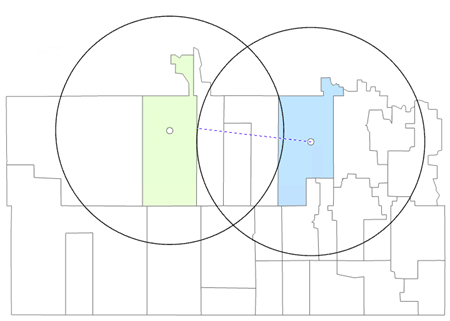
When setting the Minimum Distance Between Centers parameter, the distance between centers can be greater than the minimum distance.
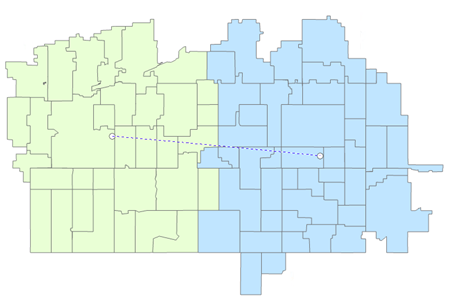
If a network distance is specified, a Territory Network Index (TNI) will be created when the Solve tool is run.
The Distance Type parameter's default value is Straight Line. When a local network data source is selected, additional network travel modes will be dynamically populated.
To select a network dataset, click the Network Parameters category, and navigate to the data source from the Network Data Source parameter. Online network datasets are not supported.
If the Network Parameters category of parameters is set, a summary of network settings will be written as messages at the bottom of the Geoprocessing pane when the Solve tool is run.
Parameters
| Label | Explanation | Data type |
|---|---|---|
|
Input Territory Solution |
The Territory Design solution layer that will be used in the analysis. |
Group Layer; Feature Dataset; String |
|
Level |
The level to which the distance parameters will be applied. |
String |
|
Distance Type (Optional) |
Specifies the method of travel that will be used for the distance calculation. When a network data source is selected, additional travel mode options will be dynamically populated. The following distance methods are supported:
|
String |
|
Measure Units (Optional) |
Specifies the type of measuring units that will be used.
|
String |
|
Maximum Territory Radius (Optional) |
The maximum radius of the territory. |
Double |
|
Territory Buffer Distance (Optional) |
The radius of the territory buffer. |
Double |
|
Minimum Distance Between Centers (Optional) |
The minimum distance between territory centers. |
Double |
|
Network Data Source (Optional) |
The network dataset on which the network distance calculation will be performed. The parameter requires a locally installed dataset. |
Network Dataset Layer |
|
Build Network Index (Optional) |
Specifies whether a network index will be built. A network index will improve performance when solving the territory solution.
|
Boolean |
|
Travel Direction (Optional) |
Specifies the direction of travel between stores and customers.
|
String |
|
Time of Day (Optional) |
The time and date that will be used when calculating distance. |
Date |
|
Time Zone (Optional) |
Specifies the time zone of the Time of Day parameter.
|
String |
|
Search Tolerance (Optional) |
The search tolerance that will be used for locating territories on the network. Territories that are outside the search tolerance will be left unlocated. This parameter requires a distance value and units for the tolerance. The default value is 5000 meters. |
Linear Unit |
Derived output
| Label | Explanation | Data type |
|---|---|---|
|
Updated Territory Solution |
The updated territory solution. |
Group Layer |
Environments
Licensing information
- Basic: Requires Business Analyst
Requires locally installed network routing data. - Standard: Requires Business Analyst
Requires locally installed network routing data. - Advanced: Requires Business Analyst
Requires locally installed network routing data.