Project members
Note:
ArcGIS Reality Web App is a beta feature at ArcGIS Enterprise 12.2. While in beta, this capability may not be feature complete and, as such, may have known performance or quality issues and will not be supported by Esri Technical Support.
Feedback on this feature can be provided through the Esri Early Adopter Community.
Project members are organization members who have been added to a project. Only organization members with the Administrator or Reality Analyst role can be added as project members. Once added, a project member can perform any reality mapping task within that project. This includes:
Edit, archive, or delete the project
Create, edit, process, or delete missions
Upload or remove mission images
Add and remove project members
Create, edit, and delete GCP sets
Tag ground control points
View, compare, and delete mission outputs
Project members page components
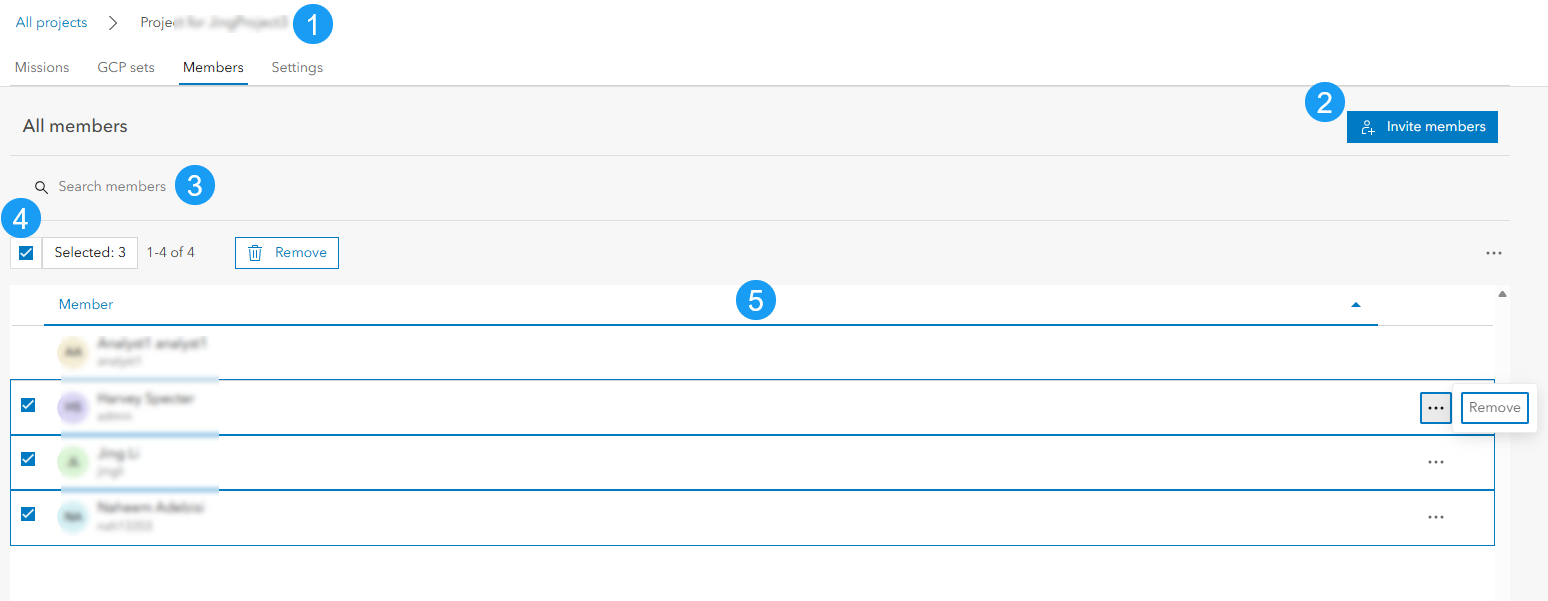
The members page contains the following elements:
Project Breadcrumb Navigation: Displays the current project location and provides navigation back to the Projects page. Users can click All Projects to return to the Projects page.
Invite members button: To invite eligible organization members to the project. See Manage Project Members for instructions.
Search Box: Searches project members by name or username.
Member Selection Controls: To select or deselect multiple members and perform bulk actions on selected members. The selected member count and available actions are also displayed here. The only bulk action that can be performed on members is remove.
Member List: Displays all members added to the project, sorted by name. Each row shows the member's name, username, and an action menu
...for removing the member. The signed-in member's row has no check box or action menu, since a member cannot remove themselves from the project.