Update a survey
A survey is composed of two parts: the form item that the app uses and the feature layer that contains the data submitted from the survey. You can update a survey that has been published.
Surveys created in the Survey123 web designer, Survey123 Studio, or Survey123 Connect can be updated and republished in the Survey123 web designer.
Note:
Some survey properties and complex expressions created in Survey123 Studio or Survey123 Connect can only be edited in the Survey123 web designer using a plain text editor. Surveys that reference external files such as CSV or media files, or include default values for geotrace or geoshape questions, cannot be viewed or edited in the web designer. When a grid layout is applied, the survey header, description, footer, CAPTCHA, and thank you screen cannot be edited in the web designer.
Caution:
If a survey has been created from an existing feature layer (either an ArcGIS Server feature layer or hosted feature layer), new questions and choice list values can be added to the survey only after the corresponding field or domain is added to the feature layer.
After making changes to a survey, you can typically republish it without deleting and re-creating the feature layers. You can make the following changes to a published survey in the Survey123 web designer without causing a loss of data:
Reorder questions
Add questions
Add notes
Add groups
Update labels in questions
Update labels in groups
Update constraints, defaults, hints, and whether a question is required
Update calculations
Add choices in lists
Delete choices in lists
Delete questions and repeats
Change question types (if the underlying field type is the same)
Note:
For existing questions in a published survey, you cannot swap between the following question types: Singleline text and Note; Single select and Multiple select; and Map (point) and Address. If you add these questions to a published survey, this limitation only applies after republishing.
After saving changes to the survey, click the Publish button to republish it, after which, your changes will be available to all users.
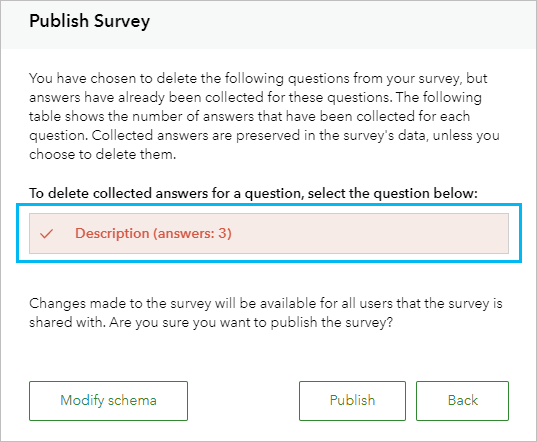
If your updates will change the feature layer where the responses are saved, you are warned and asked whether you want to delete questions that have answers. In the following image, the question named Description has been selected to be deleted. The field for the question and its three collected answers will be deleted from the feature layer when the survey is republished.
Caution:
Once a survey that was created with the Survey123 web designer is republished from Survey123 Connect, you can no longer edit the portions of the survey that are managed by the XLSForm in the web designer. For example, the survey title and survey questions cannot be edited. Themes, webhooks, and sharing options can still be edited in the web designer.
Choice lists
Choice lists for Single select, Single select grid, and Dropdown questions are stored as a list of values (domain) for the field in the feature layer. When you remove a choice from a question, the value is also removed from the domain. The data in the field is not modified.
Choice lists for Multiple select questions and Dropdown questions that allow multiple choices are not stored as domains in the feature layer. Removing a choice from these questions has no effect on the feature layer.