Map Production System web app
 Available with an ArcGIS Topographic Mapping license.
The Map Production System (MPS) web app is an ArcGIS Enterprise configurable web app that allows organization members to export preconfigured, high-end map products in a variety of formats from a web browser. It is composed of two main tabs: the Map tab and the Export tab.
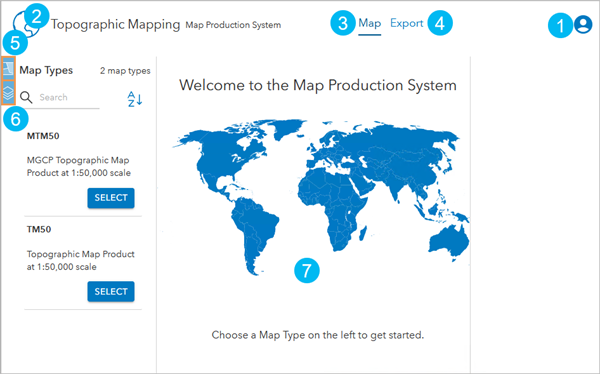
The item numbers in the following table correspond to the numbers in the image above:
|
Item |
Details |
|---|---|
|
|
Sign in and out of the web app. When signed in with administrator privileges, you can access and update MPS web app settings. |
|
|
You can replace this logo. |
|
|
You can perform the following actions to export a map product from the Map tab:
|
|
|
You can perform the following actions from the Export tab:
|
|
|
Choose a map product type. |
|
|
Specify export settings for a map product. |
|
|
Select AOIs to add to the export queue. |


This app is included with ArcGIS Enterprise.
In ArcGIS Pro, you can publish the service and configure its properties, including specifying which map products the service supports and which ones are available in the app to export.