Description styling
In ArcGIS Urban, you can style the text of the following descriptions:
Indicator description
Project description
Plan description
Zoning and land-use type description
Overlay boundary description
Analysis description
You can style descriptions with markdown. Markdown is a markup language that is used to format text. ArcGIS Urban supports the following markdown syntax elements:
Paragraphs
Bold and italic text
Link
Unordered list
Ordered list
Table
Paragraphs
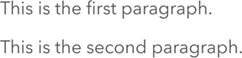
To create paragraphs, separate text blocks with a blank line.
Example
This is the first paragraph.

This is the second paragraph.
Bold and italic text
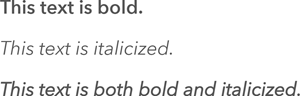
You can emphasize a single word or a phrase the following way:
Bold—Add two asterisks before and after the text (**).
Italic—Add an underscore before and after the text (_).
Bold and italic—Add three asterisks before and after the text (***).
Example
**This text is bold.**

_This text is italicized._

***This text is both bold and italicized.***
Link
To create a link, enclose the link text in square brackets [ ] and append the URL enclosed in round brackets ( ).
Example
[Link text](https://www.esri.com/)

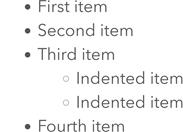
Unordered list
To create an unordered list, begin each item of the list with a dash (-). To add a nested list, indent the sublist by four spaces.
Example
- First item
- Second item
- Third item
    - Indented item
    - Indented item
- Fourth item
Ordered list
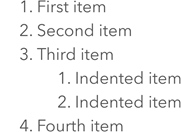
To create an ordered list, begin each item of the list with a number followed by a period. To add a nested list, indent the sublist by four spaces.
Example
1. First item
2. Second item
3. Third item
    1. Indented item
    2. Indented item
4. Fourth item
Table
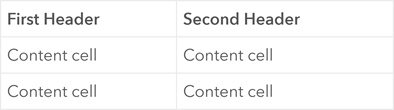
To create a table, add a new line for each row and separate columns with pipes (|). Add three or more dashes (---) in each column of the second line to separate the headers from the content.
Example
| First Header  | Second Header |
| ------------- | ------------- |
| Content cell  | Content cell  |
| Content cell  | Content cell  |
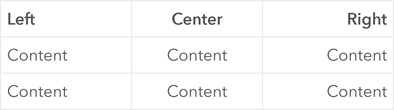
You can align the content per column by adjusting the second row of the table definition as follows:
Align right—Add a colon to the left of the dashes (:---).
Align center—Enclose the dashes with colons (:---:).
Align right—Add a colon to the right of the dashes (---:).
Example
| Left    | Center  | Right   |
| :---    |  :---:  |    ---: |
| Content | Content | Content |
| Content | Content | Content |