Introduction to data retention
When you store output features in a spatiotemporal feature layer, ArcGIS Velocity manages data according to a set of data retention policies. Data retention refers to the length of time that data is actively maintained in the feature layer.
For more information about writing data to a new feature layer in Velocity, refer to Feature Layer (new). For writing to an existing feature layer, refer to Feature Layer (existing).
Note:
Data retention policies can only be applied to spatiotemporal feature layers.
Purpose of data retention
By applying data retention strategies, spatiotemporal feature layers can be maintained at a given size, even as real-time data streams continuously add features. This ensures that the underlying dataset does not grow indefinitely, especially as older data becomes less relevant for understanding trends and viewing the latest activity.
Data retention is not intended to be used for limiting the features available to specific time frames. Data retention ensures that data is retained in the feature layer for at least the specified period. At any given time, there can be data older than the specified period, as the data removal process runs on a periodic schedule. To ensure that a map displays data from a specified time period, the best practice is to query data accordingly in client applications.
Configure data retention
A real-time analytic can write data to spatiotemporal feature layer outputs, which can be configured with data retention. To create a spatiotemporal feature layer output, complete the following steps:
In a browser, open the Velocity app and sign in using your ArcGIS organization credentials.
Create or open an existing real-time analytic.
Click Outputs and choose Feature Layer (new).
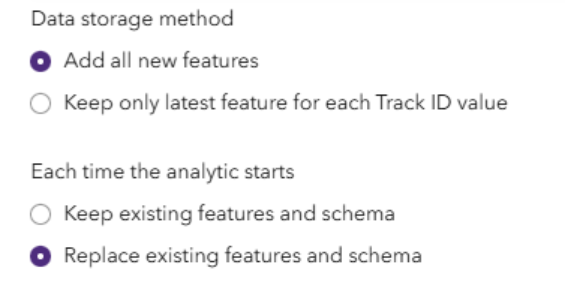
Choose the Data storage method option.
The following are the available options:
Add all new features
Keep only the latest feature for each Track ID value.
Data retention is only required when you are storing data that accumulates in size over time. This is evaluated based on the data storage method settings and how you preserve data between analytic runs.
Choose the Each time the analytic starts option.
The following are the available options:
Keep existing features and schema
Replace existing features and schema
Set the Data retention (time period for retaining data) parameter.
When you define an output spatiotemporal feature layer in a real-time analytic, you can specify the data retention period to apply to that feature layer. For example, you may want to keep weather data for the past day but maintain a history of the fleet or vehicle positions for up to six months.

When a data retention period is set for a feature layer on a regular basis, features older than the specified time period are deleted from the underlying dataset. For data retention, feature age is based on the timestamp of when the data was created in the underlying dataset, which may or may not be the same as the start time of the feature. Data retention is performed based on creation time to apply a consistent approach across all datasets, including those that can represent interval data or do not have date or time information in the feature record.
The Data retention (time period for retaining data) parameter allows you to set data retention options when adding the feature layer output. For example, if you choose the Add all new features option (as opposed to only keeping the latest feature) and you choose the Keep existing features and schema option, if the analytic is restarted, the incoming data grows over time. Therefore, you must specify a value for the Data retention (time period for retaining data) parameter.
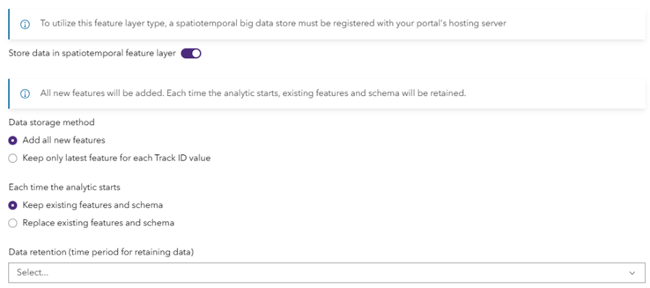
If, however, you choose the Keep only latest feature for each Track ID value option, you are only storing the latest observation of each track. This data can grow as new sensors are deployed in your organization, but it generally stabilizes at a maximum size. If you choose the Keep existing features and schema option, you must specify a value for the Data retention (time period for retaining data) parameter. If you choose the Replace existing features and schema option, the Data retention (time period for retaining data) parameter does not apply.
Click Next.
Name and save the configuration.
Click Complete.
A spatiotemporal feature layer output is created in Velocity.