Slack
The Slack output in ArcGIS Velocity allows you to send messages to Slack channels. These messages can include text, graphics, and buttons, providing an interactive and engaging way to communicate information. With Velocity, feature data can be included in the message that is posted to a Slack channel. This is a mechanism to communicate information to users across different systems.
To use this output type, you must first generate a webhook URL in Slack. This webhook URL is then used to configure the Slack output in Velocity.
Example
The following is an example use case for the output:
An analyst configures a real-time analytic to process real-time traffic data with a Slack output that sends a message to a Slack channel when a new crash or hazard is detected within the city limits. Dispatchers can use these notifications to triage, assign priority, and determine resources that need to be deployed.
Usage notes
Keep the following in mind when working with the output:
The Slack webhook URL is configured in Slack.
When sending JSON in a request body, wrap the output JSON with the
Text()Arcade function to properly format the JSON.
Slack message JSON examples
The following example creates a basic Slack message displaying vessel information.
Example 1: Basic Slack message
// Output is wrapped in Text()
Text({
    "blocks": [
      {
        "type": "header",
        "text": {
          "type": "plain_text",
          "text": "Vessel Information",
          "emoji": true
        }
      },
      {
        "type": "section",
        "fields": [
          {
												"type": "plain_text",
            "text": "Vessel Name: " + $feature.name,
            "emoji": true
          },
          {
            "type": "plain_text",
            "text": "Vessel ID: " + $feature.num,
            "emoji": true
          }
        ]
      }
    ]
})
The example above creates the following vessel information message that includes the vessel name and ID.

The following example generates a Slack message with a link and markdown text.
Example 2: Slack message with link and markdown text
// Output is wrapped in Text()
Text({
    "blocks": [
        {
            "type": "header",
            "text": {
                "type": "plain_text",
                "text": "New vessel detected at " + $feature.currTime,
                "emoji": true
            }
        },
        {
            "type": "section",
            "text": {
                "type": "plain_text",
                "text": "Vessel Name " + $feature.name + ", traveling at " + $feature.speed + " miles per hour, was detected entering the service territory.",
                "emoji": true
            }
        },
        {
            "type": "section",
            "text": {
                "type": "mrkdwn",
                "text": "Click the <https://www.esri.com/en-us/arcgis/products/arcgis-velocity/overview|link> for additional information about this vessel. :boat: "
            }
        }
    ]
})
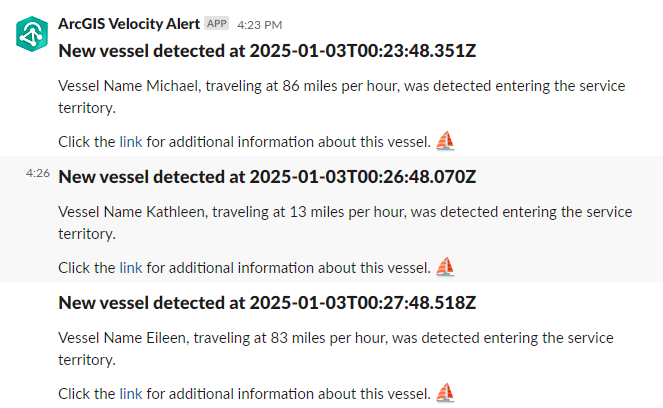
The example above creates the following newly detected vessel message that includes the vessel name, date and time, and a link for more information.
Parameters
The following are the parameters for the output:
|
Parameter |
Description |
Data type |
|---|---|---|
|
Slack Webhook URL (Required) |
The incoming webhook URL created in Slack. |
String |
|
POST body (Required) |
The JSON Arcade expression. The JSON must be wrapped in the |
Arcade Expression |
|
Additional logging (Optional) |
You can enable logging for raw HTTP requests and responses generated by Velocity. Note:This parameter should only be enabled for troubleshooting purposes and disabled once troubleshooting is complete. When enabled, start the analytic and the debug level logs are available on the analytic logs page. If you need assistance with troubleshooting, contact Esri Technical Support. |
Boolean |
Considerations and limitations
The following are considerations and limitations when using this output:
It is important to understand the velocity of the data. Each record sent to this output generates a separate request. If more than one request is made in a second, the client connection can be throttled. The best practice is to use this output for incidents that are expected to occur infrequently.
It is important to understand the message being sent. Slack will truncate messages that contain more than 40,000 characters and a simple
textvalue should not exceed 4,000 characters.