HfForward
サマリー
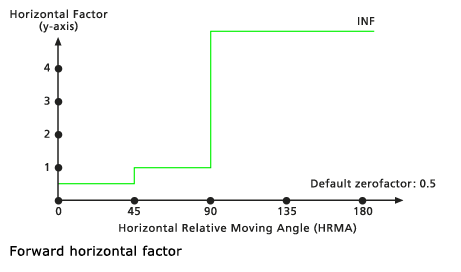
Defines the relationship between the horizontal cost factor and the horizontal relative moving angle through a forward function. The function establishes that only forward movement is allowed.
ディスカッション
This object is used in the Distance Accumulation and Distance Allocation Spatial Analyst tools, as well as the Path Distance, Path Distance Allocation, and Path Distance Back Link Legacy Distance tools.
If a horizontal relative moving angle (HRMA) is less than 45 degrees for a section of travel, the horizontal factor (HF) is set to the value associated with the zeroFactor. When the HRMA is larger than or equal to 45 degrees and less than 90 degrees, the HF is set to the sideValue. If the HRMA is equal to or greater than 90 degrees, the HF is set to infinity.
構文
HfForward({zeroFactor}, {sideValue})
| 名前 | 説明 | データ タイプ |
|---|---|---|
|
zeroFactor (オプション) |
The The default value is 0.5. |
Double |
|
sideValue (オプション) |
Identifies the HF value that will be assigned for HRMAs that are equal to or less than 45 degrees and less than 90 degrees. In the diagram above, the The default value is 1.0. |
Double |
プロパティ
| 名前 | 説明 | データ タイプ |
|---|---|---|
|
zeroFactor (読み取り/書き込み) |
The The |
Double |
|
sideValue (読み取り/書き込み) |
Identifies the HF value that will be assigned for HRMAs that are equal to or less than 45 degrees and less than 90 degrees. In the diagram above the |
Double |
コードのサンプル
Demonstrates how to create an HfForward class and use it in the DistanceAccumulation tool within the Python window.
import arcpy
from arcpy import env
from arcpy.sa import *
env.workspace = "C:/sapyexamples/data"
myHorizFactor = HfForward(0.5, 1.0)
outDistAccum = DistanceAccumulation("source.shp", "barrier.tif",
                                    "elev.tif", "", "", "",
                                    "horizontalRas.tif", myHorizFactor)
outDistAccum.save("C:/sapyexamples/output/distaccumhff")
Performs a distance accumulation analysis using the HfForward class.
# Name: HfForward_Ex_02.py
# Description: Uses the HfForward object to run the
#              DistanceAccumulation tool.
# Requirements: Spatial Analyst extension

# Import system modules
import arcpy
from arcpy import env
from arcpy.sa import *

# Set environment settings
env.workspace = "C:/sapyexamples/data"

# Set local variables
inSourceData = "sourcepts.shp"
inSurfaceRaster = "elevation.tif"
inHorizontalRaster = "horizontalRas.tif"

# Create the HfForward Object
zeroFactor = 0.5
sideValue = 1.0
myHorizFactor = HfForward(zeroFactor, sideValue)

# Run PathDistance
outDistAccum = DistanceAccumulation(inSourceData,"", inSurfaceRaster,"","",
                                    "", inHorizontalRaster, myHorizFactor)

# Save the output
outDistAccum.save("C:/sapyexamples/output/distaccumhfF2")